RAID 5 parity recovery after two failures: two-disk and dual-disk failure recovery
RAID 5 is built to survive one disk failure. Lose a single drive, and parity data lets you rebuild without losing files. But if two disks fail at the same time, the system is supposed to be done—data gone, no way back.
This article looks at what happens when RAID 5 goes beyond its limits. We’ll break down how parity works, why two‑disk failures are so dangerous, and what recovery methods can sometimes pull data back from the edge. It’s a straight look at the risks, the possibilities, and the tools that can help when RAID 5 fails harder than expected.
Short answer: is RAID 5 recoverable after two disk failures?
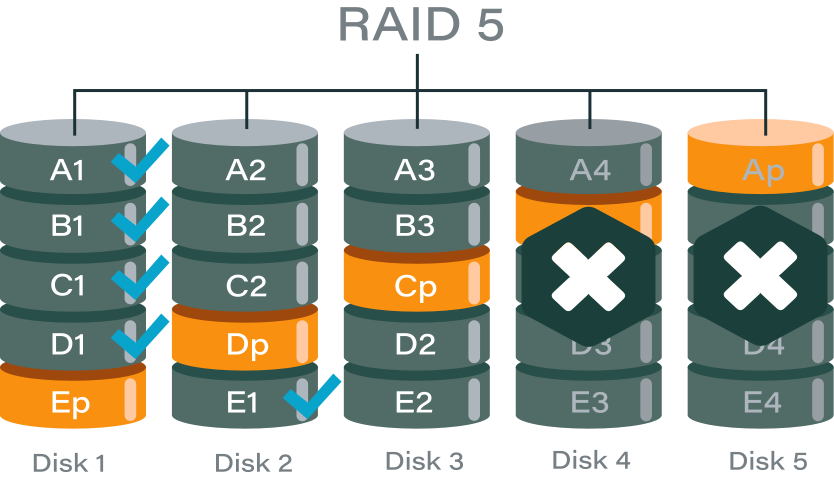
RAID 5 is designed to handle only one disk failure. Once a second drive goes down, the array moves beyond its built‑in fault tolerance. At that point, traditional parity rebuilds are no longer possible.
Recovery then shifts into advanced territory: instead of relying on standard parity, specialists use data reconstruction techniques, disk imaging, and forensic analysis to piece information back together. The chances of success depend heavily on the condition of the failed drives, the timing of the failures, and whether any rebuild attempts were made before the second disk dropped.
Why RAID 5 fails beyond tolerance
RAID 5 fault tolerance explained
RAID 5 works by splitting data into stripes across all disks and adding one parity block per stripe. That parity block is the mathematical checksum that allows the system to rebuild the contents of a missing drive.
Because there is only one parity block per stripe, RAID 5 can only calculate the data for one lost disk. If a single drive fails, the controller uses parity plus the remaining data blocks to rebuild the missing information. This is the built‑in safety net that makes RAID 5 attractive: performance, capacity, and protection against one failure.
But this design has a hard limit. RAID 5 was never engineered to handle more than one disk failure at a time. Once that threshold is crossed, the math no longer works.
What happens when more than one disk fails
When two drives fail, the array loses more data blocks than parity can cover. Imagine a stripe with four disks: three data blocks and one parity block. If one disk is gone, parity fills the gap. But if two disks are gone, parity can only rebuild one of them — the other remains missing.
This creates logical gaps across multiple stripes. Some files may be partially recoverable, but others will have missing segments that cannot be reconstructed. The RAID controller detects this inconsistency and marks the array as failed or unrecoverable.
In practice, this means:
- The operating system can no longer mount the array.
- Applications lose access to stored files.
- Any attempt at a standard rebuild will fail because parity math cannot solve for two unknowns.
At this stage, recovery moves beyond normal RAID tolerance. Specialized tools and techniques — such as disk imaging, parity analysis, and manual reconstruction — are required to even attempt data recovery.
RAID 5 more than one disk failed recovery scenarios
Two disks failed simultaneously
In some cases, two drives can fail at the same time due to external factors rather than gradual wear. Common triggers include:
- Power surge – sudden electrical spikes can damage multiple drives at once, leaving the array instantly broken.
- Controller failure – if the RAID controller itself malfunctions, it may report multiple disks as failed or corrupt their metadata.
- Backplane issues – faults in the backplane or cabling can cause multiple drives to drop offline together, mimicking simultaneous failure.
When this happens, recovery is extremely difficult because parity cannot rebuild two missing disks. Specialized recovery tools or forensic imaging may be the only option.
Second disk failed during the rebuild
Another common scenario is when one disk fails during the rebuild process after the first failure. This usually happens because:
- Bad sectors exposed under rebuild load – the rebuild process stresses every sector of the remaining drives. A disk with hidden defects may collapse under the load.
- Unstable drive not replaced in time – if a drive was already showing signs of instability and wasn’t swapped quickly, it may fail while the array is still vulnerable.
This type of failure is especially frustrating because the rebuild itself triggers the second collapse. Recovery requires careful cloning of the unstable drive before attempting reconstruction.
False dual‑disk failure
Not every “two‑disk failure” is real. Sometimes one of the drives is physically healthy but appears failed due to:
- Metadata or controller error – corrupted RAID metadata or a misbehaving controller can mark a good disk as offline.
- Logically dropped drive – the disk is fine at the hardware level but has been excluded from the array by software logic.
In these cases, recovery may be possible by re‑importing the healthy disk or correcting metadata errors. Identifying a false failure is critical, because it can turn an “unrecoverable” situation into a fixable one.
Partial parity reconstruction
Even when two disks fail, not every stripe is completely broken. Some stripes may still have all their data blocks intact, while others lose only one block that parity can cover. In these cases, partial parity reconstruction can recover files stored in consistent areas of the array.
This doesn’t restore the entire RAID, but it can salvage usable portions of data. Large files may be fragmented, but smaller files or those located in intact stripes often remain accessible. Recovery tools focus on identifying these “safe zones” and extracting what can still be rebuilt.
Sector‑level disk imaging and analysis
Failed disks are not always completely unreadable. Many sectors may still be accessible even if the drive is degraded. By creating sector‑level images of each disk, recovery specialists can capture every readable block before the hardware deteriorates further.
These images are then analyzed to reconstruct missing data. In practice, failed disks are treated as partially readable sources rather than total losses. This approach allows recovery software to piece together files from whatever fragments remain, typically yielding significant portions of usable data.
Manual RAID parameter reconstruction
Occasionally the greatest obstacle isn’t the disks themselves but the RAID configuration. If metadata is corrupted or the controller misreports settings, recovery requires manual parameter reconstruction.
Key parameters include:
- Disk order – the correct sequence of drives in the array.
- Stripe size – the block size used to split data across disks.
- Parity rotation – the pattern in which parity blocks are distributed.
By manually identifying and re‑applying these parameters, recovery tools can rebuild the logical structure of the array. Once the correct layout is restored, partial parity and sector‑level analysis can be applied more effectively.
RAID 5 unrecoverable array recovery: when “unrecoverable” is not final
“Unrecoverable” is a controller status, not a data verdict
When a RAID controller marks an array as unrecoverable, it simply means the built‑in firmware logic cannot rebuild the disks with its standard parity rules. This is a status flag, not a final judgment on the data itself. The controller stops trying, but the raw blocks on the disks may still contain usable information.
Software‑level reconstruction bypasses controller logic
Specialized recovery software can ignore the controller’s verdict and work directly with the disk contents. By analyzing stripes, parity blocks, and disk order outside the RAID firmware, these tools can reconstruct data that the controller declared lost. This software‑level reconstruction bypasses hardware limitations and often succeeds where the controller fails.
Metadata loss does not equal data loss
RAID arrays rely on metadata to track disk order, stripe size, and parity rotation. If this metadata becomes corrupted, the controller may drop the array entirely. But metadata corruption doesn’t mean the actual file data is gone. With careful analysis, recovery specialists can rebuild the missing parameters manually and reassemble the array. Often, metadata loss is reversible, and the underlying data remains intact.
What not to do after a two-disk RAID 5 failure
Do not initialize or re‑create the array
When the controller marks the array as failed, it may prompt you to initialize or re‑create it. Doing so will overwrite existing metadata and parity information, making recovery far more difficult or even impossible. The original disk layout must be preserved for any chance of reconstruction.
Do not attempt another rebuild
A rebuild works only when one disk is missing. With two failed drives, parity math cannot solve the gaps. Attempting another rebuild risks writing corrupted data across the array, destroying what remains intact. At this stage, the focus should shift to imaging and analysis, not controller‑driven rebuilds.
Do not hot‑swap disks blindly
Swapping drives without a clear recovery plan can cause further damage. If the wrong disk is reinserted or replaced, the controller may treat it as a new member and overwrite critical data. Every disk must be carefully identified and imaged before any changes are made. Blind hot‑swapping often turns a recoverable situation into a permanent loss.
Comparison table: RAID 5 two-disk failure outcomes
| Scenario | Recovery probability | Risk level | Recommended action |
| One disk logical, one physical | Medium | High | Software recovery |
| Two physical disk failures | Low–Medium | Critical | Advanced tools |
| One disk failed during rebuild | Medium | High | Immediate recovery |
| Full parity overwrite | Low | Extreme | Professional-only |
Software‑based RAID 5 dual‑disk failure recovery
When software recovery is viable
Software recovery becomes an option when the failed disks are at least partially readable. Even if they cannot function in the array, as long as sectors can still be imaged, recovery tools can work with them.
It is important that the disks have not been subjected to a full zero‑fill or a forced rebuild attempt. These actions overwrite critical data structures and parity information, making software reconstruction impossible. As long as the raw data remains intact, specialized recovery software can analyze and rebuild the array logically.
Example: DiskInternals RAID Recovery
One widely used tool for this scenario is DiskInternals RAID Recovery. It offers:
- Manual RAID 5 reconstruction – users can define disk order, stripe size, and parity rotation to rebuild arrays even when metadata is lost.
- Support beyond nominal tolerance – the software can handle arrays with more than one failed disk, working with whatever readable data remains.
- Compatibility with hardware and software RAID – it can reconstruct arrays created by dedicated controllers or operating system‑level RAID.
- File preview before saving – recovered files can be previewed to confirm integrity before committing to full extraction.
This approach bypasses the limitations of the RAID controller and focuses directly on the disk contents, giving administrators a chance to recover data even when the array is marked “unrecoverable.”
Ready to get your data back?
To start recovering your data, documents, databases, images, videos, and other files from your RAID 0, RAID 1, 0+1, 1+0, 1E, RAID 4, RAID 5, 50, 5EE, 5R, RAID 6, RAID 60, RAIDZ, RAIDZ2, and JBOD, press the FREE DOWNLOAD button to get the latest version of DiskInternals RAID Recovery® and begin the step-by-step recovery process. You can preview all recovered files absolutely for free. To check the current prices, please press the Get Prices button. If you need any assistance, please feel free to contact Technical Support. The team is here to help you get your data back!
When lab‑level RAID recovery is required
Severe physical disk damage
If one or more drives suffer serious physical damage—such as head crashes, platter scratches, or motor failure—software recovery is no longer an option. These cases require cleanroom environments where specialists can repair or replace components to extract raw data. Attempting to power up or handle such disks outside a lab often worsens the damage and reduces recovery chances.
Multiple disks with unreadable service areas
Every hard drive has a service area that stores firmware and calibration data. If multiple disks in the array have unreadable or corrupted service areas, the drives cannot even initialize properly. Recovery then requires lab‑level tools to rebuild or emulate the missing firmware so the disks can be accessed again. Without this step, the array remains inaccessible regardless of parity or metadata.
Enterprise RAID with proprietary parity logic
Some enterprise‑grade RAID systems use custom parity algorithms or proprietary layouts that differ from standard RAID 5. When these arrays fail, generic recovery software cannot interpret the data correctly. Lab specialists with access to vendor‑specific knowledge and tools are needed to decode the proprietary logic and reconstruct the array. This is especially common in high‑end storage appliances where performance optimizations introduce non‑standard RAID behavior.
How to reduce the risk of dual‑disk RAID 5 failure
Replace degraded drives early
RAID 5 arrays often give warning signs when a disk starts to degrade—SMART errors, slow response times, or increasing bad sectors. Replacing a weak drive before it fails completely is the best way to prevent a dual‑disk failure scenario. Waiting too long risks losing the array when another disk drops unexpectedly.
Never rebuild on unstable disks
A rebuild stresses every sector of the surviving drives. If one of those disks is already unstable, the rebuild process can push it over the edge. Always check drive health before starting a rebuild. If a disk shows errors or instability, clone it first or replace it rather than risking a collapse mid‑process.
Use RAID 6 or backups for critical data
RAID 5 protects against one disk failure, but it cannot guarantee safety against two. For critical workloads, RAID 6 offers dual parity, allowing survival of two simultaneous disk failures. Even better, combine RAID with a solid backup strategy. Backups ensure that even if the array fails beyond tolerance, your data is still safe and recoverable.
FAQ
Related articles
- RAID 6 Double Parity Calculation Explained – Data Protection Insights
- Forensic RAID Recovery
- Raid Drive Array Recovery
- How to Setup Raid 0 Windows 10 (11)?
- How to set up RAID 1 on Windows 10 and Linux
- How Many Disks Can Fail in RAID 5?
- What is RAID 5? Overview and Key Functions
- What Is a RAID Controller and What Are the Benefits of It?
- Recover Data from Broken/Failed RAID Set
- How to Clone RAID 0, 1, 5 Disk
- A Comprehensive Review of RAID Recovery Software: Choosing the Right Tool
- DiskInternals RAID Recovery vs EaseUS Data Recovery Wizard | Comprehensive Comparison
- DiskInternals RAID Recovery vs ReclaiMe: Comprehensive RAID Recovery Solutions Compared
- What is RAID Data Recovery? | Recover RAID Arrays with RAID Recovery Software
- SAN RAID Data Recovery: Recover RAID Arrays with Professional SAN Recovery Solutions
- What is a RAID? RAID Systems Explained & How to Recover RAID Arrays with Professional Tools
- RAID 0, 1, 5, 10 Explained: Performance, Redundancy & Best RAID Configurations
- How to Recover Data from a Broken RAID 1 Set – Step-by-Step Guide
- ZFS RAID Expansion: How to Expand RAIDZ and ZFS Pools Safely
- RAID 6 Drive Failure Tolerance: How Many Drives Can Fail?
- RAID 5 with 3 Disks: Configuration, Benefits, and Performance Insights
- How to Create RAID 5 with 6 Disks: Complete Setup Guide and Performance Tips
- How to Add a Disk to mdadm RAID 5: Step-by-Step Guide
- RAID 0 vs RAID 10 and RAID 10 vs RAID 0 Performance Comparison
- How to Fix Degraded RAID 1: Step-by-Step Guide to Restore RAID 1 Degraded Arrays
- RAID 5 vs RAID 0+1: Key Differences Explained
- Why RAID 1 Is Not a Good Substitute for a Backup
- How to Check Which RAID Is Configured: A Complete Guide for Windows and Linux
- RAID 50 vs. RAID 5 – Performance, Speed, and Data Protection Comparison
- Configuring RAID 5: Step-by-Step Guide on How to Configure RAID 5 for Performance
- Cannot Format Old RAID Drive? Effective RAID Data Recovery Solutions
- RAID Array Rebuild: How to Rebuild a RAID Array Safely and Recover Lost Data
- Recover Data from Old RAID Drives | Best Methods & Software for RAID Recovery
- Encrypting RAID Arrays — RAID with Full Disk Encryption & Secure Setup
- Best RAID for OLTP: RAID Configuration for OLTP Workloads & Transactional Databases
- Best RAID for MySQL: RAID Configuration & RAID Setup for MySQL Databases
- Best RAID for NVMeoF: NVMe RAID Configuration & NVMe over Fabrics RAID Setup
- RAID 10 with 8 Disks — Configuration, Performance, Rebuilds & Best Practices
- Is RAID 0 Worth It in 2026? Risk, Performance, SSD & NVMe Guidance
- Fault Tolerance in NVMe-oF RAID — Rebuild Time, Data Protection & Redundancy
- Best Practices for RAID over NVMe-oF — Tuning, Monitoring & DR
- RAID 0 vs Single Drive — SSD, NVMe & HDD Comparison (Performance vs Risk)
- RAID 0 vs Single Drive Reliability — Failure Risk, SSD Comparison & Recovery
- RAID 0 for Gaming — Is RAID 0 Good for Gaming? Performance & Risk Guide
- RAID 0 for 4K Editing — Is RAID 0 Good for 4K Video Editing?
- RAID 0 for Large File Workloads: Scratch Disks, NVMe, When It Makes Sense
- RAID 0 vs. SSD Performance: PCIe 4.0, PCIe 5.0 Speed Compared
- RAID 0 Redundancy vs No Redundancy — Does RAID 0 Have Redundancy?
- Does RAID 0 Increase FPS? — RAID 0 vs Single Drive FPS Guide
- RAID 5 Interrupted Rebuild Recovery: Fix Stopped or Aborted Rebuilds
- RAID 0 Failure Probability with N Disks Explained
- RAID 1 Corrupted Mirror Recovery: How to Recover a Damaged RAID 1 Mirror
- When RAID 0 Is Acceptable: Use Cases, Risks, and When You Should Use RAID 0
- RAID Best Practices for VMware: Best RAID Configuration for VMware ESXi
- RAID 0 Backed by Versioned Backup: Is RAID 0 Safe with Versioned Backups?
- RAID 10 Best for VMware: Why RAID 10 Is the Recommended RAID for ESXi
- Best RAID Controller Guide: Hardware RAID Cards Compared for Servers and SSDs
- Best PCIe RAID Controller: Top Hardware PCI Express RAID Cards Compared
- RAID Controller for ESXi: VMware ESXi RAID Controller Recommendations
- RAID Controller for Linux: Best Linux-Compatible Hardware RAID Controllers
- SATA RAID Controller for ESXi: VMware ESXi Compatible SATA RAID Options
- SAS RAID Controller for VMware ESXi: Best Hardware RAID Options
- RAID 0 vs RAID 1: Performance, Redundancy & Use Cases
- Dell RAID 1 Recovery: How to Recover Data from RAID 1 on Dell Servers Safely
- Dell RAID 5 Recovery - Safely and Fast
- RAID 6 Data Recovery
- RAID 0, 1, 3, 5, 10 data recovery software for Windows 10
- RAID Recovery Services
- The Truth about Recovering RAID 5 with 2 Failed Disks
- RAID 4 Data Recovery: How to Perform It⠀
- RAID 5 vs RAID 10 comparison: Which one is better for you?⠀
- SSD benefits for RAID array
- How to set up RAID in Windows 10 in 2025
- RAID 5 VS RAID 6 - advantages and disadvantages
- The best NAS RAID: how to choose⠀
- HDD Raid Vs SSD Raid Storage Systems - How to move⠀
- Benefits of RAID arrays - what are the advantages of RAID?⠀
- RAID 3 vs RAID 5: which one would you prefer?
- RAID 10 vs RAID 01: Is There Any Difference?
- RAID vs JBOD: performance and cost comparison⠀
- What are RAID 01, RAID 1+0 and RAID 0+1⠀
- Mdadm RAID 1 not activating a spare disk Linux⠀
- NAS vs SAN storage - Detailed Comparison⠀
- Perform RAID 50 Data Recovery Today!
- Basic Disks vs Dynamic: What is the Difference
- What to do if RAID array doesn't reassemble after reboot
- RAID levels 0, 1, 5, 6, and 10
- Minimum disks for RAID 10⠀
- RAID Consistency Check: Ensure Data Integrity & Recover Lost Data
- What Is a Hot Spare? Peculiarities of Usage
- Global Hot Spare vs Dedicated Hot Spare: Find the Difference
- Differences Between Software RAID and Hardware RAID
- What Are Some Common Symptoms of RAID Array Failures?⠀
- RAID status degraded - fix it⠀
- How to check RAID status? 4 different methods!
- RAID Array Growing: How to Perform It
- How to downsize hardware RAID partition and protect data
- How To Create RAID Arrays with mdadm on Ubuntu (22.04)
- How About RAID 1 Reliability?
- What is RAID-Z? Its Difference Between RAID-Z2 vs RAID-Z3
- Can RAID array have snapshots?
- RAID Array Metadata: What Is Inside?
- RAID 6: Replace Two Dead Drives
- Do You Need to Defragment RAID?
- How to Recover RAID partition - step by step guide⠀
- RAID 5: How Big Should an Array Be?
- Does chunk size influence the speed of RAID?
- RAID 0, 5, 6, 10 Performance
- How Does RAID 5 on Windows 10 Work?
- What is FakeRAID?
- Which RAID is Better to Use for 4 Drives
- RAID Array for Video Editing: How to Choose
- Perform Hyper-V Data Recovery Today
- How to Install Hyper-V in Your Environment in 2025
- Hyper-V Manager - what is it?⠀
- Hyper-V: Generation 1 vs Generation 2
- Hyper-V Live Migration - what is it?⠀
- Hyper-V Snapshot Merge
- Hyper-V Virtual Machine Replication⠀
- About Hyper-V clusters
- Difference Between Type 1 and Type 2 Hypervisor?⠀
- Hyper-V Server Core installation vs GUI - let's compare⠀
- Hyper-V network adapters⠀
- How to Run Linux on a Hyper-V VM in 2025
- Back up Active Directory Guide - Step-by-step Instructions⠀
- What is nutanix ahv?⠀
- What is System Center Virtual Machine Manager⠀
- Effective Btrfs File Recovery: Complete Guide to Btrfs Data Recovery
- Make Sure Your Data is Safe While Using Microsoft Storage
- What is Microsoft SQL Server and How Can You Use it Safely?
- Set Up and Use Microsoft SQL Server Management Studio
- Microsoft SQL Server Express Guide
- Use Microsoft Windows Server Safely
- What to do if you get Microsoft SQL Server error 18456?
- Microsoft Storage Spaces
- Xserve RAID data safety
- Apple RAID Card Data Recovery
- Guide: Linux Raid and Disk Data Safety
- Here is Everything You Need to Know About RAID-Z Technology
- What is JBOD?
- Btrfs vs. EXT4: A Comprehensive Comparison of File Systems in Linux (2025)
- RAID Redundancy - best performance solutions⠀
- Is it worth using RAID 5E/5EE?
- Let's compare: Synology vs QNAP
- Here is How to Backup RAID in 2025
- No hard drive detected or disk controller not supported in RAID
- Issue with the RAID after the BIOS update
- Synology RAID Set That Is Broken or Crashed? RAID data recovery
- Here is How to add drive to RAID 5 in 2025
- Raid Recovery Qnap⠀
- RAID recovery software for Mac⠀
- Best FREE RAID Data Recovery Software (2026)
- SQL Server Database in Recovery Pending - How to fix it (2025)
- Buffalo Data Recovery
- How to Rebuild RAID array
- What is Synology Hybrid RAID? What is the difference between SHR and RAID Drives?
- Bootable RAID Recovery Software: Complete Guide for RAID 0, 1, 5, 10 Recovery
- NAS as a File Server: NAS vs. File Server Comparison for Storage and Sharing
- Recover Striped RAID: Professional RAID 0 Data Recovery with DiskInternals RAID Recovery™
- RAIDZ1 vs RAID 5 — Performance, Integrity & Recovery Comparison
- How to Set Up and Configure RAID 10: Step-by-Step Guide
- RAID 10: How Many Disks Are Needed and How to Set It Up
- ZFS Recovery software - How to recover deleted ZFS files
- RAID 50 vs. RAID 60 – Key Differences
- Difference between RAID 2 and RAID 3
- Difference and Comparison - RAID 1 and RAID 2
- Difference between RAID 4 and RAID 5
- Difference between RAID 3 and RAID 4
- Guide to Recovering a Failed RAID Array | Step-by-Step Recovery Process
- What is RAID 1? RAID Mirroring
- How to Remove software RAID device using mdadm
- Best NAS hard drive recovery in 2026 | Top RAID network-attached storage Hard Drives
- RAID Data Recovery Cost: Affordable Solutions for RAID 0, RAID 1, RAID 5, and RAID 10 Failures
- Ultimate Guide to RAID Data Recovery: Tips & Techniques
- ZFS vs mdadm RAID — Why choose ZFS instead of RAID
- ZFS Recovery Tools — Data Recovery ZFS Guide & Best Software
- ZFS Mirror vs RAIDZ — Performance, Capacity & Recovery Guide
- ZFS Minimum Drives — How Many Disks You Need for RAIDZ1, RAIDZ2, RAIDZ3
- X-RAID Recovery: Expert Guide to Netgear X-RAID and ReadyNAS Data Recovery
- Windows Storage Spaces vs RAID: Performance, Speed, and Data Protection Comparison
- XFS RAID Recovery Guide & Best XFS RAID Recovery Software
- What is Synology Hybrid RAID (SHR). How to Recover Data from Synology Hybrid RAID
- What is RAID in Linux? Learn About Software RAID & Recover RAID Arrays Easily
- RAID Hard Drives Explained: What Is RAID for HDDs and External Drives
- RAID Level 4: What Is RAID 4, How It Works
- What Is RAID 1E? Performance RAID 10 1E vs RAID-1E Guide for Power Users
- Top 10 RAID Recovery Services: Best Solutions for Data Recovery
- RAID Server Data Recovery: Recover and Restore RAID Arrays Fast with Professional Tools
- SCSI RAID Recovery Software: Effective Solutions for SCSI RAID Data Recovery
- ReiserFS RAID Recovery: How to Restore Data from Failed RAID Arrays
- What Is RAID Redundancy? | RAID Redundancy Explained for Data Protection
- Optimize RAID for Redundancy and Performance - Expert Guide
- RAID in Cloud Storage Systems — SDS, Virtual RAID & Erasure Coding Guide
- RAID Hard Disk Data Recovery Software (2025)
- RAID Degraded — What to Do | Warning Fixes & Rebuild Failed Steps
- RAID Data Recovery evaluation. What is RAID data recovery?
- RAID Configuration Explained: Types, Setup, and Best Practices
- RAID 10 vs RAID 6: Which Better?
- RAID 6 with 6 Drives: Performance, Redundancy, and Best Use Cases
- RAID 7 — What It Is? Origins, Risks & Recovery Options
- RAID 5 RAID 6 RAID 10 - Key Differences and Performance Comparison
- RAID 50 vs. RAID 6 – Key Differences
- RAID 2 Array Explained: What Is RAID Level 2, Setup, and Performance Comparison
- RAID 1E vs RAID 5: Performance, Capacity and Failure Risk Compared
- RAID 1E vs RAID 10: Performance, Capacity, Cost & Failure Risk Guide
- RAID-1 vs RAID-5: Performance, Cost, and Data Protection Compared
- RAID 1 vs RAID 5 vs RAID 10 Performance Management, Speed & Capacity Guide
- RAID 1 Speeds: Read, Write & Disk Performance | Speed Up RAID 1 Guide
- RAID 0 vs RAID 1 vs RAID 5 vs RAID 10 — Performance, Capacity & Recovery
- Open Source RAID Recovery Software Explained and Comparison
- MDADM RAID 0 Recovery: Expert Guide to Fix and Recover Your RAID Array
- QNAP RAID 5 Recovery Failed? Safe Data Recovery Steps for NAS Users
- Intel RAID 0 Recovery & RAID 1 Recovery: Solutions for Data Loss & Recovery Tools
- RAID 0 vs. JBOD – Key Differences, Performance, and Speed Comparison
- Is RAID 0 Obsolete? RAID 0 with SSD and NVMe — Still Worth It?
- How Many Drives for RAID 6?
- How to Read RAID Drives & Recover RAID Arrays on Windows: A Guide
- Intel Matrix RAID Recovery: Restore RAID 0, 1, 5, 10 with Reliable Solutions
- Ext3 RAID Recovery Guide - Data Recovery RAID Ext3
- Best RAID for 6 Disks: Compare RAID 0, 5, 6, 10, 50 & 60 for Performance & Redundancy
- ASUS RAID Recovery Guide - Fix Failed ASUS RAID
- RAID 0 vs RAID 5: Speed, Performance & Key Differences (2026)
- RAID 1 Recovery: all you can do yourself
- RAID 10 Recovery
- How to rebuild RAID 1 without losing data
- RAID Rebuild Time: What is and How to Optimize It?
- How to Set Up RAID in Windows 11: A Step-by-Step Guide
- RAID 0: How Many Drives Are Needed?
- RAID 10: How Many Drives Can Fail? | Comprehensive Guide to Failure Tolerance
- RAID Data Recovery for Deleted Arrays: Recover RAID Array Safely & Effectively
- RAID 50: Drive Failure Tolerance and Data Recovery Solutions
- 15 Best External Hard Drives for RAID in 2026
- RAID 0 Data Recovery
- RAID 5 Data Recovery Step by Step
- NAS vs External Hard Drive: Comprehensive Guide to Choosing the Best Data Storage Solution
- RAID 50 vs RAID 10 - What is the difference
- Using SSD in RAID Array
- RAID Foreign Disk: Causes, Solutions, and Best Practices
- NTFS RAID Recovery: Comprehensive Guide to Data Retrieval
- What is Xserve RAID? Comprehensive Guide and Overview
- Comprehensive Guide to RAID in Cyber Security: Levels, Recovery, and Best Practices
- Complete Guide to RAID Controller Failure and Recovery: Expert Tips
- Understanding Hardware RAID: Comprehensive Guide to RAID Levels and Benefits
- What is software RAID? - Comprehensive Guide
- Understanding RAID 0: Benefits, Risks, and Applications
- RAID 3 Explained: Benefits, Limitations, and Data Recovery Guide
- How Many Drives Are Needed for RAID 5? Minimum & Maximum Explained
- Understanding RAID 60: Architecture, Advantages, and Data Recovery
- Understanding RAID Striping: A Comprehensive Guide to Disk Striping and Its Variants
- ZFS RAID Setup Guide: Configuration, Management & Expansion
- ZFS vs Btrfs vs RAID: Comprehensive Storage Comparison for Performance, Reliability, and Scalability
- How to Resize RAID Partitions: Step-by-Step Guide for RAID 1, 5, 6 & 10
- Comprehensive Guide to ZFS RAID Levels, Types, and Configurations
- ZFS vs RAID: Comprehensive Comparison of Performance, Reliability, and Features
- RAID 1 Minimum Drive Requirement: How Many Drives Do You Need?
- RAID 5 Rebuild Failure Probability: Risks, Factors, and Solutions in 2025
- Understanding RAID 6 Performance: A Comprehensive Guide
- RAID Drives Explained: Learn How RAID Storage Enhances Performance
- HP RAID Recovery Tool | How to Recover Data with DiskInternals RAID Recovery Software
- BTRFS Restore File: How to Undelete Files and Restore Deleted Data Easily
- Recover Data from a RAID Array: Effective Solutions for Fast and Secure Data Retrieval
- Windows 7 RAID Recovery: How to Recover Data from RAID 1, RAID 5, and RAID 10 Arrays
- Adaptec RAID Recovery: Restore Data from Failed Arrays with DiskInternals RAID Recovery™
- What is a RAID Volume? Understanding RAID Volumes and Recovery Solutions
- Best RAID Software for Mac | Top Free & Paid RAID Tools for macOS 2026
- RAID System Recovery: Essential Steps & Best Software for Safe Data and File Restoration
- RAID Recovery Volume: Effective RAID Array Recovery Solutions for Data Loss Prevention
- Synology RAID 5 Recovery: Recover Your RAID Array with Expert Tools and Tips
- Synology RAID 1 Recovery: Recover RAID Array with Trusted Tools and Expert Solutions
- Interim Recovery RAID 5: Expert Guide to Data Recovery and RAID Array Repair
- Change log for RAID Recovery™
- RAID Restorer – Recover Data from Failed RAID Arrays with Reliable Software
- ZFS RAID with Different Size Drives – Setup, Limitations, and Best Practices
- Configure RAID on Ubuntu – Step-by-Step Guide for RAID 0, 1, 5, and 10
- RAID 6 with 5 Drives: Configuration, Performance, and Data Protection
- RAID 6 with 8 Drives: Configuration, Failures, and Performance Explained
- RAID 5 with 5 Drives: Configuration, Performance & Recovery | RAID 5 5 Drives Guide
- RAID Calculator Online – Usable Space & Disk Size Calculator for RAID
- How to Rebuild RAID 5 Without Losing Your Data
- RAID Reconstructor on Broken RAID Arrays
- RAID 0 failure - How to Fix Failed Raid 0 Array
- Best RAID Data Recovery Software for Linux
- How to Recover RAID Array Configuration
- How to Rebuild RAID Without Losing Data
- How to Rebuild RAID 0 Without Losing Data
- RAID Server Data Recovery
- How to Recover RAID Crash Data
- AHCI vs. RAID: Pros, Cons & Differences
- Recover Data from RAID 1 on mdadm (Linux)
- Recover Data from RAID 5 on mdadm (Linux)
- Difference & Comparison: RAID vs. non-RAID System
- RAID Disaster Data Recovery: Techniques and Strategies for Handling Catastrophic Events
- How to Repair a Failed RAID?
- HDD RAID vs SSD RAID and Combining Both: Everything You Need to Know
- What Is RAID 6? Definition, function
- How to recover data from a corrupted RAID?
- RAID 1: How Many Drives Are Needed for Data Redundancy?
- RAID 1 with 3 Drives: Everything You Need to Know
- Recovering RAID 5 After Controller Failure
- Recovering Data from RAID Drives: Step-by-Step Guide to RAID Recovery
- What is RAID Connectivity? Essential Guide to RAID Array Setup
- NAS Data Recovery Software & Tools for RAID Recovery
- RAID Calculator For Geeks – Estimate Usable Space & Drive Size
- Rapid RAID Recovery Software
- Recover Data from RAID on Linux
- Raid Rebuild Vs. Raid Recovery
- RAID vs. backup - differences and benefits (RAID is not a Backup)
- Features
- RAID Recovery Software
FREE DOWNLOADVer 7.0, WinBUY NOWFrom $149 249.00
