
Encrypting RAID arrays — RAID with full disk encryption & secure RAID configuration
In this article, we explore how to secure RAID arrays with full disk encryption. Learn the steps for setting up encrypted RAID to protect your data efficiently and securely.
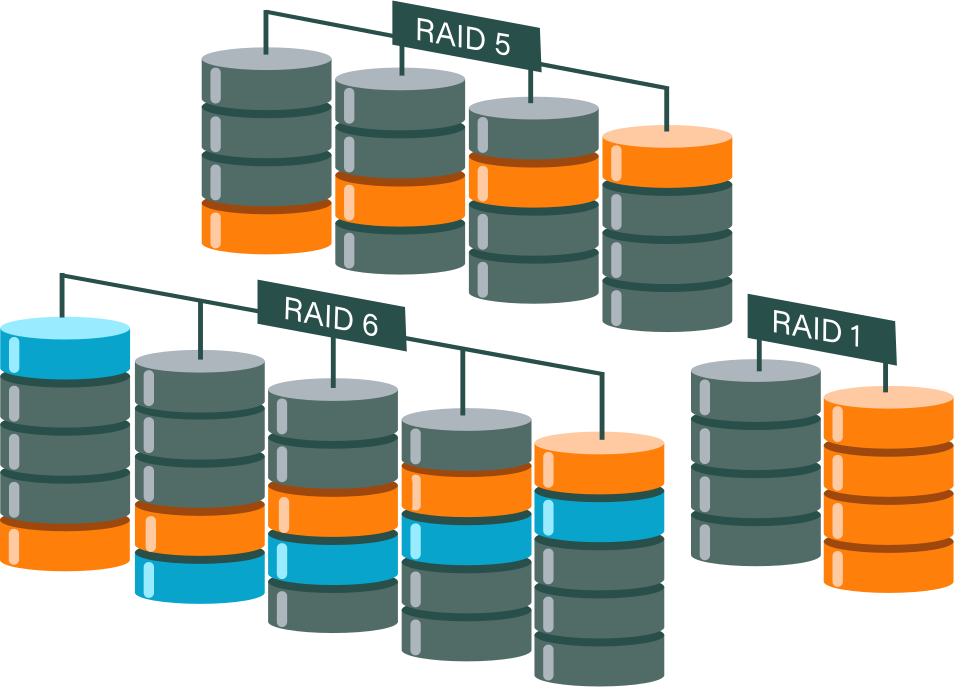
What You Must Know First
Encrypting RAID arrays ensures data-at-rest protection but alters recovery, key management, and operational processes. The encryption layer choice is crucial:
- Above RAID (filesystem/LUKS): Offers simpler recovery at the cost of potential performance impacts.
- Below RAID (self-encrypting drives, controller): Provides seamless protection with faster boot times but can complicate recovery and portability.
Quick Decisions
- Prioritize Recoverability and Flexibility: Build RAID first, then encrypt the RAID device using LUKS/dm-crypt or the filesystem on top.
- Focus on Performance and Transparent Encryption: Opt for certified self-encrypting drives (SEDs) or controller-backed encryption, but ensure vendor metadata and recovery paths are verified.
- Plan Key Management Carefully: Losing encryption keys leads to irreversible data loss. Always secure backup keys and regularly test restore procedures.
Encryption placement & tradeoffs
| 🔎 Option | Where it sits | Recoverability | Performance | Portability | Notes |
| 🧱 Encrypt above RAID (LUKS on /dev/mdX or ZFS native) | On RAID device or filesystem | High (if keys available) | Moderate (CPU cost) | High — move array + key | Recommended for admin control. |
| 🔐 Encrypt below RAID (Self-Encrypting Drives, Opal) | Drive firmware layer | Low if controller/drive metadata lost | Low CPU cost; hardware offload | Low — drives unreadable without same controller/key | Fast, but vendor lock and recovery risk. |
| 🛡️ Controller / HBA encryption | Controller abstracts disks | Depends on controller metadata export | Low CPU cost | Low — controller-specific | Check vendor recovery docs. |
Why Encrypt RAID Arrays — Threat Model & Benefits
Who You Protect Against
In the digital age, protecting sensitive data from unauthorized access is essential. By encrypting RAID arrays, you mitigate several key risks:
- Physical Theft: In the event of hardware theft, encryption ensures that the data remains secure and inaccessible to thieves. Even if someone gains physical access to the drives, encrypted data can't be read without the correct keys.
- Rogue Technicians: Sometimes, insiders with technical skills could pose a threat to data integrity. Encryption stops unauthorized access by those who might attempt to extract or manipulate data.
- Lost or Retired Drives: Drives can be misplaced or retired due to hardware lifecycle management. Encryption ensures that such drives don't become a security liability by preventing data access once they're out of controlled environments.
- Compliance Requirements: Many industries have stringent data protection laws and regulations (such as GDPR, HIPAA) that necessitate encryption as part of compliance to safeguard customer data.
What Encryption Does Not Solve
While encryption is a powerful tool, it does not cover all security bases:
- Logical Deletion: Encryption does not address the issue of data that seems deleted in file systems but can still be recovered. It's crucial to have measures in place for secure data deletion.
- Ransomware Attacks: Cryptographic solutions do not prevent ransomware from encrypting data and demanding ransom for its release. A comprehensive security plan includes anti-ransomware strategies and regular backups.
- Insider Abuse with Live Access: If employees or insiders have authorized access to the system while it's operational, encryption won't prevent them from misusing their access rights.
- Backup Protection Without Key Separation: Backups must be encrypted and keys managed separately to ensure that backups aren't vulnerable to the same threats as the primary storage.
Common Deployment Patterns & Recommended Order
Pattern A — RAID → LUKS → Filesystem (Recommended for Most)
This architecture starts by creating a RAID array using tools like mdadm for software RAID or ZFS's vdev for more robust setups. Once the RAID array is established, LUKS/dm-crypt is layered on top to encrypt the data before it reaches the file system.
✅Pros:
- Portability: The entire RAID volume is encrypted, allowing for easier transfer across systems without re-encrypting.
- Recoverability: Since the RAID array sits below the encryption layer, if any drive physically fails, you can replace it and rebuild the array without affecting the encrypted data layer.
- Simplicity: The process is straightforward and well-supported by community resources and documentation.
❎Cons:
- Key Dependency: Recovery depends entirely on having access to the encryption keys. Proper key management is crucial to avoid data loss.
Pattern B — LUKS on Physical Disks → RAID on /dev/mapper (Less Common)
In this less common approach, each disk in the array is encrypted individually with LUKS. The operating system then assembles a RAID array out of these decrypted mappings, which appear as regular devices.
✅Pros:
- Per-Disk Keys: Each disk can have its own encryption key, enhancing security granularity.
- Independent Disk Handling: Individual disks can be transported or replaced with their data intact once decrypted.
❎Cons:
- Complex Key Management: Managing keys for multiple disks increases complexity significantly.
- Boot Complications: Additional steps are required during the boot process to open each encrypted disk before assembling the RAID array.
- Performance Overhead: This setup might introduce a performance overhead due to the multiple layers of encryption and decryption operations.
Pattern C — ZFS Native Encryption (Dataset-Level)
ZFS offers built-in encryption capabilities that allow datasets to be encrypted transparently as part of its storage management.
✅Pros:
- Integrated Encryption: ZFS handles encryption as part of its storage management, including built-in key management and seamless rollback/replication.
- Advanced Features: Works seamlessly with ZFS's other features like snapshots and clones.
❎Cons:
- Replication Considerations: If datasets are encrypted, replication processes need to handle keys securely, and there may be constraints on what operations can be performed on encrypted datasets.
- Key Management Complexity: Although integrated, proper management and security of keys are vital to avoid unintended data access issues.
Pattern D — Hardware Encryption / SEDs
This involves using self-encrypting drives (SEDs) which support the Opal or SCSI Security protocols, or employing controller-level encryption solutions.
✅Pros:
- Performance Efficiency: Since encryption and decryption are handled by the drive hardware, it imposes minimal CPU load.
- Transparent to OS: The operating system interacts with the hardware as if it were unencrypted, making integration simple.
❎Cons:
- Vendor Lock-In and Recovery: Ensure that vendor-specific implementations provide robust options for data recovery and that metadata can be easily exported and transferred.
- Security Verification: It is crucial to validate claims of security and encryption standards by hardware vendors to avoid relying on potentially flawed implementations.
Key Management
Key Storage Options
Effective encryption hinges on robust key management. Here are some standard key storage options:
- Hardware Security Modules (HSM): These physical devices secure and manage encryption keys with high levels of protection against theft and tampering.
- Enterprise Key Management Services (KMS): Solutions like HashiCorp Vault or AWS KMS provide centralized management with extensive access controls and auditing capabilities.
- Offline Secure Key Backups: Storing keys on paper or USB drives can be safe if protected with strong encryption and physical security measures. This avoids potential breaches from online threats.
It's crucial to never store encryption keys on the same system they're used to encrypt, unless adequately protected by strong measures, such as encryption or secure enclaves.
Key Rotation & Backup Procedures
Regular key rotation is fundamental to maintaining security:
- Policy-Driven Rotation: Implement key rotation policies that define how and when keys should be updated to minimize exposure.
- Testing Rekey Operations: Always perform rekeying on non-production environments first to identify and resolve any issues without risking real data.
- Versioned Offline Backups: Keep at least one versioned offline backup of your encryption keys. This ensures that you have access to a recoverable version in case the primary keys are compromised or lost.
Recovery Planning
Having a well-structured recovery plan is essential to avoid catastrophic data loss:
- Defined Access Control: Clearly outline who has authorization to access recovery keys. Access should be strictly controlled and tracked.
- Documented Recovery Procedures: Maintain detailed documentation for unlocking arrays and data recovery. This should include step-by-step instructions that can be followed in a crisis.
- Testing Recovery: Regularly test the full recovery process from cold images to ensure all parts of the plan are effective and functional. Losing encryption keys results in irreversible data loss, so it's vital to verify that all recovery aspects are robust.
Performance Impact — What to Expect and How to Mitigate
CPU vs Hardware Offload
When it comes to encryption, the choice between software and hardware implementations can significantly affect performance:
- Software Encryption (e.g., LUKS/dm-crypt): This method relies on CPU cycles to perform encryption tasks. While it can introduce noticeable overhead, modern CPUs equipped with AES-NI (Advanced Encryption Standard New Instructions) can dramatically reduce the impact by accelerating encryption tasks.
- Hardware Solutions (SEDs/Controllers): Self-encrypting drives (SEDs) and certain RAID controllers offload encryption to dedicated hardware, effectively eliminating CPU usage impacts. This approach provides encryption with minimal performance overhead and is highly efficient in handling large volumes of data.
I/O Patterns Matter
The performance hit of encryption is not uniform and varies depending on I/O patterns:
- Small Random I/O: These operations can experience a higher relative performance overhead because encryption adds latency to each I/O operation. This can be more pronounced in workloads with frequent small random reads/writes.
- Large Sequential Transfers: These are generally less affected by encryption overhead because the data flows more uniformly, allowing for optimizations in handling the data stream.
To understand the real-world impact of encryption on a system, it's crucial to use tools like fio to simulate workloads and gauge performance.
Mitigations
Several strategies can help mitigate the performance impact of encryption:
- Utilize AES-NI: Ensure that CPUs with AES-NI are utilized to accelerate encryption processes. This hardware support can significantly reduce encryption overhead.
- Allocate CPU Resources: Dedicate specific CPU cores to handle encryption tasks, which can stabilize performance under load.
- Use Crypto Offload Hardware: If available, consider using dedicated hardware for encryption tasks to free up CPU resources for other operations.
- Leverage NVMe SSDs: These drives provide lower latency and higher throughput compared to traditional HDDs, helping to offset encryption overhead.
- Tune I/O Scheduler and Queue Depths: By optimizing these settings, you can enhance the efficiency of how requests are handled, reducing delays induced by encryption.
Secure RAID Configuration Checklist — Step-by-Step
- 1. Choose Encryption Placement:
- Opt for encryption above RAID, which facilitates easier recovery and management.
- 2. Select Algorithm and Mode:
- Use AES-XTS for encryption, which is optimized for disk encryption.
- Employ a secure hash algorithm for key derivation to ensure robust key security.
- 3. Deploy Key Management:
- Implement a comprehensive key management solution utilizing HSMs or enterprise KMS systems.
- Ensure you have secure offline backups of keys to prevent data loss in case of system compromise.
- 4. Build RAID:
- Choose disks that are appropriately matched in terms of capacity and performance.
- Conduct SMART tests on all disks to verify their health before building the RAID array.
- 5. Apply Encryption:
- Use LUKS for systems primarily using Linux, or ZFS native encryption if employing ZFS for superior integration.
- Apply the encryption layer before formatting to maintain security across the filesystem.
- 6. Test Configurations:
- Test the process of unlocking the encryption and mounting the filesystem to ensure smooth operations.
- Regularly scrub the RAID array to detect and repair any potential data issues.
- Perform a full restore from a cold image to validate your backup and recovery procedures.
- 7. Automate Secure Wiping and Key Revocation:
- For decommissioned drives, automate secure data wiping and key revocation to prevent unauthorized access to data remnants.
Encryption Placement Quick Guide
| 🔐 Placement | ✅ Pros | ⚠️ Cons |
| Above RAID (LUKS / dm-crypt) | Portable, recoverable with keys | CPU overhead; unlock step at boot |
| Below RAID (SED / Opal) | Low CPU cost, transparent | Vendor lock-in; recovery risk if controller/metadata lost |
| Filesystem-level (ZFS native) | Integrated, dataset keys | Some replication limits; ZFS-specific toolchain |
Algorithm & Mode
| 🔑 Algorithm | Mode | Notes |
| AES | XTS | Standard for disk encryption — pair with strong KDF |
| ChaCha20 | Poly1305 | Good alternative on CPU without AES-NI |
| PBKDF2 / Argon2 | KDF | Use Argon2 for stronger key-derivation where available |
Failure Modes & Recovery Implications
Key Loss = Data Loss
When dealing with encrypted RAID arrays, the loss of encryption keys equates to the loss of all data, as the disks become unreadable without the necessary keys. It's paramount to plan for key escrow, ensuring that keys are securely backed up and accessible to authorized individuals in the event of emergency.
Controller or Metadata Problems
Hardware-encrypted arrays or those relying on controller-specific metadata present unique challenges:
If the controller fails, accessing your data can become impossible if metadata is not duplicated elsewhere.
To mitigate this, create disk images and thoroughly document controller metadata before attempting recovery. This preparation can help you transition to a new controller or recovery setup without data loss.
Software-First Recovery Workflows
In cases where RAID or metadata corruption occurs, software-first recovery is often the safest approach:
- Use non-destructive tools that can reconstruct arrays from disk images and detect RAID layout configurations.
- A tool like DiskInternals RAID Recovery can auto-detect arrays and preview recoverable files before you export them. Always work from disk images rather than original disks to prevent further data corruption during recovery attempts.
Ready to get your data back?
To recover data from a RAID drive (start recovering your data, documents, databases, images, videos, and other files from your RAID 0, RAID 1, 0+1, 1+0, 1E, RAID 4, RAID 5, 50, 5EE, 5R, RAID 6, RAID 60, RAIDZ, RAIDZ2, and JBOD), press the FREE DOWNLOAD button to get the latest version of the free RAID recovery tool and begin the step-by-step recovery process. You can preview all recovered files absolutely for free. To check the current prices, please press the Get Prices button. If you need any assistance, please feel free to contact Technical Support. The team is here to help you recover from RAID!
Practical Examples & Commands (Brief)
Create mdadm RAID1 Then Encrypt with LUKS
To create a RAID1 array with mdadm and encrypt it using LUKS, follow these commands:
- 1. Create RAID1 Array with
mdadm:
mdadm --create /dev/md0 --level=1 --raid-devices=2 /dev/sda2 /dev/sdb2
- 2. Encrypt the RAID Array with LUKS:
cryptsetup luksFormat /dev/md0
- 3. Open the Encrypted RAID Device:
cryptsetup open /dev/md0 securemd
- 4. Format and Mount:
mkfs.xfs /dev/mapper/securemd
mount /dev/mapper/securemd /mnt
ZFS Native Encryption
For ZFS native encryption, use the following commands:
- 1. Create ZFS Pool with Mirrored Disks:
zpool create tank mirror /dev/sda /dev/sdb
- 2. Create Encrypted Dataset:
zfs create -o encryption=on -o keyformat=passphrase tank/secure
- 3. Testing Key Loading and Unloading:
- Load Key:
zfs load-key tank/secure
- Unload Key:
zfs unload-key tank/secure
These commands provide a straightforward approach to setting up secure storage solutions using RAID1 with LUKS encryption and ZFS native encryption.
Guide: Setting Up RAID DrivesOperational Best Practices & Policies
- Enforce Least-Privilege Access: Limit access to key stores strictly to individuals who require it for their roles. This minimizes the risk of unauthorized access and potential data breaches.
- Conduct Regular Key-Recovery Drills and Full Restores: Schedule frequent exercises to simulate key-recovery and perform full data restores from backup images. This ensures that recovery procedures are reliable and that staff are familiar with the process.
- Monitor SMART and RAID Health: Regularly check the integrity and performance of your RAID arrays and individual drives using SMART diagnostics. Schedule array scrubs while they are unlocked to detect and fix any potential issues early.
- Securely Wipe Decommissioned Drives: Follow NIST or DoD standards for data destruction after performing a crypto-erase or key revocation. This ensures that removed drives do not present a security risk by preventing unauthorized data retrieval.
Related articles
- How to Rebuild RAID 5 Without Losing Your Data
- RAID 1 Recovery: all you can do yourself
- RAID 10 Recovery
- RAID 5 Data Recovery Step by Step
- RAID 6 Data Recovery
- RAID 0, 1, 3, 5, 10 data recovery software for Windows 10
- RAID Recovery Services
- The Truth about Recovering RAID 5 with 2 Failed Disks
- RAID 4 Data Recovery: How to Perform It⠀
- RAID 0 vs RAID 1: Performance, Redundancy & Use Cases
- RAID 5 vs RAID 10 comparison: Which one is better for you?⠀
- SSD benefits for RAID array
- How to set up RAID in Windows 10 in 2025
- RAID 5 VS RAID 6 - advantages and disadvantages
- RAID 0 failure - How to Fix Failed Raid 0 Array
- The best NAS RAID: how to choose⠀
- HDD Raid Vs SSD Raid Storage Systems - How to move⠀
- Benefits of RAID arrays - what are the advantages of RAID?⠀
- NAS vs External Hard Drive: Comprehensive Guide to Choosing the Best Data Storage Solution
- RAID-1 vs RAID-5: Performance, Cost, and Data Protection Compared
- RAID 3 vs RAID 5: which one would you prefer?
- RAID 10 vs RAID 01: Is There Any Difference?
- RAID vs JBOD: performance and cost comparison⠀
- What are RAID 01, RAID 1+0 and RAID 0+1⠀
- Mdadm RAID 1 not activating a spare disk Linux⠀
- NAS vs SAN storage - Detailed Comparison⠀
- Perform RAID 50 Data Recovery Today!
- Basic Disks vs Dynamic: What is the Difference
- What to do if RAID array doesn't reassemble after reboot
- RAID levels 0, 1, 5, 6, and 10
- Minimum disks for RAID 10⠀
- RAID Consistency Check: Ensure Data Integrity & Recover Lost Data
- What Is a Hot Spare? Peculiarities of Usage
- Global Hot Spare vs Dedicated Hot Spare: Find the Difference
- Differences Between Software RAID and Hardware RAID
- What Are Some Common Symptoms of RAID Array Failures?⠀
- RAID status degraded - fix it⠀
- How to check RAID status? 4 different methods!
- RAID 50 vs RAID 10 - What is the difference
- RAID Array Growing: How to Perform It
- How to downsize hardware RAID partition and protect data
- How To Create RAID Arrays with mdadm on Ubuntu (22.04)
- How About RAID 1 Reliability?
- What is RAID-Z? Its Difference Between RAID-Z2 vs RAID-Z3
- Can RAID array have snapshots?
- RAID Array Metadata: What Is Inside?
- RAID 6: Replace Two Dead Drives
- Do You Need to Defragment RAID?
- How to Recover RAID partition - step by step guide⠀
- RAID 5: How Big Should an Array Be?
- Does chunk size influence the speed of RAID?
- RAID 0, 5, 6, 10 Performance
- How Does RAID 5 on Windows 10 Work?
- RAID Configuration Explained: Types, Setup, and Best Practices
- What is FakeRAID?
- Which RAID is Better to Use for 4 Drives
- What Is RAID Redundancy? | RAID Redundancy Explained for Data Protection
- RAID Array for Video Editing: How to Choose
- Perform Hyper-V Data Recovery Today
- How to Install Hyper-V in Your Environment in 2025
- Hyper-V Manager - what is it?⠀
- Hyper-V: Generation 1 vs Generation 2
- Hyper-V Live Migration - what is it?⠀
- Hyper-V Snapshot Merge
- Hyper-V Virtual Machine Replication⠀
- About Hyper-V clusters
- Difference Between Type 1 and Type 2 Hypervisor?⠀
- Hyper-V Server Core installation vs GUI - let's compare⠀
- How to Run Linux on a Hyper-V VM in 2025
- Back up Active Directory Guide - Step-by-step Instructions⠀
- What is nutanix ahv?⠀
- What is System Center Virtual Machine Manager⠀
- Effective Btrfs File Recovery: Complete Guide to Btrfs Data Recovery
- Make Sure Your Data is Safe While Using Microsoft Storage
- What is Microsoft SQL Server and How Can You Use it Safely?
- Set Up and Use Microsoft SQL Server Management Studio
- Microsoft SQL Server Express Guide
- Use Microsoft Windows Server Safely
- What to do if you get Microsoft SQL Server error 18456?
- Microsoft Storage Spaces
- Xserve RAID data safety
- Apple RAID Card Data Recovery
- Guide: Linux Raid and Disk Data Safety
- Here is Everything You Need to Know About RAID-Z Technology
- What is JBOD?
- Btrfs vs. EXT4: A Comprehensive Comparison of File Systems in Linux (2025)
- RAID Redundancy - best performance solutions⠀
- Is it worth using RAID 5E/5EE?
- Let's compare: Synology vs QNAP
- Here is How to Backup RAID in 2025
- No hard drive detected or disk controller not supported in RAID
- Issue with the RAID after the BIOS update
- Using SSD in RAID Array
- Synology RAID Set That Is Broken or Crashed? RAID data recovery
- Here is How to add drive to RAID 5 in 2025
- ZFS Recovery software - How to recover deleted ZFS files
- Raid Recovery Qnap⠀
- RAID recovery software for Mac⠀
- Best FREE RAID Data Recovery Software (2026)
- Best NAS hard drive recovery in 2026 | Top RAID network-attached storage Hard Drives
- SQL Server Database in Recovery Pending - How to fix it (2025)
- RAID Hard Disk Data Recovery Software (2025)
- Best RAID Data Recovery Software for Linux
- How to Recover RAID Array Configuration
- How to Rebuild RAID Without Losing Data
- How to rebuild RAID 1 without losing data
- How to Rebuild RAID 0 Without Losing Data
- Difference and Comparison - RAID 1 and RAID 2
- Difference between RAID 2 and RAID 3
- Difference between RAID 3 and RAID 4
- Difference between RAID 4 and RAID 5
- Buffalo Data Recovery
- Rapid RAID Recovery Software
- What is Synology Hybrid RAID (SHR). How to Recover Data from Synology Hybrid RAID
- RAID Server Data Recovery
- Recover Data from RAID on Linux
- RAID Foreign Disk: Causes, Solutions, and Best Practices
- How to Recover RAID Crash Data
- Forensic RAID Recovery
- RAID Data Recovery evaluation. What is RAID data recovery?
- Raid Drive Array Recovery
- How to Setup Raid 0 Windows 10 (11)?
- How to set up RAID 1 on Windows 10 and Linux
- How Many Disks Can Fail in RAID 5?
- What is RAID 5? Overview and Key Functions
- What Is a RAID Controller and What Are the Benefits of It?
- Recover Data from Broken/Failed RAID Set
- How to Clone RAID 0, 1, 5 Disk
- How to Remove software RAID device using mdadm
- Raid Rebuild Vs. Raid Recovery
- RAID vs. backup - differences and benefits (RAID is not a Backup)
- How to Rebuild RAID array
- What is Synology Hybrid RAID? What is the difference between SHR and RAID Drives?
- AHCI vs. RAID: Pros, Cons & Differences
- Recover Data from RAID 1 on mdadm (Linux)
- Recover Data from RAID 5 on mdadm (Linux)
- Difference & Comparison: RAID vs. non-RAID System
- Ultimate Guide to RAID Data Recovery: Tips & Techniques
- RAID Rebuild Time: What is and How to Optimize It?
- RAID Disaster Data Recovery: Techniques and Strategies for Handling Catastrophic Events
- How to Repair a Failed RAID?
- How to Set Up RAID in Windows 11: A Step-by-Step Guide
- RAID 50 vs. RAID 60 – Key Differences
- Guide to Recovering a Failed RAID Array | Step-by-Step Recovery Process
- HDD RAID vs SSD RAID and Combining Both: Everything You Need to Know
- How to Set Up and Configure RAID 10: Step-by-Step Guide
- What Is RAID 6? Definition, function
- RAID 10 vs RAID 6: Which Better?
- RAID 0: How Many Drives Are Needed?
- RAID 10: How Many Disks Are Needed and How to Set It Up
- How to recover data from a corrupted RAID?
- What is RAID 1? RAID Mirroring
- Recovering RAID 5 After Controller Failure
- NTFS RAID Recovery: Comprehensive Guide to Data Retrieval
- What is Xserve RAID? Comprehensive Guide and Overview
- Comprehensive Guide to RAID in Cyber Security: Levels, Recovery, and Best Practices
- Complete Guide to RAID Controller Failure and Recovery: Expert Tips
- Understanding Hardware RAID: Comprehensive Guide to RAID Levels and Benefits
- What is software RAID? - Comprehensive Guide
- Understanding RAID 0: Benefits, Risks, and Applications
- RAID 3 Explained: Benefits, Limitations, and Data Recovery Guide
- How Many Drives Are Needed for RAID 5? Minimum & Maximum Explained
- Understanding RAID 60: Architecture, Advantages, and Data Recovery
- Understanding RAID Striping: A Comprehensive Guide to Disk Striping and Its Variants
- RAID 10: How Many Drives Can Fail? | Comprehensive Guide to Failure Tolerance
- ZFS RAID Setup Guide: Configuration, Management & Expansion
- ZFS vs Btrfs vs RAID: Comprehensive Storage Comparison for Performance, Reliability, and Scalability
- How to Resize RAID Partitions: Step-by-Step Guide for RAID 1, 5, 6 & 10
- A Comprehensive Review of RAID Recovery Software: Choosing the Right Tool
- DiskInternals RAID Recovery vs EaseUS Data Recovery Wizard | Comprehensive Comparison
- DiskInternals RAID Recovery vs ReclaiMe: Comprehensive RAID Recovery Solutions Compared
- Comprehensive Guide to ZFS RAID Levels, Types, and Configurations
- ZFS vs RAID: Comprehensive Comparison of Performance, Reliability, and Features
- RAID 1 Minimum Drive Requirement: How Many Drives Do You Need?
- Bootable RAID Recovery Software: Complete Guide for RAID 0, 1, 5, 10 Recovery
- RAID Hard Drives Explained: What Is RAID for HDDs and External Drives
- RAID 5 Rebuild Failure Probability: Risks, Factors, and Solutions in 2025
- Understanding RAID 6 Performance: A Comprehensive Guide
- RAID Drives Explained: Learn How RAID Storage Enhances Performance
- HP RAID Recovery Tool | How to Recover Data with DiskInternals RAID Recovery Software
- Recovering Data from RAID Drives: Step-by-Step Guide to RAID Recovery
- Recover Striped RAID: Professional RAID 0 Data Recovery with DiskInternals RAID Recovery™
- BTRFS Restore File: How to Undelete Files and Restore Deleted Data Easily
- Recover Data from a RAID Array: Effective Solutions for Fast and Secure Data Retrieval
- Windows 7 RAID Recovery: How to Recover Data from RAID 1, RAID 5, and RAID 10 Arrays
- Adaptec RAID Recovery: Restore Data from Failed Arrays with DiskInternals RAID Recovery™
- What is RAID Data Recovery? | Recover RAID Arrays with RAID Recovery Software
- SAN RAID Data Recovery: Recover RAID Arrays with Professional SAN Recovery Solutions
- What is a RAID Volume? Understanding RAID Volumes and Recovery Solutions
- What is a RAID? RAID Systems Explained & How to Recover RAID Arrays with Professional Tools
- Best RAID Software for Mac | Top Free & Paid RAID Tools for macOS 2026
- Top 10 RAID Recovery Services: Best Solutions for Data Recovery
- RAID Server Data Recovery: Recover and Restore RAID Arrays Fast with Professional Tools
- RAID System Recovery: Essential Steps & Best Software for Safe Data and File Restoration
- RAID Recovery Volume: Effective RAID Array Recovery Solutions for Data Loss Prevention
- What is RAID Connectivity? Essential Guide to RAID Array Setup
- Intel RAID 0 Recovery & RAID 1 Recovery: Solutions for Data Loss & Recovery Tools
- How Many Drives for RAID 6?
- Optimize RAID for Redundancy and Performance - Expert Guide
- How to Read RAID Drives & Recover RAID Arrays on Windows: A Guide
- RAID 0 vs RAID 5: Speed, Performance & Key Differences (2026)
- Synology RAID 5 Recovery: Recover Your RAID Array with Expert Tools and Tips
- Synology RAID 1 Recovery: Recover RAID Array with Trusted Tools and Expert Solutions
- X-RAID Recovery: Expert Guide to Netgear X-RAID and ReadyNAS Data Recovery
- Interim Recovery RAID 5: Expert Guide to Data Recovery and RAID Array Repair
- MDADM RAID 0 Recovery: Expert Guide to Fix and Recover Your RAID Array
- SCSI RAID Recovery Software: Effective Solutions for SCSI RAID Data Recovery
- RAID Data Recovery for Deleted Arrays: Recover RAID Array Safely & Effectively
- What is RAID in Linux? Learn About Software RAID & Recover RAID Arrays Easily
- Change log for RAID Recovery™
- Intel Matrix RAID Recovery: Restore RAID 0, 1, 5, 10 with Reliable Solutions
- RAID Level 4: What Is RAID 4, How It Works
- RAID Restorer – Recover Data from Failed RAID Arrays with Reliable Software
- ZFS RAID with Different Size Drives – Setup, Limitations, and Best Practices
- RAID 0, 1, 5, 10 Explained: Performance, Redundancy & Best RAID Configurations
- How to Recover Data from a Broken RAID 1 Set – Step-by-Step Guide
- ZFS RAID Expansion: How to Expand RAIDZ and ZFS Pools Safely
- RAID 6 Drive Failure Tolerance: How Many Drives Can Fail?
- RAID 50: Drive Failure Tolerance and Data Recovery Solutions
- Windows Storage Spaces vs RAID: Performance, Speed, and Data Protection Comparison
- RAID 2 Array Explained: What Is RAID Level 2, Setup, and Performance Comparison
- RAID 5 RAID 6 RAID 10 - Key Differences and Performance Comparison
- RAID 5 with 3 Disks: Configuration, Benefits, and Performance Insights
- How to Create RAID 5 with 6 Disks: Complete Setup Guide and Performance Tips
- RAID 6 Double Parity Calculation Explained – Data Protection Insights
- How to Add a Disk to mdadm RAID 5: Step-by-Step Guide
- RAID 0 vs RAID 10 and RAID 10 vs RAID 0 Performance Comparison
- How to Fix Degraded RAID 1: Step-by-Step Guide to Restore RAID 1 Degraded Arrays
- RAID 5 vs RAID 0+1: Key Differences Explained
- Why RAID 1 Is Not a Good Substitute for a Backup
- How to Check Which RAID Is Configured: A Complete Guide for Windows and Linux
- RAID 50 vs. RAID 5 – Performance, Speed, and Data Protection Comparison
- RAID 50 vs. RAID 6 – Key Differences
- Configure RAID on Ubuntu – Step-by-Step Guide for RAID 0, 1, 5, and 10
- Configuring RAID 5: Step-by-Step Guide on How to Configure RAID 5 for Performance
- Cannot Format Old RAID Drive? Effective RAID Data Recovery Solutions
- RAID 6 with 5 Drives: Configuration, Performance, and Data Protection
- Best RAID for 6 Disks: Compare RAID 0, 5, 6, 10, 50 & 60 for Performance & Redundancy
- RAID 6 with 8 Drives: Configuration, Failures, and Performance Explained
- RAID 6 with 6 Drives: Performance, Redundancy, and Best Use Cases
- RAID 0 vs. JBOD – Key Differences, Performance, and Speed Comparison
- RAID Array Rebuild: How to Rebuild a RAID Array Safely and Recover Lost Data
- Recover Data from Old RAID Drives | Best Methods & Software for RAID Recovery
- RAID 5 with 5 Drives: Configuration, Performance & Recovery | RAID 5 5 Drives Guide
- 15 Best External Hard Drives for RAID in 2026
- Dell RAID 1 Recovery: How to Recover Data from RAID 1 on Dell Servers Safely
- Dell RAID 5 Recovery - Safely and Fast
- RAID 1E vs RAID 10: Performance, Capacity, Cost & Failure Risk Guide
- What Is RAID 1E? Performance RAID 10 1E vs RAID-1E Guide for Power Users
- RAID 1E vs RAID 5: Performance, Capacity and Failure Risk Compared
- RAID 1 Speeds: Read, Write & Disk Performance | Speed Up RAID 1 Guide
- Ext3 RAID Recovery Guide - Data Recovery RAID Ext3
- XFS RAID Recovery Guide & Best XFS RAID Recovery Software
- ASUS RAID Recovery Guide - Fix Failed ASUS RAID
- RAID Data Recovery Cost: Affordable Solutions for RAID 0, RAID 1, RAID 5, and RAID 10 Failures
- NAS as a File Server: NAS vs. File Server Comparison for Storage and Sharing
- QNAP RAID 5 Recovery Failed? Safe Data Recovery Steps for NAS Users
- ReiserFS RAID Recovery: How to Restore Data from Failed RAID Arrays
- RAID 0 vs RAID 1 vs RAID 5 vs RAID 10 — Performance, Capacity & Recovery
- ZFS Recovery Tools — Data Recovery ZFS Guide & Best Software
- RAID 1 vs RAID 5 vs RAID 10 Performance Management, Speed & Capacity Guide
- RAIDZ1 vs RAID 5 — Performance, Integrity & Recovery Comparison
- ZFS Mirror vs RAIDZ — Performance, Capacity & Recovery Guide
- ZFS Minimum Drives — How Many Disks You Need for RAIDZ1, RAIDZ2, RAIDZ3
- RAID Degraded — What to Do | Warning Fixes & Rebuild Failed Steps
- RAID 7 — What It Is? Origins, Risks & Recovery Options
- ZFS vs mdadm RAID — Why choose ZFS instead of RAID
- RAID in Cloud Storage Systems — SDS, Virtual RAID & Erasure Coding Guide
- Best RAID for OLTP: RAID Configuration for OLTP Workloads & Transactional Databases
- Best RAID for MySQL: RAID Configuration & RAID Setup for MySQL Databases
- Best RAID for NVMeoF: NVMe RAID Configuration & NVMe over Fabrics RAID Setup
- RAID 10 with 8 Disks — Configuration, Performance, Rebuilds & Best Practices
- Is RAID 0 Worth It in 2026? Risk, Performance, SSD & NVMe Guidance
- Fault Tolerance in NVMe-oF RAID — Rebuild Time, Data Protection & Redundancy
- Best Practices for RAID over NVMe-oF — Tuning, Monitoring & DR
- RAID 0 vs Single Drive — SSD, NVMe & HDD Comparison (Performance vs Risk)
- RAID 0 vs Single Drive Reliability — Failure Risk, SSD Comparison & Recovery
- RAID 0 for Gaming — Is RAID 0 Good for Gaming? Performance & Risk Guide
- RAID 0 for 4K Editing — Is RAID 0 Good for 4K Video Editing?
- RAID 0 for Large File Workloads: Scratch Disks, NVMe, When It Makes Sense
- Is RAID 0 Obsolete? RAID 0 with SSD and NVMe — Still Worth It?
- RAID 0 vs. SSD Performance: PCIe 4.0, PCIe 5.0 Speed Compared
- RAID 0 Redundancy vs No Redundancy — Does RAID 0 Have Redundancy?
- Does RAID 0 Increase FPS? — RAID 0 vs Single Drive FPS Guide
- RAID 5 Interrupted Rebuild Recovery: Fix Stopped or Aborted Rebuilds
- RAID 0 Failure Probability with N Disks Explained
- RAID 5 Two-Disk Failure Recovery: Parity Recovery Beyond Tolerance
- RAID 1 Corrupted Mirror Recovery: How to Recover a Damaged RAID 1 Mirror
- When RAID 0 Is Acceptable: Use Cases, Risks, and When You Should Use RAID 0
- RAID Best Practices for VMware: Best RAID Configuration for VMware ESXi
- RAID 0 Backed by Versioned Backup: Is RAID 0 Safe with Versioned Backups?
- RAID 10 Best for VMware: Why RAID 10 Is the Recommended RAID for ESXi
- Best RAID Controller Guide: Hardware RAID Cards Compared for Servers and SSDs
- Best PCIe RAID Controller: Top Hardware PCI Express RAID Cards Compared
- RAID Controller for ESXi: VMware ESXi RAID Controller Recommendations
- RAID Controller for Linux: Best Linux-Compatible Hardware RAID Controllers
- SATA RAID Controller for ESXi: VMware ESXi Compatible SATA RAID Options
- SAS RAID Controller for VMware ESXi: Best Hardware RAID Options
- NAS Data Recovery Software & Tools for RAID Recovery
- Features
- RAID 0 Data Recovery
- RAID Reconstructor on Broken RAID Arrays
- RAID Recovery Software
- Hyper-V network adapters⠀
- Open Source RAID Recovery Software Explained and Comparison
- RAID 1: How Many Drives Are Needed for Data Redundancy?
- RAID 1 with 3 Drives: Everything You Need to Know
- RAID Calculator For Geeks – Estimate Usable Space & Drive Size
- RAID Calculator Online – Usable Space & Disk Size Calculator for RAID
