
RAID 5 interrupted rebuild recovery: rebuild interrupted, stopped, or aborted
A RAID 5 rebuild can fail mid‑process due to power loss, disk errors, or controller faults. When this happens, the array is left vulnerable: parity is incomplete, performance drops, and data integrity is at risk. This guide explains why rebuilds stop, how to identify the cause, and the exact recovery steps to safely resume or repair an interrupted RAID 5 rebuild.
Immediate answer: can RAID 5 be recovered after an interrupted rebuild?
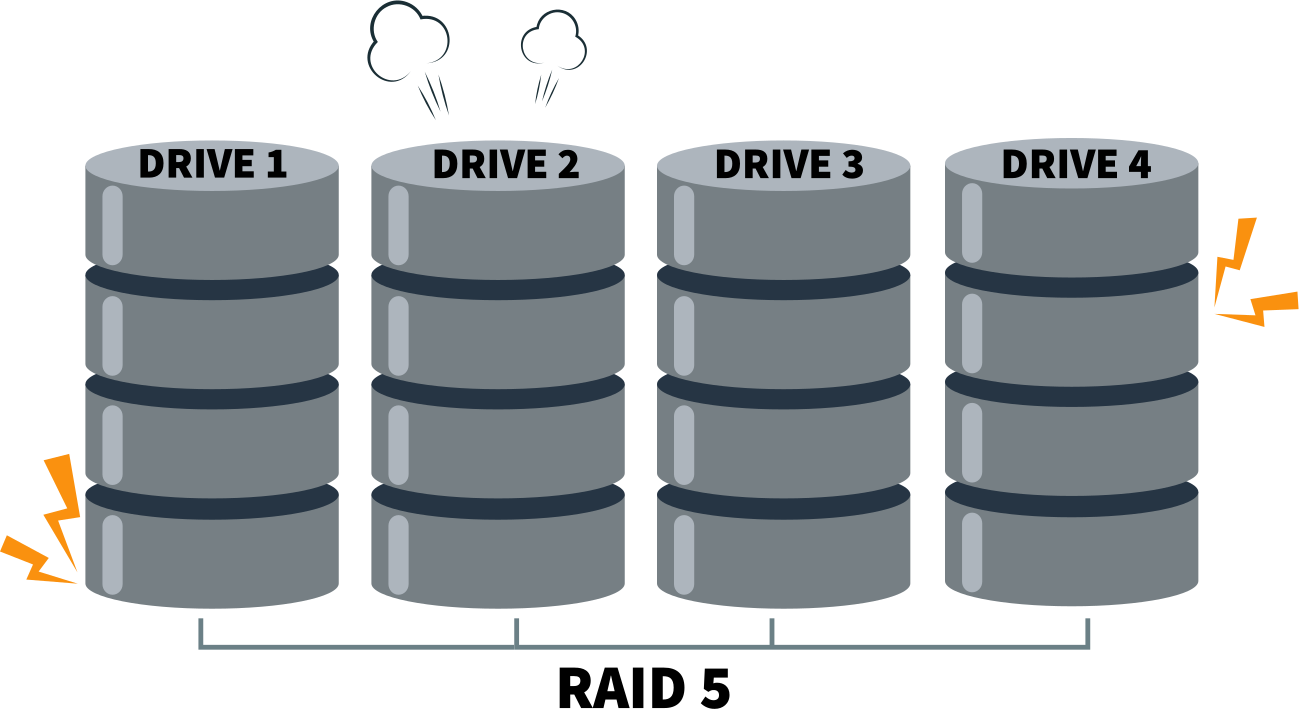
Recovery is possible if the rebuild did not overwrite parity across all stripes.
Why recovery is possible
- Parity structure in RAID 5: Each stripe contains data blocks and one parity block distributed across disks. As long as parity remains intact, missing data can be reconstructed.
- Interrupted rebuilds: If the rebuild stops before parity is fully rewritten, the original parity still exists on most stripes, allowing recovery tools to reconstruct the array.
Factors that determine success
- 1. Rebuild progress:
- Minimal progress: High chance of recovery, since most parity blocks are untouched.
- Partial progress: Recovery is possible but complex, as some stripes contain new parity while others retain old parity.
- Near completion: Risk is highest—parity may be inconsistent across the array.
- 2. Disk role in failure:
- If the replacement disk failed, the original data/parity may still be intact.
- If an active member disk failed mid‑rebuild, recovery becomes harder because both data and parity may be compromised.
Risks of repeated rebuild attempts
- Each new rebuild attempt writes fresh parity across stripes.
- This overwrites the original parity, making it impossible to reconstruct missing data.
- Multiple aborted rebuilds often leave the array in a “mixed parity” state, where some stripes reflect old parity and others new parity—this inconsistency is the main cause of unrecoverable data loss.
Practical takeaway
- Do not restart rebuilds blindly.
- Preserve the current disk state before attempting recovery.
- Use specialized RAID recovery software or professional services to reconstruct the array from the existing parity and data blocks.
What happens when a RAID 5 rebuild is interrupted
How RAID 5 rebuild works at block level
- 1. Parity recalculation
- RAID 5 uses distributed parity: each stripe has one parity block stored across different disks.
- During rebuild, the controller reads surviving data blocks, recalculates parity, and writes it to the replacement disk.
- This ensures redundancy is restored and the array can tolerate future disk failures.
- 2. Sequential stripe overwrite
- Rebuilds proceed stripe by stripe, starting at the beginning of the logical volume.
- Once a stripe is rebuilt, its old parity/data state is overwritten permanently.
- This sequential overwrite means that if the process stops mid‑way, the array contains a mix of rebuilt and unreconstructed stripes.
- 3. Dependency on correct disk order
- RAID 5 relies on the exact sequence of member disks to align parity correctly.
- If the disk order is misidentified (e.g., after controller replacement or manual intervention), parity calculations are written to the wrong positions, corrupting data.
- This dependency makes rebuilds sensitive to configuration errors.
Why interruption corrupts RAID metadata
- 1. Partial parity updates
- When a rebuild halts, some stripes have updated parity while others retain old parity.
- This creates a “mixed parity” state where the controller cannot reliably determine which version is correct.
- 2. Inconsistent stripe state
- A single stripe may contain:
- New parity on the replacement disk.
- Old data/parity on surviving disks.
- This inconsistency breaks the logical mapping of the array, making reconstruction unreliable.
- 3. Logical damage without physical disk failure
- Even if all disks remain physically healthy, the metadata (RAID configuration, rebuild markers, parity maps) becomes corrupted.
- The controller may mark the array as degraded or failed because it cannot reconcile stripe states.
- This is why interrupted rebuilds often appear as “failed arrays” despite no hardware damage.
Example scenario
Imagine a RAID 5 with 3 disks (A, B, C) and parity rotating across them:
- Stripe 1: Data A1, Data B1, Parity C1
- Stripe 2: Data A2, Parity B2, Data C2
- Stripe 3: Parity A3, Data B3, Data C3
During rebuild:
- Stripe 1 parity is recalculated and overwritten → now “new parity.”
- Stripe 2 rebuild starts but is interrupted → parity remains “old.”
- Stripe 3 untouched → parity still “old.”
Result:
- Array contains a mix of new and old parity.
- Controller cannot determine which parity is valid for each stripe.
- Logical corruption occurs even though disks A, B, and C are physically fine.
Common interrupted rebuild scenarios
RAID 5 rebuild stopped recovery
- Power loss: A sudden outage halts the rebuild mid‑process. Some stripes may have updated parity while others remain untouched, leaving the array in a mixed state.
- Manual cancel: If an administrator cancels the rebuild, the controller stops writing parity updates. Depending on progress, this can leave the array partially rebuilt and inconsistent.
- Controller reset: A reset or reboot of the RAID controller interrupts the sequential rebuild operation. Metadata markers may be lost, making it unclear which stripes were already rebuilt.
RAID 5 rebuild aborted recovery
- Second disk error during rebuild: RAID 5 can only tolerate one disk failure. If another disk throws errors mid‑rebuild, the array drops into failure mode, and recovery becomes far more complex.
- Firmware crash: A controller firmware bug can abort the rebuild, leaving incomplete parity updates and corrupted metadata.
- RAID controller failure: Hardware failure in the controller itself halts the rebuild. Even if disks are intact, the array cannot continue until the controller is replaced or repaired.
RAID 5 rebuild interrupted recovery due to wrong drive replacement
- Incorrect disk inserted: Adding the wrong disk (e.g., a blank or mismatched drive) causes the controller to overwrite parity incorrectly, corrupting the array.
- Failed disk misidentified: If the wrong disk is marked as failed and replaced, the rebuild writes parity against the wrong member, destroying valid data.
- Hot‑swap errors: Mistakes during hot‑swap (e.g., removing the wrong drive or improper insertion) can break disk order and cause rebuild corruption.
Recover RAID 5 after interrupted rebuild: what not to do
Do not restart the rebuild
- Restarting a rebuild forces the controller to overwrite parity blocks across stripes.
- Once overwritten, the original parity is lost, eliminating the possibility of reconstructing missing data.
- Multiple rebuild attempts often leave the array in a “mixed parity” state, where some stripes contain new parity and others old parity, making recovery nearly impossible.
Do not initialize or re‑create the array
- Initializing or re‑creating the RAID 5 array erases the existing metadata (disk order, stripe size, parity rotation).
- Without this metadata, recovery tools cannot reconstruct the original stripe layout.
- This action makes logical damage permanent, even if the disks themselves are physically intact.
Do not swap disk order blindly
- RAID 5 depends on the exact sequence of member disks to align parity correctly.
- Blindly swapping disks or guessing their order leads to stripe misalignment, where parity and data blocks no longer match.
- Misaligned stripes increase corruption and can destroy otherwise recoverable data.
Key factors that determine recovery success
Rebuild progress percentage
- Low progress: Most parity blocks remain untouched, giving recovery tools a high chance of reconstructing the array.
- Mid progress: Some stripes contain new parity while others retain old parity, creating mixed states. Recovery is possible but requires advanced analysis to reconcile inconsistencies.
- High progress : Nearly all parity has been rewritten. If interrupted here, recovery is difficult because original parity is largely lost.
Which disk failed first vs during rebuild
- Initial failed disk: If the rebuild was triggered by a single disk failure, recovery depends on the health of the remaining disks.
- Second disk failure during rebuild: RAID 5 cannot tolerate two failed disks. If another disk throws errors mid‑rebuild, the array drops into failure mode, making recovery far more complex.
- Replacement disk failure: If the new disk fails during rebuild, the original parity/data may still be intact, improving recovery chances.
Hardware RAID vs software RAID
- Hardware RAID: Recovery depends heavily on the controller’s metadata and firmware behavior. Proprietary formats can make manual recovery difficult without specialized tools.
- Software RAID (e.g., Windows Storage Spaces, mdadm in Linux): Metadata is often more transparent, and recovery tools can directly access disk structures. This can simplify reconstruction if the rebuild is interrupted.
Controller model and firmware behavior
- Controller metadata handling: Some controllers mark rebuild progress in metadata. If interrupted, they may resume correctly; others may leave the array flagged as failed.
- Firmware stability: Bugs or crashes during rebuild can corrupt parity or metadata. Recovery success depends on whether the controller wrote partial updates before failing.
- Vendor differences: Different RAID vendors (Dell, HP, LSI, Adaptec, etc.) implement rebuild logic differently. Some overwrite parity aggressively, while others preserve old parity until completion. This behavior directly impacts recovery chances.
Comparison table: RAID 5 rebuild outcomes
| Scenario | Recovery chance | Risk level | Recommended action |
| Rebuild stopped early | High | Moderate | Software recovery |
| Rebuild stopped mid-way | Medium | High | Read-only analysis |
| Rebuild near completion | Low | Critical | Professional tools |
| Second disk failed | Variable | Extreme | Immediate recovery |
RAID 5 recovery approach after interrupted rebuild
Step 1: Preserve all disks
- No writes
- Immediately stop all write operations to the array. Any new writes risk overwriting recoverable parity and data blocks.
- Disconnect the disks from the controller if necessary to prevent accidental activity.
- No rebuild retries
- Do not attempt to restart the rebuild. Each retry overwrites more parity, reducing the chances of successful recovery.
- Preserve the current disk state for analysis with recovery tools.
Step 2: Identify original RAID parameters
- Disk order
- Determine the exact sequence of member disks. RAID 5 relies on disk order to align parity correctly.
- Misidentifying order leads to stripe misalignment and corrupted reconstruction.
- Stripe size
- Identify the stripe size (commonly 64 KB, 128 KB, or 256 KB). This defines how data and parity blocks are distributed across disks.
- Recovery tools require the correct stripe size to rebuild logical volumes accurately.
- Parity rotation
- RAID 5 uses distributed parity, rotating parity blocks across disks.
- Knowing the parity rotation pattern (left‑symmetric, right‑asymmetric, etc.) is essential for reconstructing the array.
Step 3: Virtual RAID reconstruction
- Read‑only parity emulation
- Use specialized recovery software to emulate the RAID virtually in read‑only mode.
- This allows parity calculations without altering the actual disks, preserving original data.
- Partial stripe recovery
- Recovery tools can reconstruct incomplete stripes by combining old parity with surviving data blocks.
- Even if some stripes are inconsistent, partial recovery can restore large portions of the array.
Software‑based RAID 5 interrupted rebuild recovery
When software recovery works
- Logical damage
- Software recovery is effective when the disks themselves are physically healthy but the array suffers from logical corruption (e.g., inconsistent parity, broken metadata, or misaligned stripes).
- In these cases, specialized tools can reconstruct the array virtually without altering the original disks.
- No full parity overwrite
- Recovery is possible if the interrupted rebuild did not overwrite parity across all stripes.
- As long as some original parity remains intact, recovery software can emulate the RAID structure and rebuild missing data.
Example: DiskInternals RAID Recovery
- Manual RAID 5 reconstruction
- The tool allows administrators to manually specify RAID parameters such as disk order, stripe size, and parity rotation.
- This is critical when metadata is corrupted or unavailable.
- Supports interrupted rebuild scenarios
- DiskInternals RAID Recovery is designed to handle arrays with mixed parity states, making it suitable for interrupted rebuilds.
- Works with hardware and software RAID
- Compatible with arrays created by hardware controllers as well as software RAID implementations (e.g., Windows Dynamic Disks, Linux mdadm).
- Allows preview before saving data
- Provides a read‑only preview of recovered files before committing to data export.
- This ensures that recovery results are validated before any changes are made to the disks.
Ready to get your data back?
To start recovering your data, documents, databases, images, videos, and other files from your RAID 0, RAID 1, 0+1, 1+0, 1E, RAID 4, RAID 5, 50, 5EE, 5R, RAID 6, RAID 60, RAIDZ, RAIDZ2, and JBOD, press the FREE DOWNLOAD button to get the latest version of DiskInternals RAID Recovery® and begin the step-by-step recovery process. You can preview all recovered files absolutely for free. To check the current prices, please press the Get Prices button. If you need any assistance, please feel free to contact Technical Support. The team is here to help you get your data back!
When professional recovery becomes mandatory
Multiple disk degradation
- RAID 5 can only tolerate a single disk failure.
- If multiple disks show read errors, bad sectors, or complete failure during or after a rebuild, recovery becomes extremely complex.
- Professional labs use advanced imaging techniques to extract data from degraded drives without stressing them further, something not possible with standard software tools.
Controller‑specific parity schemes
- Different RAID controllers (LSI, Adaptec, Dell PERC, HP Smart Array, etc.) implement parity rotation and metadata handling in proprietary ways.
- If the controller fails or parity is partially overwritten, only specialists with knowledge of the specific scheme can reconstruct the array correctly.
- Attempting manual recovery without understanding the controller’s parity logic risks misaligned stripes and permanent corruption.
Enterprise RAID with proprietary metadata
- Large‑scale enterprise arrays often store proprietary metadata structures that define disk order, stripe size, and rebuild progress.
- If this metadata is corrupted or lost during an interrupted rebuild, recovery requires specialized tools and expertise not available in consumer software.
- Professional recovery services can parse and rebuild proprietary metadata to restore access to mission‑critical data.
Prevention: how to avoid RAID 5 rebuild disasters
Never rebuild on unstable disks
- A rebuild stresses all drives in the array by performing continuous read/write operations.
- If surviving disks already show signs of degradation (bad sectors, SMART warnings, slow response), the rebuild can push them into failure.
- Always check disk health with diagnostic tools before initiating a rebuild. Replace or clone unstable drives first to avoid compounding failures.
Verify failed drive before replacement
- Misidentifying the failed disk is one of the most common causes of rebuild corruption.
- Before swapping, confirm the failure using controller logs, SMART data, and consistency checks.
- Replacing the wrong disk leads to overwriting valid data during rebuild, often making recovery impossible.
Use backups before rebuild attempts
- Even if the rebuild looks straightforward, always secure a backup of critical data first.
- Backups provide a safety net in case the rebuild fails or introduces logical corruption.
- For enterprise environments, snapshot or clone the array before attempting rebuild operations to ensure rollback capability.
Related articles
- Features
- DiskInternals RAID Recovery vs ReclaiMe: Comprehensive RAID Recovery Solutions Compared
- Best FREE RAID Data Recovery Software (2026)
- SSD benefits for RAID array
- Mdadm RAID 1 not activating a spare disk Linux⠀
- Minimum disks for RAID 10⠀
- How to check RAID status? 4 different methods!
- Can RAID array have snapshots?
- RAID Array Metadata: What Is Inside?
- How Does RAID 5 on Windows 10 Work?
- What is FakeRAID?
- Hyper-V: Generation 1 vs Generation 2
- Bootable RAID Recovery Software: Complete Guide for RAID 0, 1, 5, 10 Recovery
- How to Rebuild RAID array
- What is Synology Hybrid RAID? What is the difference between SHR and RAID Drives?
- Btrfs vs. EXT4: A Comprehensive Comparison of File Systems in Linux (2025)
- RAID vs JBOD: performance and cost comparison⠀
- Complete Guide to RAID Controller Failure and Recovery: Expert Tips
- Comprehensive Guide to RAID in Cyber Security: Levels, Recovery, and Best Practices
- Raid Recovery Qnap⠀
- Best RAID for MySQL: RAID Configuration & RAID Setup for MySQL Databases
- Understanding Hardware RAID: Comprehensive Guide to RAID Levels and Benefits
- What Is a RAID Controller and What Are the Benefits of It?
- RAID Foreign Disk: Causes, Solutions, and Best Practices
- RAID 3 Explained: Benefits, Limitations, and Data Recovery Guide
- How to Resize RAID Partitions: Step-by-Step Guide for RAID 1, 5, 6 & 10
- Windows 7 RAID Recovery: How to Recover Data from RAID 1, RAID 5, and RAID 10 Arrays
- RAID Array Rebuild: How to Rebuild a RAID Array Safely and Recover Lost Data
- How to Check Which RAID Is Configured: A Complete Guide for Windows and Linux
- RAID 10 vs RAID 6: Which Better?
- What is software RAID? - Comprehensive Guide
- What is a RAID? RAID Systems Explained & How to Recover RAID Arrays with Professional Tools
- Best PCIe RAID Controller: Top Hardware PCI Express RAID Cards Compared
- Adaptec RAID Recovery: Restore Data from Failed Arrays with DiskInternals RAID Recovery™
- How to Rebuild RAID 0 Without Losing Data
- How to rebuild RAID 1 without losing data
- Raid Drive Array Recovery
- Best RAID Data Recovery Software for Linux
- How to Rebuild RAID Without Losing Data
- Forensic RAID Recovery
- AHCI vs. RAID: Pros, Cons & Differences
- Recovering RAID 5 After Controller Failure
- Best NAS hard drive recovery in 2026 | Top RAID network-attached storage Hard Drives
- RAID 50 vs RAID 10 - What is the difference
- What Is RAID Redundancy? | RAID Redundancy Explained for Data Protection
- Difference & Comparison: RAID vs. non-RAID System
- RAID Drives Explained: Learn How RAID Storage Enhances Performance
- Optimize RAID for Redundancy and Performance - Expert Guide
- RAID Level 4: What Is RAID 4, How It Works
- RAID 0 vs RAID 5: Speed, Performance & Key Differences (2026)
- How to Set Up and Configure RAID 10: Step-by-Step Guide
- SATA RAID Controller for ESXi: VMware ESXi Compatible SATA RAID Options
- RAID 10: How Many Disks Are Needed and How to Set It Up
- RAID 5 Rebuild Failure Probability: Risks, Factors, and Solutions in 2025
- SAN RAID Data Recovery: Recover RAID Arrays with Professional SAN Recovery Solutions
- RAID 6 with 6 Drives: Performance, Redundancy, and Best Use Cases
- RAID 5 Two-Disk Failure Recovery: Parity Recovery Beyond Tolerance
- ZFS Recovery software - How to recover deleted ZFS files
- How Many Drives for RAID 6?
- RAID 1 Speeds: Read, Write & Disk Performance | Speed Up RAID 1 Guide
- RAID 0 Data Recovery
- RAID Disaster Data Recovery: Techniques and Strategies for Handling Catastrophic Events
- RAID-1 vs RAID-5: Performance, Cost, and Data Protection Compared
- RAID Data Recovery evaluation. What is RAID data recovery?
- RAID 50 vs. RAID 6 – Key Differences
- Back up Active Directory Guide - Step-by-step Instructions⠀
- RAID Hard Drives Explained: What Is RAID for HDDs and External Drives
- Synology RAID 5 Recovery: Recover Your RAID Array with Expert Tools and Tips
- Windows Storage Spaces vs RAID: Performance, Speed, and Data Protection Comparison
- RAID Recovery Services
- RAID 50 vs. RAID 60 – Key Differences
- RAID 0 vs Single Drive Reliability — Failure Risk, SSD Comparison & Recovery
- Using SSD in RAID Array
- RAID 1 with 3 Drives: Everything You Need to Know
- How to Read RAID Drives & Recover RAID Arrays on Windows: A Guide
- Difference and Comparison - RAID 1 and RAID 2
- What is RAID in Linux? Learn About Software RAID & Recover RAID Arrays Easily
- Configuring RAID 5: Step-by-Step Guide on How to Configure RAID 5 for Performance
- ZFS Minimum Drives — How Many Disks You Need for RAIDZ1, RAIDZ2, RAIDZ3
- Differences Between Software RAID and Hardware RAID
- Recover Data from RAID 5 on mdadm (Linux)
- RAID 2 Array Explained: What Is RAID Level 2, Setup, and Performance Comparison
- RAID 5 VS RAID 6 - advantages and disadvantages
- How to Clone RAID 0, 1, 5 Disk
- RAID vs. backup - differences and benefits (RAID is not a Backup)
- Top 10 RAID Recovery Services: Best Solutions for Data Recovery
- RAID 0 vs RAID 1: Performance, Redundancy & Use Cases
- Recover Data from RAID on Linux
- How to recover data from a corrupted RAID?
- How Many Drives Are Needed for RAID 5? Minimum & Maximum Explained
- RAID 5 vs RAID 0+1: Key Differences Explained
- How to Set Up RAID in Windows 11: A Step-by-Step Guide
- Best RAID for 6 Disks: Compare RAID 0, 5, 6, 10, 50 & 60 for Performance & Redundancy
- Recover Data from Broken/Failed RAID Set
- What Is RAID 6? Definition, function
- ZFS vs Btrfs vs RAID: Comprehensive Storage Comparison for Performance, Reliability, and Scalability
- How to Recover RAID Array Configuration
- RAID Rebuild Time: What is and How to Optimize It?
- Understanding RAID 0: Benefits, Risks, and Applications
- QNAP RAID 5 Recovery Failed? Safe Data Recovery Steps for NAS Users
- SQL Server Database in Recovery Pending - How to fix it (2025)
- What is RAID 5? Overview and Key Functions
- Raid Rebuild Vs. Raid Recovery
- Guide to Recovering a Failed RAID Array | Step-by-Step Recovery Process
- RAID 50 vs. RAID 5 – Performance, Speed, and Data Protection Comparison
- RAID 0 vs. JBOD – Key Differences, Performance, and Speed Comparison
- RAID 1 Recovery: all you can do yourself
- How to Setup Raid 0 Windows 10 (11)?
- Ultimate Guide to RAID Data Recovery: Tips & Techniques
- RAID 1: How Many Drives Are Needed for Data Redundancy?
- ZFS Mirror vs RAIDZ — Performance, Capacity & Recovery Guide
- RAID Calculator Online – Usable Space & Disk Size Calculator for RAID
- The Truth about Recovering RAID 5 with 2 Failed Disks
- RAID Configuration Explained: Types, Setup, and Best Practices
- How to set up RAID 1 on Windows 10 and Linux
- How Many Disks Can Fail in RAID 5?
- Is RAID 0 Worth It in 2026? Risk, Performance, SSD & NVMe Guidance
- Recover Data from RAID 1 on mdadm (Linux)
- DiskInternals RAID Recovery vs EaseUS Data Recovery Wizard | Comprehensive Comparison
- RAID 0 failure - How to Fix Failed Raid 0 Array
- RAID Server Data Recovery
- RAID 0 vs RAID 10 and RAID 10 vs RAID 0 Performance Comparison
- BTRFS Restore File: How to Undelete Files and Restore Deleted Data Easily
- Recover Data from a RAID Array: Effective Solutions for Fast and Secure Data Retrieval
- RAID 7 — What It Is? Origins, Risks & Recovery Options
- What is RAID 1? RAID Mirroring
- SAS RAID Controller for VMware ESXi: Best Hardware RAID Options
- RAID 10: How Many Drives Can Fail? | Comprehensive Guide to Failure Tolerance
- Recover Striped RAID: Professional RAID 0 Data Recovery with DiskInternals RAID Recovery™
- How to Add a Disk to mdadm RAID 5: Step-by-Step Guide
- Configure RAID on Ubuntu – Step-by-Step Guide for RAID 0, 1, 5, and 10
- ZFS Recovery Tools — Data Recovery ZFS Guide & Best Software
- RAID 0 for Gaming — Is RAID 0 Good for Gaming? Performance & Risk Guide
- How to Remove software RAID device using mdadm
- NAS vs SAN storage - Detailed Comparison⠀
- Effective Btrfs File Recovery: Complete Guide to Btrfs Data Recovery
- RAID Hard Disk Data Recovery Software (2025)
- Rapid RAID Recovery Software
- What is Synology Hybrid RAID (SHR). How to Recover Data from Synology Hybrid RAID
- How to Recover RAID Crash Data
- RAID 0, 1, 3, 5, 10 data recovery software for Windows 10
- Hyper-V Server Core installation vs GUI - let's compare⠀
- RAID 6 Data Recovery
- What to do if RAID array doesn't reassemble after reboot
- How to Rebuild RAID 5 Without Losing Your Data
- The best NAS RAID: how to choose⠀
- What are RAID 01, RAID 1+0 and RAID 0+1⠀
- What is Microsoft SQL Server and How Can You Use it Safely?
- Make Sure Your Data is Safe While Using Microsoft Storage
- What is nutanix ahv?⠀
- RAID 10 Recovery
- RAID levels 0, 1, 5, 6, and 10
- RAID 0: How Many Drives Are Needed?
- RAID Server Data Recovery: Recover and Restore RAID Arrays Fast with Professional Tools
- RAID Data Recovery for Deleted Arrays: Recover RAID Array Safely & Effectively
- RAID 0, 1, 5, 10 Explained: Performance, Redundancy & Best RAID Configurations
- How to Recover Data from a Broken RAID 1 Set – Step-by-Step Guide
- RAID 6 Drive Failure Tolerance: How Many Drives Can Fail?
- RAID 50: Drive Failure Tolerance and Data Recovery Solutions
- 15 Best External Hard Drives for RAID in 2026
- RAID 0 vs RAID 1 vs RAID 5 vs RAID 10 — Performance, Capacity & Recovery
- Best RAID for OLTP: RAID Configuration for OLTP Workloads & Transactional Databases
- Best RAID for NVMeoF: NVMe RAID Configuration & NVMe over Fabrics RAID Setup
- RAID 0 Backed by Versioned Backup: Is RAID 0 Safe with Versioned Backups?
- How to set up RAID in Windows 10 in 2025
- How About RAID 1 Reliability?
- RAID 5: How Big Should an Array Be?
- What Are Some Common Symptoms of RAID Array Failures?⠀
- Hyper-V Virtual Machine Replication⠀
- Difference Between Type 1 and Type 2 Hypervisor?⠀
- RAID 4 Data Recovery: How to Perform It⠀
- How to Recover RAID partition - step by step guide⠀
- Hyper-V Manager - what is it?⠀
- How to Run Linux on a Hyper-V VM in 2025
- What to do if you get Microsoft SQL Server error 18456?
- What Is a Hot Spare? Peculiarities of Usage
- What is JBOD?
- RAID Recovery Software
- RAID 3 vs RAID 5: which one would you prefer?
- Basic Disks vs Dynamic: What is the Difference
- Global Hot Spare vs Dedicated Hot Spare: Find the Difference
- How to downsize hardware RAID partition and protect data
- RAID 6: Replace Two Dead Drives
- Perform Hyper-V Data Recovery Today
- How to Install Hyper-V in Your Environment in 2025
- Hyper-V Live Migration - what is it?⠀
- Hyper-V Snapshot Merge
- What is System Center Virtual Machine Manager⠀
- Guide: Linux Raid and Disk Data Safety
- Is it worth using RAID 5E/5EE?
- Let's compare: Synology vs QNAP
- What is RAID Connectivity? Essential Guide to RAID Array Setup
- RAID recovery software for Mac⠀
- Understanding RAID 6 Performance: A Comprehensive Guide
- What is a RAID Volume? Understanding RAID Volumes and Recovery Solutions
- Recover Data from Old RAID Drives | Best Methods & Software for RAID Recovery
- Encrypting RAID Arrays — RAID with Full Disk Encryption & Secure Setup
- RAID 10 with 8 Disks — Configuration, Performance, Rebuilds & Best Practices
- RAID 6 Double Parity Calculation Explained – Data Protection Insights
- A Comprehensive Review of RAID Recovery Software: Choosing the Right Tool
- What is RAID Data Recovery? | Recover RAID Arrays with RAID Recovery Software
- ZFS RAID Expansion: How to Expand RAIDZ and ZFS Pools Safely
- RAID 5 with 3 Disks: Configuration, Benefits, and Performance Insights
- How to Create RAID 5 with 6 Disks: Complete Setup Guide and Performance Tips
- How to Fix Degraded RAID 1: Step-by-Step Guide to Restore RAID 1 Degraded Arrays
- Why RAID 1 Is Not a Good Substitute for a Backup
- Cannot Format Old RAID Drive? Effective RAID Data Recovery Solutions
- Fault Tolerance in NVMe-oF RAID — Rebuild Time, Data Protection & Redundancy
- Best Practices for RAID over NVMe-oF — Tuning, Monitoring & DR
- RAID 0 vs Single Drive — SSD, NVMe & HDD Comparison (Performance vs Risk)
- RAID 0 for 4K Editing — Is RAID 0 Good for 4K Video Editing?
- RAID 0 for Large File Workloads: Scratch Disks, NVMe, When It Makes Sense
- RAID 0 vs. SSD Performance: PCIe 4.0, PCIe 5.0 Speed Compared
- RAID 0 Redundancy vs No Redundancy — Does RAID 0 Have Redundancy?
- Does RAID 0 Increase FPS? — RAID 0 vs Single Drive FPS Guide
- RAID 0 Failure Probability with N Disks Explained
- RAID 1 Corrupted Mirror Recovery: How to Recover a Damaged RAID 1 Mirror
- When RAID 0 Is Acceptable: Use Cases, Risks, and When You Should Use RAID 0
- RAID Best Practices for VMware: Best RAID Configuration for VMware ESXi
- RAID 10 Best for VMware: Why RAID 10 Is the Recommended RAID for ESXi
- Best RAID Controller Guide: Hardware RAID Cards Compared for Servers and SSDs
- RAID Controller for ESXi: VMware ESXi RAID Controller Recommendations
- RAID Controller for Linux: Best Linux-Compatible Hardware RAID Controllers
- Dell RAID 1 Recovery: How to Recover Data from RAID 1 on Dell Servers Safely
- Dell RAID 5 Recovery - Safely and Fast
- RAID 5 vs RAID 10 comparison: Which one is better for you?⠀
- HDD Raid Vs SSD Raid Storage Systems - How to move⠀
- Benefits of RAID arrays - what are the advantages of RAID?⠀
- RAID 10 vs RAID 01: Is There Any Difference?
- Perform RAID 50 Data Recovery Today!
- RAID Consistency Check: Ensure Data Integrity & Recover Lost Data
- RAID status degraded - fix it⠀
- RAID Array Growing: How to Perform It
- How To Create RAID Arrays with mdadm on Ubuntu (22.04)
- What is RAID-Z? Its Difference Between RAID-Z2 vs RAID-Z3
- Do You Need to Defragment RAID?
- Does chunk size influence the speed of RAID?
- RAID 0, 5, 6, 10 Performance
- Which RAID is Better to Use for 4 Drives
- RAID Array for Video Editing: How to Choose
- About Hyper-V clusters
- Hyper-V network adapters⠀
- Set Up and Use Microsoft SQL Server Management Studio
- Microsoft SQL Server Express Guide
- Use Microsoft Windows Server Safely
- Microsoft Storage Spaces
- Xserve RAID data safety
- Apple RAID Card Data Recovery
- Here is Everything You Need to Know About RAID-Z Technology
- RAID Redundancy - best performance solutions⠀
- Here is How to Backup RAID in 2025
- No hard drive detected or disk controller not supported in RAID
- Issue with the RAID after the BIOS update
- Synology RAID Set That Is Broken or Crashed? RAID data recovery
- Here is How to add drive to RAID 5 in 2025
- Buffalo Data Recovery
- NAS as a File Server: NAS vs. File Server Comparison for Storage and Sharing
- RAIDZ1 vs RAID 5 — Performance, Integrity & Recovery Comparison
- Difference between RAID 2 and RAID 3
- Difference between RAID 4 and RAID 5
- Difference between RAID 3 and RAID 4
- RAID Data Recovery Cost: Affordable Solutions for RAID 0, RAID 1, RAID 5, and RAID 10 Failures
- ZFS vs mdadm RAID — Why choose ZFS instead of RAID
- X-RAID Recovery: Expert Guide to Netgear X-RAID and ReadyNAS Data Recovery
- XFS RAID Recovery Guide & Best XFS RAID Recovery Software
- What Is RAID 1E? Performance RAID 10 1E vs RAID-1E Guide for Power Users
- SCSI RAID Recovery Software: Effective Solutions for SCSI RAID Data Recovery
- ReiserFS RAID Recovery: How to Restore Data from Failed RAID Arrays
- RAID in Cloud Storage Systems — SDS, Virtual RAID & Erasure Coding Guide
- RAID Degraded — What to Do | Warning Fixes & Rebuild Failed Steps
- RAID 5 RAID 6 RAID 10 - Key Differences and Performance Comparison
- RAID 1E vs RAID 5: Performance, Capacity and Failure Risk Compared
- RAID 1E vs RAID 10: Performance, Capacity, Cost & Failure Risk Guide
- RAID 1 vs RAID 5 vs RAID 10 Performance Management, Speed & Capacity Guide
- Open Source RAID Recovery Software Explained and Comparison
- MDADM RAID 0 Recovery: Expert Guide to Fix and Recover Your RAID Array
- Intel RAID 0 Recovery & RAID 1 Recovery: Solutions for Data Loss & Recovery Tools
- Is RAID 0 Obsolete? RAID 0 with SSD and NVMe — Still Worth It?
- Intel Matrix RAID Recovery: Restore RAID 0, 1, 5, 10 with Reliable Solutions
- Ext3 RAID Recovery Guide - Data Recovery RAID Ext3
- ASUS RAID Recovery Guide - Fix Failed ASUS RAID
- RAID 5 Data Recovery Step by Step
- NAS vs External Hard Drive: Comprehensive Guide to Choosing the Best Data Storage Solution
- NTFS RAID Recovery: Comprehensive Guide to Data Retrieval
- What is Xserve RAID? Comprehensive Guide and Overview
- Understanding RAID 60: Architecture, Advantages, and Data Recovery
- Understanding RAID Striping: A Comprehensive Guide to Disk Striping and Its Variants
- ZFS RAID Setup Guide: Configuration, Management & Expansion
- Comprehensive Guide to ZFS RAID Levels, Types, and Configurations
- ZFS vs RAID: Comprehensive Comparison of Performance, Reliability, and Features
- RAID 1 Minimum Drive Requirement: How Many Drives Do You Need?
- HP RAID Recovery Tool | How to Recover Data with DiskInternals RAID Recovery Software
- Best RAID Software for Mac | Top Free & Paid RAID Tools for macOS 2026
- RAID System Recovery: Essential Steps & Best Software for Safe Data and File Restoration
- RAID Recovery Volume: Effective RAID Array Recovery Solutions for Data Loss Prevention
- Synology RAID 1 Recovery: Recover RAID Array with Trusted Tools and Expert Solutions
- Interim Recovery RAID 5: Expert Guide to Data Recovery and RAID Array Repair
- Change log for RAID Recovery™
- RAID Restorer – Recover Data from Failed RAID Arrays with Reliable Software
- ZFS RAID with Different Size Drives – Setup, Limitations, and Best Practices
- RAID 6 with 5 Drives: Configuration, Performance, and Data Protection
- RAID 6 with 8 Drives: Configuration, Failures, and Performance Explained
- RAID 5 with 5 Drives: Configuration, Performance & Recovery | RAID 5 5 Drives Guide
- RAID Reconstructor on Broken RAID Arrays
- How to Repair a Failed RAID?
- HDD RAID vs SSD RAID and Combining Both: Everything You Need to Know
- Recovering Data from RAID Drives: Step-by-Step Guide to RAID Recovery
- NAS Data Recovery Software & Tools for RAID Recovery
- RAID Calculator For Geeks – Estimate Usable Space & Drive Size
