
RAID 0 Failure Probability with N Disks
RAID 0, often praised for its speed and simplicity, is a storage configuration that stripes data across multiple disks to maximize performance. However, this performance boost comes at a steep cost: reliability. Unlike other RAID levels, RAID 0 offers no redundancy, meaning the failure of a single disk results in the loss of the entire array. As the number of disks in a RAID 0 setup increases, so too does the probability of catastrophic failure.
In this article, we’ll explore the mathematics behind RAID 0 reliability, demonstrate how failure probability scales with N disks, and highlight why understanding these risks is critical for system administrators, IT professionals, and anyone considering RAID 0 for high‑performance workloads.
RAID 0 Failure Probability with N Disks

RAID 0 (striping) offers performance gains but no redundancy. The reliability of the entire array depends on all disks staying healthy. If any single disk fails, the whole array fails.
🔢 Formula
Let:
- p = probability of a single disk failing within a given time period
- q=1-p = probability of a single disk surviving
For N disks in RAID 0:
- Probability of the array surviving = q^N=(1-p)^N
- Probability of array failure = 1-(1-p)^N
📊 Example Calculations
👉 As you can see, the more disks you add, the higher the probability of total array failure, even though each disk individually has the same reliability.
⚠️ Key Considerations
- RAID 0 should never be used for critical data without backups.
- It’s best suited for scratch space, temporary workloads, or performance testing.
- For reliability, RAID 1, RAID 5, or RAID 10 are better options, depending on your balance of performance vs redundancy.
What is RAID 0?
🔎 Definition
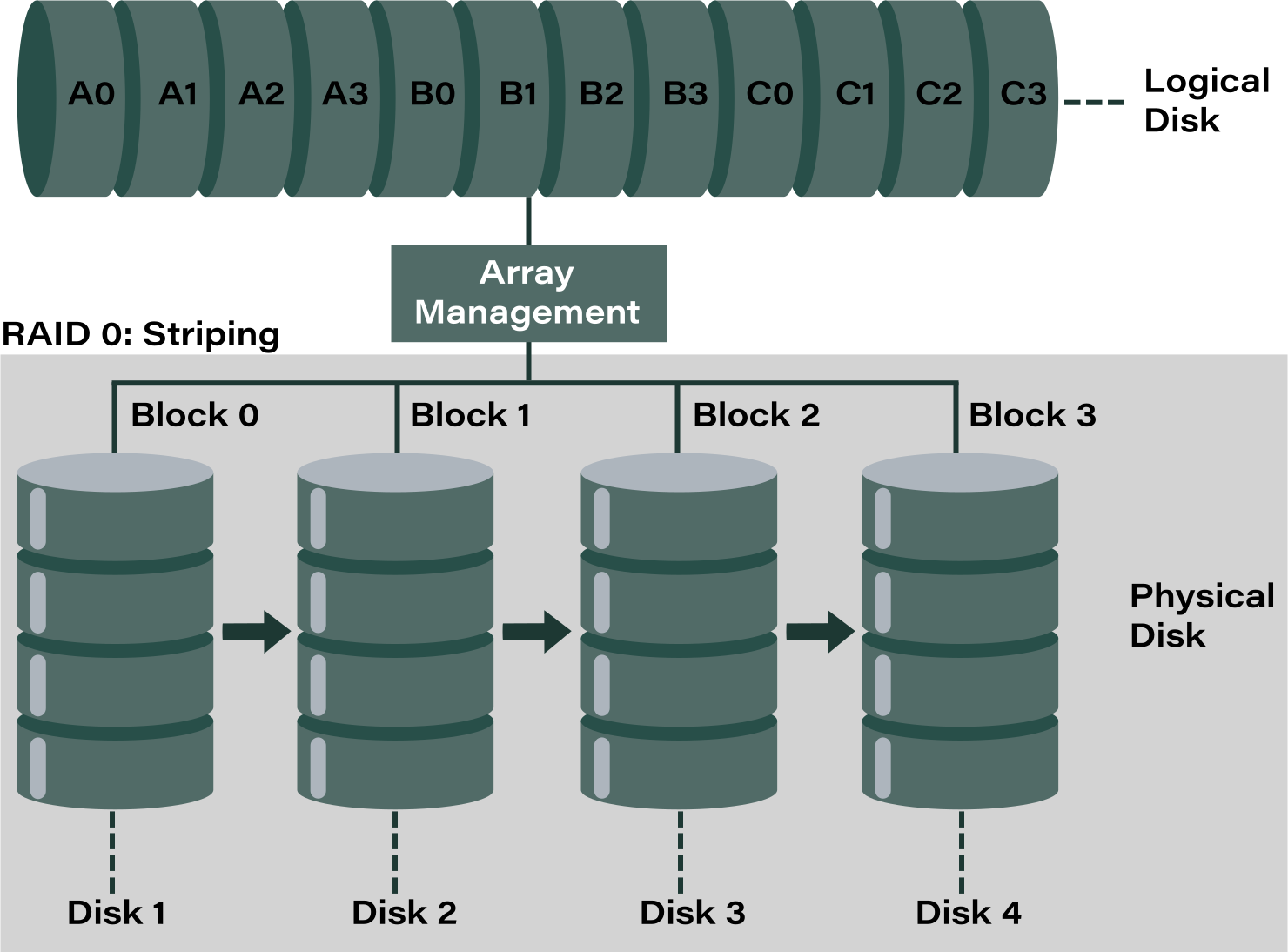
RAID 0, also known as disk striping, is the simplest RAID level. It combines two or more physical drives into a single logical volume and splits every file into equal‑sized blocks (stripes). These stripes are written across all disks in the array, allowing simultaneous read and write operations.
⚙️ How It Works
- Striping: Data is divided into blocks (e.g., 64 KB) and distributed evenly across all disks.
- Parallel Access: Multiple disks can be read or written to at the same time, significantly improving throughput.
- Minimum Disks: Requires at least 2 drives.
- No Redundancy: Unlike RAID 1 or RAID 5, RAID 0 does not duplicate or protect data.
✅ Advantages
- High Performance: Faster read/write speeds compared to a single disk.
- Increased Capacity: Total storage equals the sum of all disks in the array.
- Cost‑Effective Speed: Uses inexpensive drives to achieve performance gains.
❌ Limitations
- Zero Fault Tolerance: If one disk fails, all data in the array is lost.
- Not Suitable for Critical Data: Best used for temporary storage, gaming, or workloads where performance matters more than reliability.
- Higher Risk with More Disks: The probability of failure increases as the number of disks grows.
⚙️ Key Characteristics of RAID 0
- Data Striping: Files are split into equal‑sized blocks and distributed across all disks in the array. This allows simultaneous read/write operations, boosting throughput.
- Minimum of Two Disks: RAID 0 requires at least two drives to function, but can scale to more.
- Performance Gains: Because multiple disks are accessed in parallel, RAID 0 offers significant improvements in speed compared to a single drive.
- No Redundancy: RAID 0 provides no fault tolerance. If one disk fails, all data in the array is lost.
- Full Capacity Utilization: The total storage capacity equals the sum of all disks in the array, unlike RAID levels that reserve space for parity or mirroring.
- Higher Risk with More Disks: The probability of array failure increases as the number of disks grows, since any single disk failure destroys the array.
- Best Use Cases: Temporary storage, gaming, or workloads where speed is more important than data safety.
Defining Disk Failure Probability
🔎 What Disk Failure Probability Means
- 1. Definition: It represents the probability that a disk will fail during a specified time window (e.g., one year).
- 2. Failure Modes:
- Operational failures: the disk stops responding or cannot return data.
- Latent failures: data corruption occurs silently and is only discovered later.
- 3. Mathematical Representation:
- If the probability of a single disk failing is p, then the probability of it surviving is 1-p.
- This value is used in RAID reliability formulas, such as RAID 0’s failure probability: 1-(1-p)^N.
- 4. Industry Metrics:
- MTBF (Mean Time Between Failures): A statistical estimate of average operational hours before failure.
- AFR (Annualized Failure Rate): A more practical measure, showing the percentage of drives expected to fail in one year.
📊 Example
If a disk has an AFR of 2%, then:
- Probability of failure in one year = 0.02.
- Probability of survival in one year = 0.98.
- For a RAID 0 array with 4 disks, the probability of array failure = 1-(0.98)^4\approx 7.73\% .
⚠️ Key Considerations
- HDDs vs SSDs: HDDs are mechanical and more prone to operational failures, while SSDs are less mechanical but still vulnerable to latent faults.
- Scaling Risk: In multi‑disk systems, the chance of overall failure grows quickly as more drives are added.
- Practical Use: Disk failure probability is critical for designing RAID arrays, backup strategies, and disaster recovery plans.
RAID 0 Failure Recovery
🔎 Why RAID 0 Recovery Is Challenging
- No Redundancy: Unlike RAID 1 or RAID 5, RAID 0 does not store duplicate or parity data.
- Single Point of Failure: If one disk fails, the entire array becomes unreadable.
- Complex Striping: Data is split into blocks across disks, so recovery requires knowing the exact stripe size, disk order, and offsets.
⚙️ Common Causes of RAID 0 Failure
- Physical disk damage (bad sectors, mechanical failure).
- Logical corruption (file system errors, accidental deletion).
- Controller or RAID metadata issues.
- Power surges or improper shutdowns.
🛠️ Recovery Methods
- 1. Identify the Cause
- Determine whether the failure is physical (hardware damage) or logical (corruption).
- Physical damage often requires professional lab recovery.
- 2. Check Disk Health
- Use SMART tools to verify which disks are still operational.
- Never run repair utilities directly on failing drives — clone them first.
- 3. Reconstruct RAID Parameters
- Stripe size, disk order, and offsets must be identified.
- Without these, recovery software cannot rebuild the array correctly.
- 4. Use RAID Recovery Software
- Tools like DiskInternals RAID Recovery can reconstruct RAID 0 arrays and recover files.
- These utilities often automate RAID reconstruction once parameters are provided.
- 5. Professional Services
- If disks are physically damaged or metadata is severely corrupted, specialized labs can perform recovery.
- This is costly but often the only option for mission‑critical data.
⚠️ Key Considerations
- Always back up critical data — RAID 0 is not a substitute for backup.
- Do not write new data to the array after failure; it risks overwriting recoverable blocks.
- Document RAID parameters during setup to simplify recovery later.
Ready to get your data back?
To start recovering your data, documents, databases, images, videos, and other files from your RAID 0, RAID 1, 0+1, 1+0, 1E, RAID 4, RAID 5, 50, 5EE, 5R, RAID 6, RAID 60, RAIDZ, RAIDZ2, and JBOD, press the FREE DOWNLOAD button to get the latest version of DiskInternals RAID Recovery® and begin the step-by-step recovery process. You can preview all recovered files absolutely for free. To check the current prices, please press the Get Prices button. If you need any assistance, please feel free to contact Technical Support. The team is here to help you get your data back!