
ZFS recovery
Did you just discover that your ZFS files are missing from your PC? Well, you can recover them - all of them - using a professional ZFS data recovery software - DiskInternals RAID Recovery.Article content:
- What is ZFS file system
- ZFS Pools
- How DiskInternals RAID Recovery may be useful?
- Possible ZFS issues
- How to recover ZFS data using RAID Recovery
- Video guide on recovery process
- System requirements and compatibility
Understanding ZFS File System
ZFS, Zettabyte File System, is a file system format developed by Sun Microsystems for NAS solutions. It comes with better security, reliability, and guarantees better performance. This file system integrates its software-based RAID - RAID-Z.
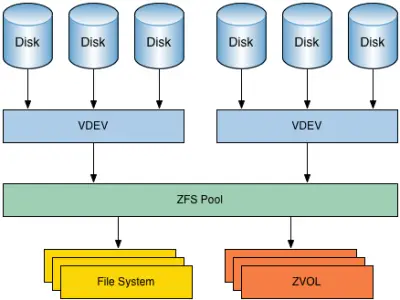
The ZFS format detects bad data blocks using checksums, and it is structured to instantly repair logical errors to maintain the integrity of data stored on the arrays.
Typically, enterprises use ZFS for their big storage servers due to its higher security features.
ZFS is different from other filesystems; it acts as a dual platform; a filesystem and logical volume manager; thus, with ZFS, it is possible to combine different storage devices into a single storage with several redundancy levels.
Furthermore, ZFS is a copy-on-write file system, so modifications to a file create new metadata records instead of modifying the existing one. Notwithstanding, the file system is structured to duplicate metadata records and store user data according to redundancy levels.
Note: Although ZFS is more secure than other file systems, it is possible to lose your files due to different actions such as user negligence, software malfunctions, and other mistakes.
Zettabyte File System, simply ZFS, is a file system format with built-in volume management features. The file system was introduced in 2001 as part of the Sun Microsystems Solaris operating system, and ever since then, it has remained as the best recommendable file system for enterprise environments.
The reason is ZFS remains relevant in enterprise spaces is because it is a highly advanced file system with native support for Unix-like OSes like Linux, FreeBSD, and Solaris.
Pros
- Combines volume management features while acting natively as a file system.
- Stabilized hard drives to minimize possible of data loses due to misprocessing of the OS, physical errors on the disk, or bit rot events.
- Integrates tools for checksums, dataset and pool-level snapshots and replication.
- Built-in RAID Z with features of RAID 5 and high data integrity support. The RAID-Z feature also allows the same data to be stored in different locations as a fault tolerance technique.
Cons
- Not accessible on Windows OS system by default
- You can only ZFS on a single server
- The multiple advanced features makes it quite complicated to run and manage this file system
Exploring ZFS Pools
The Zettabyte File System, ZFS, also serves as a volume manager that combines various storage devices in a ZFS pool. A ZFS pool is used to create one or more file systems (datasets) or data blocks. There are many types of ZFS pools and they differ in redundancy level.
Types of ZFS Pools
- Single Disk
This type has no redundancy and metadata records are duplicated in different disk sectors.
- Stripe Pool
This pool is similar to RAID0 where data blocks are distributed in member disks, and metadata records are distributed over the pool member disks.
- Mirror Pool
In this pool, metadata records and user data are stored differently - in two copies.
- RAIDZ1 Pool
Similar to RAID5, this pool calculates parity functions over the data blocks. The block size can vary on the same pool.
- RAIDZ2 Pool
This pool can withstand two drive failures and still rebuild; this implies to say that one of your drives fails, the pool can still withstand another drive failure before or while you're rebuilding, without losing your pool.
- RAIDZ3 Pool
RAIDZ3 is a redundant RAID-Z configuration that can withstand up to three device failures without any data loss.
Note: All of these ZFS pool types are fully supported by DiskInternals RAID Recovery.
Why Choose DiskInternals RAID Recovery
DiskInternals RAID repair software is a professional software tool that provides you with the right set of tools for RAID and ZFS data recovery. It is designed to recover both software and hardware RAIDs; hence, it features manual and automated recovery (via a Recovery Wizard) options.
Using DiskInternals RAID Recovery, you’d get back all your lost ZFS files and export them to local or remote locations. This RAID recovery software supports Unicode filenames and multi-level folders. More so, it allows you to create disk images, which act as a clone/backup copy of your drive - this is a way of protecting your files against possible data loss scenarios.
DiskInternals RAID Recovery bypasses Windows restrictions to make ZFS data recovery simpler and faster.
Note: RAID Recovery is a feature-rich, comprehensive ZFS recovery program. It fully supports RADZ, RAIDZ2, MegaRAID, and DDF-compatible devices. It is also very fast and easy to use - if you’re conversant with RAID data recovery, there’s a Recovery Wizard to automate the process for you in clear step-by-step procedures.
Identifying Possible ZFS Issues
ZFS is a unified file system and volume manager; thus, it is liable to encounter different failure modes. There are three main categories of problems you may face with the Zettabyte File System (ZFC).
Note: A single pool is liable to experience all these three errors. So, it is advisable to run a complete repair procedure - fixing the errors one after another.
Possible ZFS Issues
1. Missing devices in a ZFS Pool
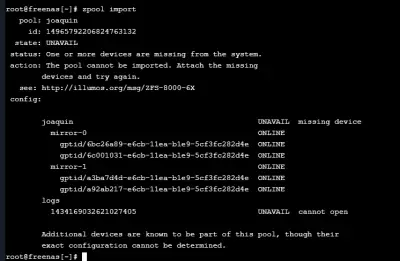
When you remove a device from a ZFS pool, ZFS places the device in a "FAULTED" state so you can't open it. In some cases, this can cause the entire pool to become unavailable until the device is reattached.
Tip: Reconnecting the removed device can fix this error immediately; yes, it is that simple.
2. Damaged devices in a ZFS Pool
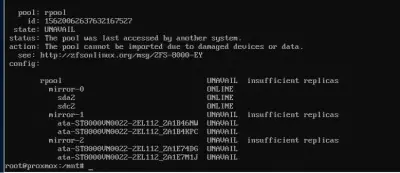
"Damaged" can mean different failure scenarios. Listed below are the commonest damages to face in a ZFS Pool.
The Most Common Causes
- Transient I/O errors due to a bad disk or controller
- Corrupted on-disk data as a result of cosmic rays
- Driver bugs causing data to be moved to a wrong location
- Another user overwrote portions of the physical device
3. Corrupted ZFS data
You'd be faced with corrupted ZFS data when many errors affect a top-level virtual device.
Tip: Regardless of how impossible the situation seems, DiskInternals RAID Recovery can help out.
Recovery Process with DiskInternals RAID Recovery
How to Recover ZFS Data Using RAID Recovery
Need to recover data from RAID drive? DiskInternals RAID Recovery software is a comprehensive solution for recovering files from various advanced file systems, which includes ZFS. This software can recover data from badly damaged, unmountable pools and automatically detects the parameters and disk order.
RAID Recovery would still work to get back your files even if a new blank pool has overwritten the original one. Simply, this software solution recovers deleted ZSF files - including their previous versions - and verifies checksums to verify the file data details.
Steps to Use DiskInternals RAID Recovery
Recovering files with DiskInternals RAID Recovery is a straightforward process that can be done manually or following the on-screen instruction of the Recovery Wizard.
First Step:
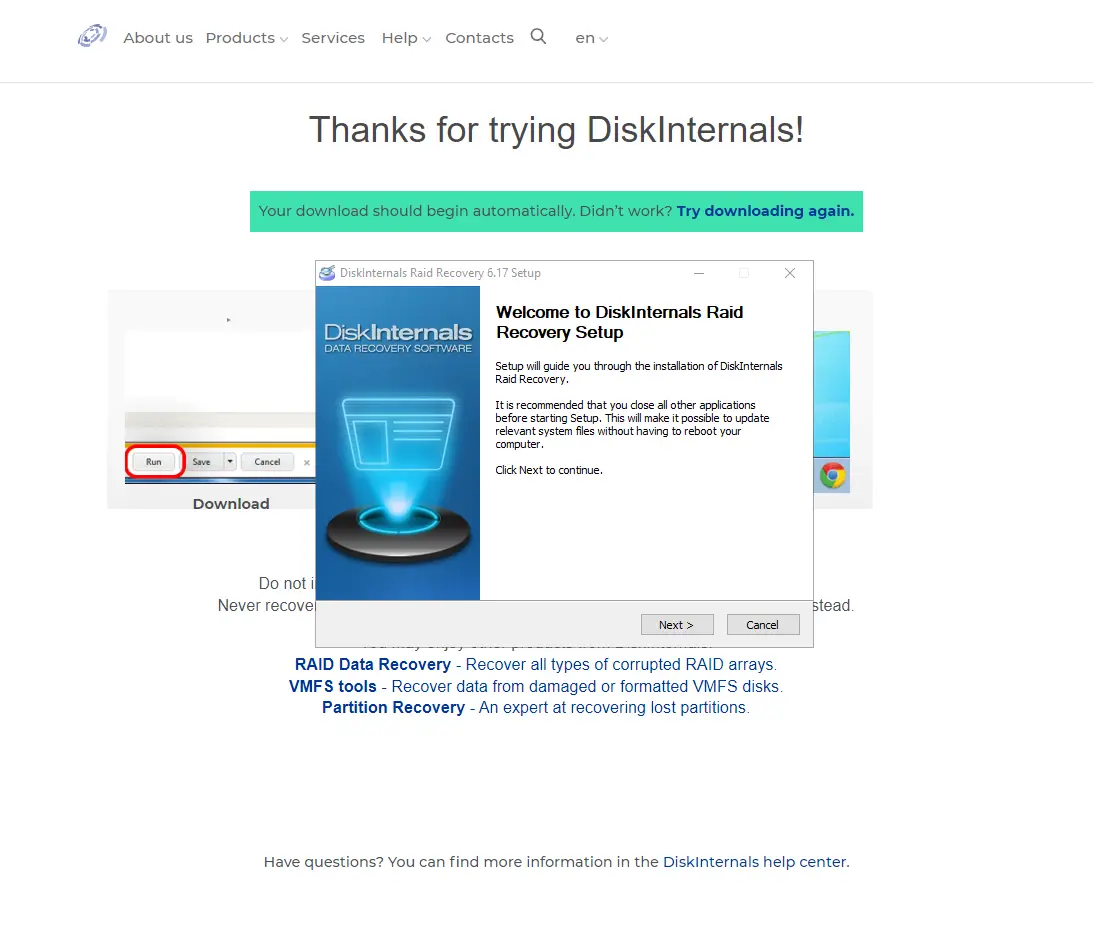
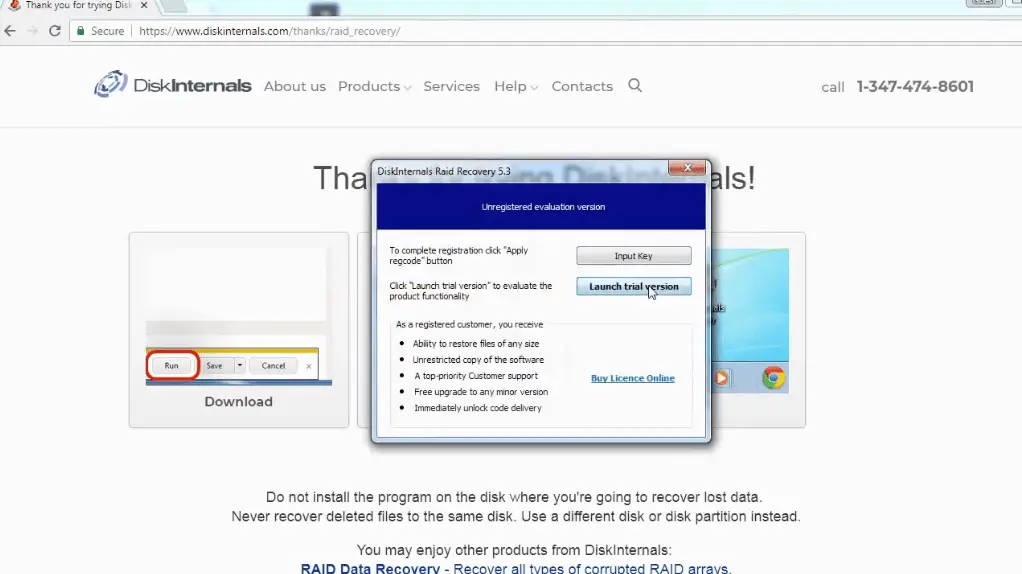
Download and install RAID Recovery on the Windows OS system. This software is compatible with Windows 7/8/8.0/10/-11 and Windows Server 2003-2019.
Second Step:
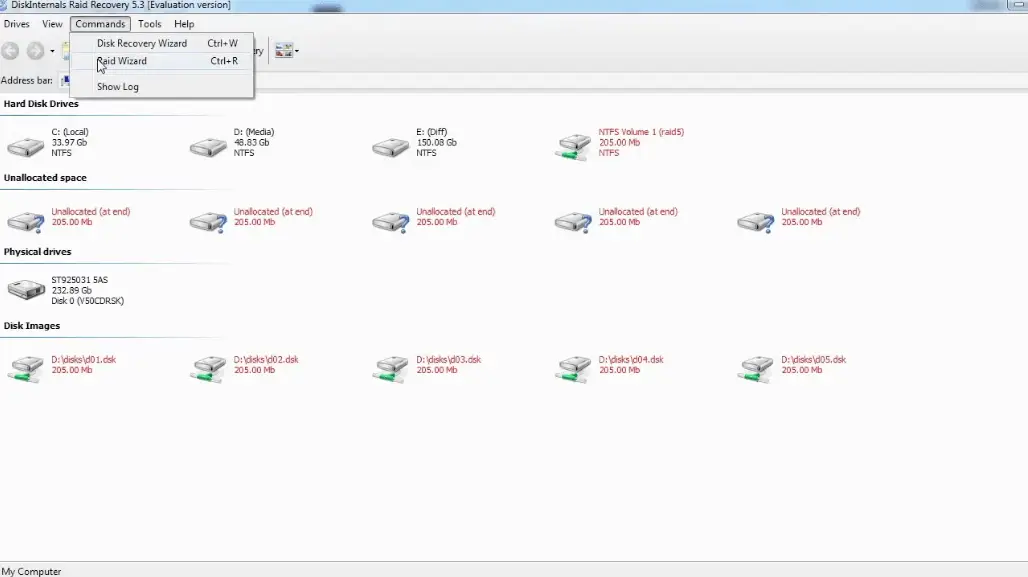
Launch the app after installation and select the affected target array. Next, choose a recovery mode:
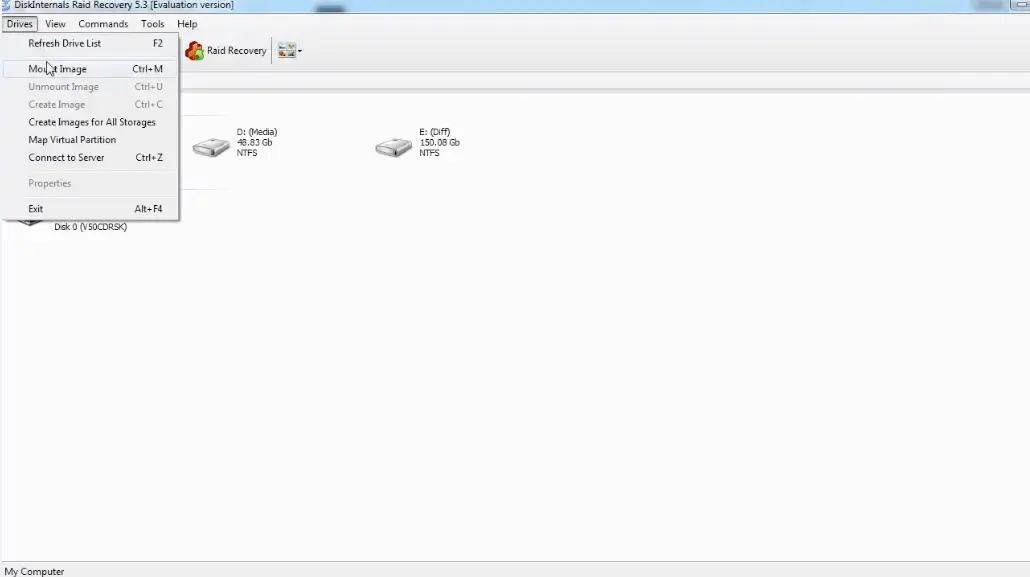
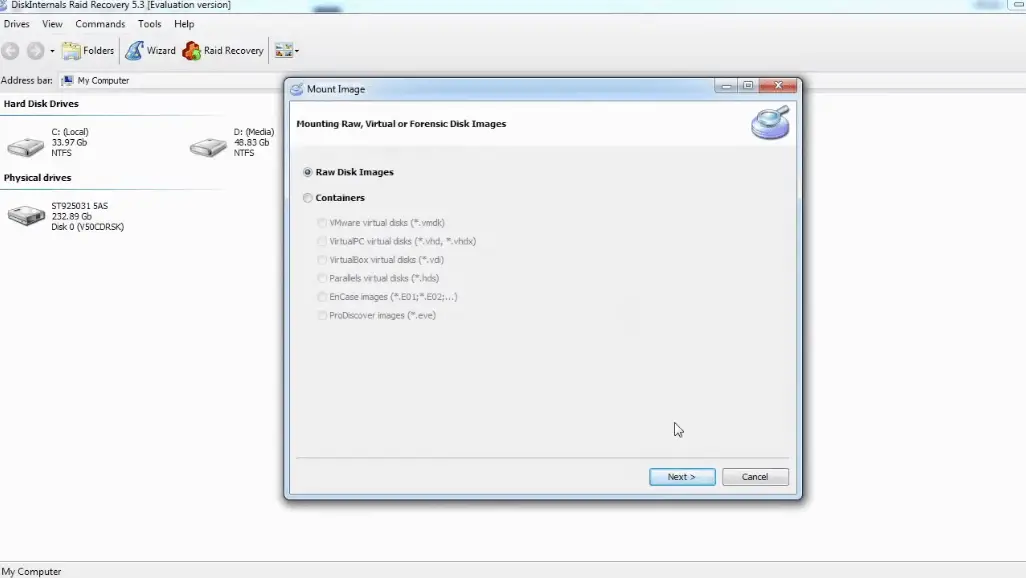
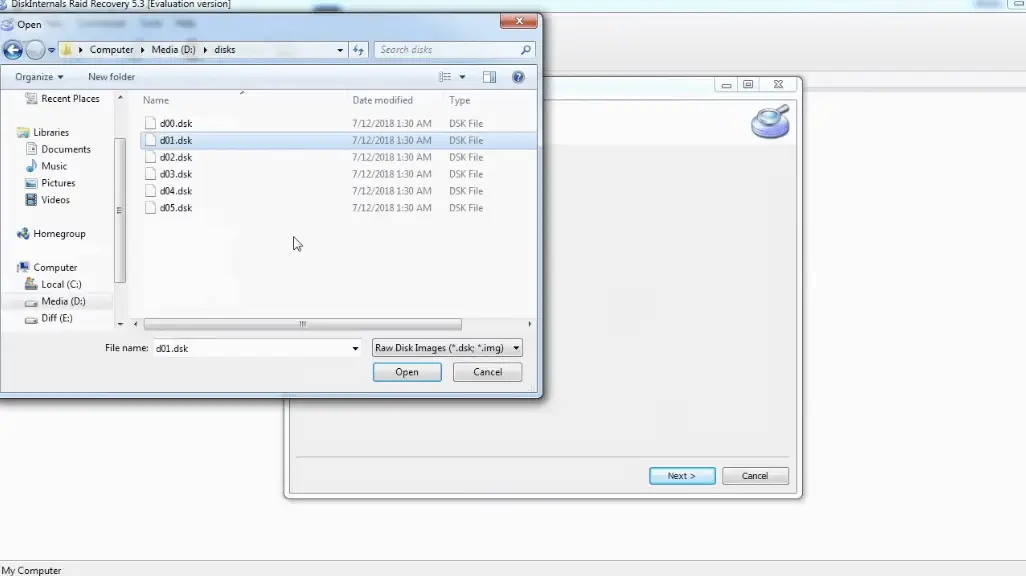
- Fast recovery mode
- Full recovery mode
The Fast Recovery Mode scans very fast and saves time, but it doesn’t get deeper to discover all the lost files. Full Recovery Mode takes time and retrieves all lost files.
Third Step:
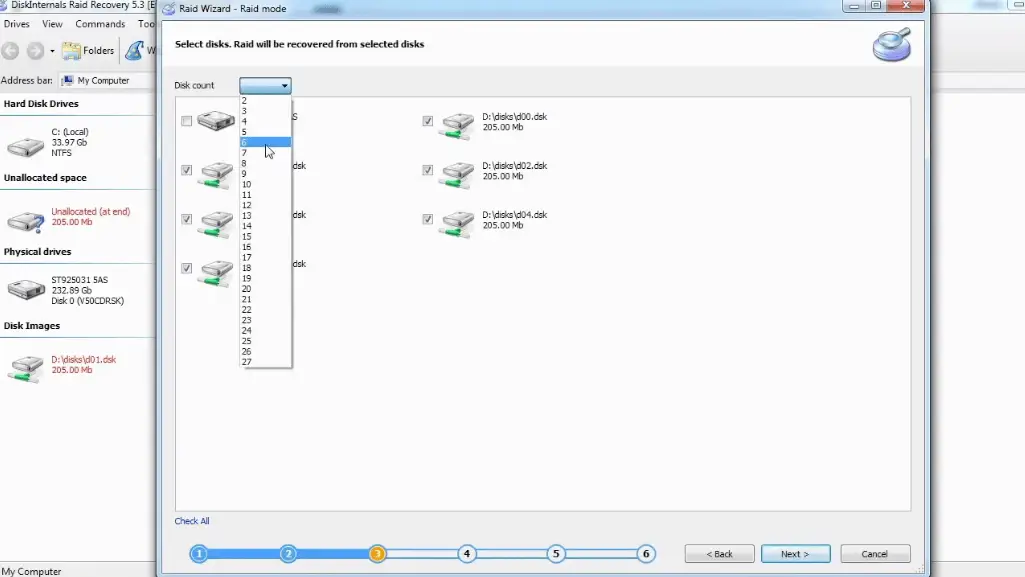
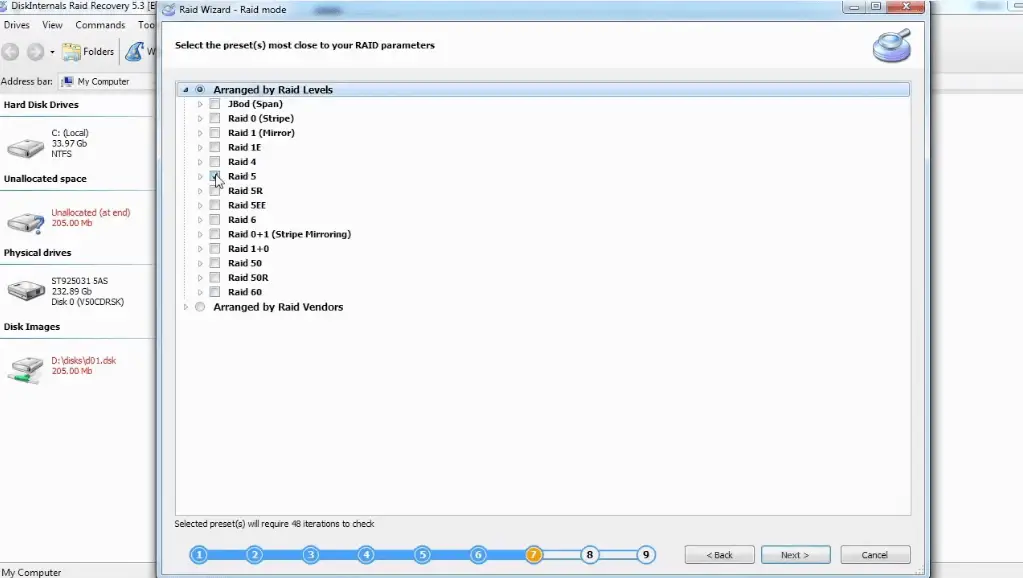
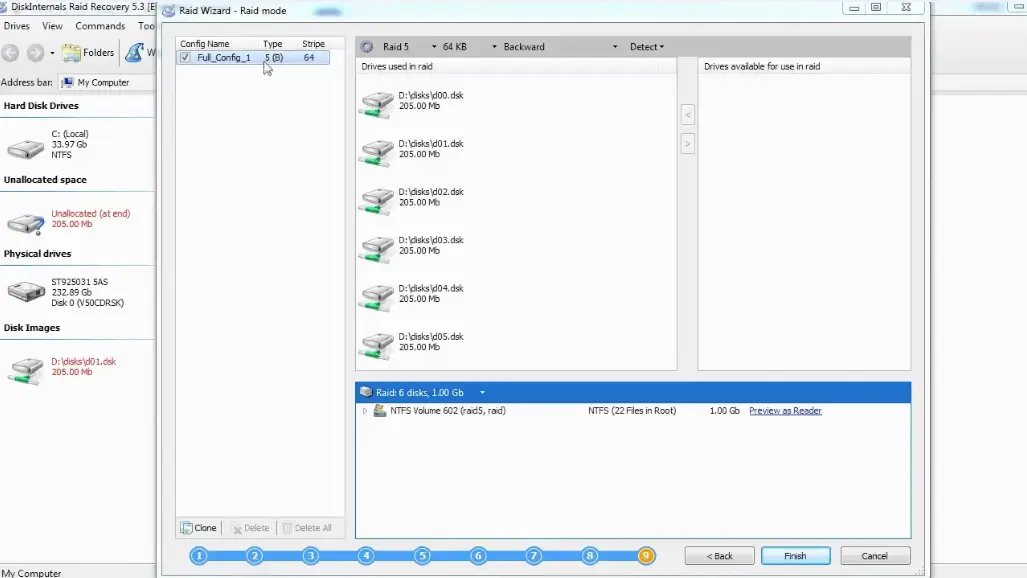
DiskInternals RAID Recovery would automatically check the status of the selected RAID array, controller, file system, or disk to recover lost files. You can preview the recovered files before proceeding to save them back to your local storage. To save the recovered files, you need to purchase a license.
Is the damage too deep/severe for you to restore? You can request guided assistance from RAID Recovery experts.
Recovery Tips
- Follow the recovery steps diligently to recover RAID data - wait until each step executes successfully before proceeding to the next; don’t hurry!
- Make sure you select the right drive for the scan; else, the program won't find the file(s) you want to recover.
- Preview the files before attempting final recovery.
- Don't re-save the recovered data on the same drive where it was deleted/lost.
Video Guide On ZFS Recovery Process
Here’s a video guide to clarify the entire steps explained above; watch to understand better:
System Requirements and Compatibility
Requirements
- Windows OS 7, 8, 10, or 11
- Windows 2003-2019 Server
- At least 100 MB disk space
- Minimum 2 GB Memory
Compatibility
- Hardware RAID, Hybrid RAID, Software RAID
- ZFS RAIDZ
- ZFS RAIDZ2
- RAID 0/1/0+1/1E, RAID 5/50/5EE/5R, RAID 4, RAID 6/60
- JBOD
- Microsoft RAID, MS Storage Spaces
- Apple RAID
- Linux RAID
How Do I Restore Files From ZFS Snapshot?
Note: Before proceeding, it is important to note that ZFS snapshot files are read-only, you can’t edit anything in them.
Restore a File From a ZFS Snapshot
To restore a file from a ZFS snapshot, follow the guide below:
- Firstly, if the original file still exists, and you would rather not overwrite it, then rename the file and save it to a new directory.
Now, navigate to the ZFS snapshot directory (zfs/snapshot), find the snapshot file with the data you want to restore, copy the (snapshot) file from the directory to the directory where the file originally existed. (Note: if you didn’t rename and move the original file, it will be overwritten by this process)
Conclusions
This article explains the Zettabyte File System (ZFS), the problems associated with this file system, and how you can recover files from ZFS drives. Also, this article explains how to use an advanced software tool - DiskInternals RAID Recovery - for ZFS data recovery. It is a comprehensive article about ZFS and RAID Recovery.
DiskInternals RAID Recovery can recover ZFS files efficiently; it also allows you to backup your important files by creating disk images of your drives. RAID Recovery is easy to use, thanks to the built-in Recovery Wizard.
Note:ZFS RAIDZ vs mirror
FAQ
-
ZFS (Zettabyte File System) is a sophisticated file system employed in Unix-like operating systems, including Solaris, FreeBSD, and Linux. Pros of ZFS include high data integrity: ZFS utilizes checksums and data replication to prevent data corruption and loss.
-
The recovery software for ZFS pools is DiskInternals RAID Recovery. It offers robust ZFS recovery capabilities, enabling users to recover lost or corrupted data from ZFS pools efficiently and reliably.
-
There are several robust ZFS recovery tools available, but one of the most notable is DiskInternals RAID Recovery. This tool is designed to handle data recovery from ZFS file systems effectively, providing comprehensive scanning options to recover lost data. It's known for its intuitive user interface that guides users through the recovery process without requiring advanced technical skills. DiskInternals RAID Recovery supports a variety of RAID configurations and can retrieve data even if the ZFS system has been corrupted. Additionally, it offers a preview feature, allowing users to verify the integrity of files before completing the recovery process.
-
ZFS recovery software works by scanning the file system to identify and reconstruct lost or corrupted data. It utilizes algorithms to locate file fragments and metadata across the ZFS structures, rebuilding lost data even if it's been deleted or formatted. The software can recover data from different storage configurations, including various RAID setups, by piecing together information from the underlying storage pool. It often provides a preview functionality, allowing users to verify files before restoring them to ensure accuracy and completeness. Overall, ZFS recovery tools simplify complex data retrieval processes, making them accessible to users with varying levels of technical expertise.
-
Yes, ZFS data recovery can often be done without compromising pool integrity. ZFS is designed with robust data integrity features, such as checksums for error detection and self-healing capabilities, which help maintain the integrity of the pool even during recovery processes. Recovery tools typically work in a read-only mode to prevent any modifications that could affect the pool's structure. By carefully reconstructing data using metadata and file fragments, these tools preserve the original pool configuration. However, it's always a good practice to back up the pool if possible, to ensure data safety during recovery operations.
-
Restoring deleted files from a ZFS RAID array is indeed possible, though it can be complex. ZFS employs a copy-on-write mechanism, which means that older data may remain on the disk until it's overwritten, providing a chance for recovery. Specialized ZFS recovery tools can scan the storage pool to locate and reconstruct these deleted files by leveraging metadata and file fragmentation details. The success of recovery often depends on the extent of data overwriting and how soon recovery efforts are initiated after deletion. It's important to act quickly and avoid further writes to the array to increase the likelihood of a successful recovery.
-
Recovering data from a failed ZFS RAID, such as RAIDZ, RAIDZ2, or RAIDZ3, can be effectively managed with tools like DiskInternals RAID Recovery. This software begins by scanning the RAID array to identify and reconstruct the structure and missing data using sophisticated algorithms. It supports various RAID configurations, enabling it to simulate the array and access the stored information. DiskInternals RAID Recovery provides a step-by-step recovery process, ensuring ease of use even for those with limited technical skills. To maximize the chances of a successful recovery, it's crucial to stop all write operations to the affected RAID and initiate recovery efforts promptly.
-
Recovering ZFS data after an accidental zpool destroy or format is challenging but not impossible. When a zpool is destroyed, metadata and pointers to data are removed, making recovery complex. However, specialized recovery tools can scan the raw disk sectors to identify and piece together remaining data fragments. Successful recovery often depends on how much new data has been written since the destroy operation, as overwriting can diminish recovery prospects. It's crucial to halt all write operations immediately after the accidental destruction to increase the likelihood of recovering the underlying data.
-
Professionals recovering data from corrupted ZFS drives typically begin by creating a sector-by-sector clone of the affected drive to prevent further data loss. They use advanced tools capable of interpreting ZFS metadata and recovering file structures and data blocks. Specialized software scans for residual data fragments and pieces together files and directories, often by leveraging ZFS's checksumming features to verify data integrity. Experts may also manually reconstruct key components of the ZFS file system, such as the zpool and dataset structures. Throughout the process, the emphasis is on minimizing further disk operations to preserve the existing data for successful recovery.
-
Preventing ZFS pool corruption and future data loss begins with regular backups to ensure that data is safe even if the pool becomes compromised. Utilizing ZFS's built-in snapshot functionality can help capture consistent states of your file system over time, providing a quick way to revert in case of issues. It's also crucial to maintain a robust disk monitoring and replacement strategy, promptly replacing any failing drives to preserve the pool's integrity. Running periodic checks with ZFS's scrub feature helps detect and repair data corruption proactively. Additionally, using Uninterruptible Power Supplies (UPS) and ensuring proper system shutdown procedures can prevent sudden power losses that might lead to corruption.
Related articles
- Features
- DiskInternals RAID Recovery vs ReclaiMe: Comprehensive RAID Recovery Solutions Compared
- Best FREE RAID Data Recovery Software (2026)
- SSD benefits for RAID array
- Mdadm RAID 1 not activating a spare disk Linux⠀
- Minimum disks for RAID 10⠀
- How to check RAID status? 4 different methods!
- Can RAID array have snapshots?
- RAID Array Metadata: What Is Inside?
- How Does RAID 5 on Windows 10 Work?
- What is FakeRAID?
- Hyper-V: Generation 1 vs Generation 2
- Bootable RAID Recovery Software: Complete Guide for RAID 0, 1, 5, 10 Recovery
- How to Rebuild RAID array
- What is Synology Hybrid RAID? What is the difference between SHR and RAID Drives?
- Btrfs vs. EXT4: A Comprehensive Comparison of File Systems in Linux (2025)
- RAID vs JBOD: performance and cost comparison⠀
- Complete Guide to RAID Controller Failure and Recovery: Expert Tips
- Comprehensive Guide to RAID in Cyber Security: Levels, Recovery, and Best Practices
- Raid Recovery Qnap⠀
- Best RAID for MySQL: RAID Configuration & RAID Setup for MySQL Databases
- Understanding Hardware RAID: Comprehensive Guide to RAID Levels and Benefits
- What Is a RAID Controller and What Are the Benefits of It?
- RAID Foreign Disk: Causes, Solutions, and Best Practices
- RAID 3 Explained: Benefits, Limitations, and Data Recovery Guide
- How to Resize RAID Partitions: Step-by-Step Guide for RAID 1, 5, 6 & 10
- Windows 7 RAID Recovery: How to Recover Data from RAID 1, RAID 5, and RAID 10 Arrays
- RAID Array Rebuild: How to Rebuild a RAID Array Safely and Recover Lost Data
- How to Check Which RAID Is Configured: A Complete Guide for Windows and Linux
- RAID 10 vs RAID 6: Which Better?
- What is software RAID? - Comprehensive Guide
- What is a RAID? RAID Systems Explained & How to Recover RAID Arrays with Professional Tools
- Best PCIe RAID Controller: Top Hardware PCI Express RAID Cards Compared
- Adaptec RAID Recovery: Restore Data from Failed Arrays with DiskInternals RAID Recovery™
- How to Rebuild RAID 0 Without Losing Data
- How to rebuild RAID 1 without losing data
- Raid Drive Array Recovery
- Best RAID Data Recovery Software for Linux
- How to Rebuild RAID Without Losing Data
- Forensic RAID Recovery
- AHCI vs. RAID: Pros, Cons & Differences
- Recovering RAID 5 After Controller Failure
- Best NAS hard drive recovery in 2026 | Top RAID network-attached storage Hard Drives
- RAID 50 vs RAID 10 - What is the difference
- What Is RAID Redundancy? | RAID Redundancy Explained for Data Protection
- Difference & Comparison: RAID vs. non-RAID System
- RAID Drives Explained: Learn How RAID Storage Enhances Performance
- Optimize RAID for Redundancy and Performance - Expert Guide
- RAID Level 4: What Is RAID 4, How It Works
- RAID 0 vs RAID 5: Speed, Performance & Key Differences (2026)
- How to Set Up and Configure RAID 10: Step-by-Step Guide
- SATA RAID Controller for ESXi: VMware ESXi Compatible SATA RAID Options
- RAID 10: How Many Disks Are Needed and How to Set It Up
- RAID 5 Rebuild Failure Probability: Risks, Factors, and Solutions in 2025
- SAN RAID Data Recovery: Recover RAID Arrays with Professional SAN Recovery Solutions
- RAID 6 with 6 Drives: Performance, Redundancy, and Best Use Cases
- RAID 5 Two-Disk Failure Recovery: Parity Recovery Beyond Tolerance
- How Many Drives for RAID 6?
- RAID 1 Speeds: Read, Write & Disk Performance | Speed Up RAID 1 Guide
- RAID 0 Data Recovery
- RAID Disaster Data Recovery: Techniques and Strategies for Handling Catastrophic Events
- RAID-1 vs RAID-5: Performance, Cost, and Data Protection Compared
- RAID Data Recovery evaluation. What is RAID data recovery?
- RAID 50 vs. RAID 6 – Key Differences
- Back up Active Directory Guide - Step-by-step Instructions⠀
- RAID Hard Drives Explained: What Is RAID for HDDs and External Drives
- Synology RAID 5 Recovery: Recover Your RAID Array with Expert Tools and Tips
- Windows Storage Spaces vs RAID: Performance, Speed, and Data Protection Comparison
- RAID Recovery Services
- RAID 50 vs. RAID 60 – Key Differences
- RAID 0 vs Single Drive Reliability — Failure Risk, SSD Comparison & Recovery
- Using SSD in RAID Array
- RAID 1 with 3 Drives: Everything You Need to Know
- How to Read RAID Drives & Recover RAID Arrays on Windows: A Guide
- Difference and Comparison - RAID 1 and RAID 2
- What is RAID in Linux? Learn About Software RAID & Recover RAID Arrays Easily
- Configuring RAID 5: Step-by-Step Guide on How to Configure RAID 5 for Performance
- ZFS Minimum Drives — How Many Disks You Need for RAIDZ1, RAIDZ2, RAIDZ3
- Differences Between Software RAID and Hardware RAID
- Recover Data from RAID 5 on mdadm (Linux)
- RAID 2 Array Explained: What Is RAID Level 2, Setup, and Performance Comparison
- RAID 5 VS RAID 6 - advantages and disadvantages
- How to Clone RAID 0, 1, 5 Disk
- RAID vs. backup - differences and benefits (RAID is not a Backup)
- Top 10 RAID Recovery Services: Best Solutions for Data Recovery
- RAID 0 vs RAID 1: Performance, Redundancy & Use Cases
- Recover Data from RAID on Linux
- How to recover data from a corrupted RAID?
- How Many Drives Are Needed for RAID 5? Minimum & Maximum Explained
- RAID 5 vs RAID 0+1: Key Differences Explained
- How to Set Up RAID in Windows 11: A Step-by-Step Guide
- Best RAID for 6 Disks: Compare RAID 0, 5, 6, 10, 50 & 60 for Performance & Redundancy
- Recover Data from Broken/Failed RAID Set
- What Is RAID 6? Definition, function
- ZFS vs Btrfs vs RAID: Comprehensive Storage Comparison for Performance, Reliability, and Scalability
- How to Recover RAID Array Configuration
- RAID Rebuild Time: What is and How to Optimize It?
- Understanding RAID 0: Benefits, Risks, and Applications
- QNAP RAID 5 Recovery Failed? Safe Data Recovery Steps for NAS Users
- SQL Server Database in Recovery Pending - How to fix it (2025)
- What is RAID 5? Overview and Key Functions
- Raid Rebuild Vs. Raid Recovery
- Guide to Recovering a Failed RAID Array | Step-by-Step Recovery Process
- RAID 50 vs. RAID 5 – Performance, Speed, and Data Protection Comparison
- RAID 0 vs. JBOD – Key Differences, Performance, and Speed Comparison
- RAID 1 Recovery: all you can do yourself
- How to Setup Raid 0 Windows 10 (11)?
- Ultimate Guide to RAID Data Recovery: Tips & Techniques
- RAID 1: How Many Drives Are Needed for Data Redundancy?
- ZFS Mirror vs RAIDZ — Performance, Capacity & Recovery Guide
- RAID Calculator Online – Usable Space & Disk Size Calculator for RAID
- The Truth about Recovering RAID 5 with 2 Failed Disks
- RAID Configuration Explained: Types, Setup, and Best Practices
- How to set up RAID 1 on Windows 10 and Linux
- How Many Disks Can Fail in RAID 5?
- Is RAID 0 Worth It in 2026? Risk, Performance, SSD & NVMe Guidance
- Recover Data from RAID 1 on mdadm (Linux)
- DiskInternals RAID Recovery vs EaseUS Data Recovery Wizard | Comprehensive Comparison
- RAID 0 failure - How to Fix Failed Raid 0 Array
- RAID Server Data Recovery
- RAID 0 vs RAID 10 and RAID 10 vs RAID 0 Performance Comparison
- BTRFS Restore File: How to Undelete Files and Restore Deleted Data Easily
- Recover Data from a RAID Array: Effective Solutions for Fast and Secure Data Retrieval
- RAID 7 — What It Is? Origins, Risks & Recovery Options
- What is RAID 1? RAID Mirroring
- SAS RAID Controller for VMware ESXi: Best Hardware RAID Options
- RAID 10: How Many Drives Can Fail? | Comprehensive Guide to Failure Tolerance
- Recover Striped RAID: Professional RAID 0 Data Recovery with DiskInternals RAID Recovery™
- How to Add a Disk to mdadm RAID 5: Step-by-Step Guide
- Configure RAID on Ubuntu – Step-by-Step Guide for RAID 0, 1, 5, and 10
- ZFS Recovery Tools — Data Recovery ZFS Guide & Best Software
- RAID 0 for Gaming — Is RAID 0 Good for Gaming? Performance & Risk Guide
- How to Remove software RAID device using mdadm
- NAS vs SAN storage - Detailed Comparison⠀
- Effective Btrfs File Recovery: Complete Guide to Btrfs Data Recovery
- RAID Hard Disk Data Recovery Software (2025)
- Rapid RAID Recovery Software
- What is Synology Hybrid RAID (SHR). How to Recover Data from Synology Hybrid RAID
- How to Recover RAID Crash Data
- RAID 0, 1, 3, 5, 10 data recovery software for Windows 10
- Hyper-V Server Core installation vs GUI - let's compare⠀
- RAID 6 Data Recovery
- What to do if RAID array doesn't reassemble after reboot
- How to Rebuild RAID 5 Without Losing Your Data
- The best NAS RAID: how to choose⠀
- What are RAID 01, RAID 1+0 and RAID 0+1⠀
- What is Microsoft SQL Server and How Can You Use it Safely?
- Make Sure Your Data is Safe While Using Microsoft Storage
- What is nutanix ahv?⠀
- RAID 10 Recovery
- RAID levels 0, 1, 5, 6, and 10
- RAID 0: How Many Drives Are Needed?
- RAID Server Data Recovery: Recover and Restore RAID Arrays Fast with Professional Tools
- RAID Data Recovery for Deleted Arrays: Recover RAID Array Safely & Effectively
- RAID 0, 1, 5, 10 Explained: Performance, Redundancy & Best RAID Configurations
- How to Recover Data from a Broken RAID 1 Set – Step-by-Step Guide
- RAID 6 Drive Failure Tolerance: How Many Drives Can Fail?
- RAID 50: Drive Failure Tolerance and Data Recovery Solutions
- 15 Best External Hard Drives for RAID in 2026
- RAID 0 vs RAID 1 vs RAID 5 vs RAID 10 — Performance, Capacity & Recovery
- Best RAID for OLTP: RAID Configuration for OLTP Workloads & Transactional Databases
- Best RAID for NVMeoF: NVMe RAID Configuration & NVMe over Fabrics RAID Setup
- RAID 0 Backed by Versioned Backup: Is RAID 0 Safe with Versioned Backups?
- How to set up RAID in Windows 10 in 2025
- How About RAID 1 Reliability?
- RAID 5: How Big Should an Array Be?
- What Are Some Common Symptoms of RAID Array Failures?⠀
- Hyper-V Virtual Machine Replication⠀
- Difference Between Type 1 and Type 2 Hypervisor?⠀
- RAID 4 Data Recovery: How to Perform It⠀
- How to Recover RAID partition - step by step guide⠀
- Hyper-V Manager - what is it?⠀
- How to Run Linux on a Hyper-V VM in 2025
- What to do if you get Microsoft SQL Server error 18456?
- What Is a Hot Spare? Peculiarities of Usage
- What is JBOD?
- RAID Recovery Software
- RAID 3 vs RAID 5: which one would you prefer?
- Basic Disks vs Dynamic: What is the Difference
- Global Hot Spare vs Dedicated Hot Spare: Find the Difference
- How to downsize hardware RAID partition and protect data
- RAID 6: Replace Two Dead Drives
- Perform Hyper-V Data Recovery Today
- How to Install Hyper-V in Your Environment in 2025
- Hyper-V Live Migration - what is it?⠀
- Hyper-V Snapshot Merge
- What is System Center Virtual Machine Manager⠀
- Guide: Linux Raid and Disk Data Safety
- Is it worth using RAID 5E/5EE?
- Let's compare: Synology vs QNAP
- What is RAID Connectivity? Essential Guide to RAID Array Setup
- RAID recovery software for Mac⠀
- Understanding RAID 6 Performance: A Comprehensive Guide
- What is a RAID Volume? Understanding RAID Volumes and Recovery Solutions
- Recover Data from Old RAID Drives | Best Methods & Software for RAID Recovery
- Encrypting RAID Arrays — RAID with Full Disk Encryption & Secure Setup
- RAID 10 with 8 Disks — Configuration, Performance, Rebuilds & Best Practices
- RAID 6 Double Parity Calculation Explained – Data Protection Insights
- A Comprehensive Review of RAID Recovery Software: Choosing the Right Tool
- What is RAID Data Recovery? | Recover RAID Arrays with RAID Recovery Software
- ZFS RAID Expansion: How to Expand RAIDZ and ZFS Pools Safely
- RAID 5 with 3 Disks: Configuration, Benefits, and Performance Insights
- How to Create RAID 5 with 6 Disks: Complete Setup Guide and Performance Tips
- How to Fix Degraded RAID 1: Step-by-Step Guide to Restore RAID 1 Degraded Arrays
- Why RAID 1 Is Not a Good Substitute for a Backup
- Cannot Format Old RAID Drive? Effective RAID Data Recovery Solutions
- Fault Tolerance in NVMe-oF RAID — Rebuild Time, Data Protection & Redundancy
- Best Practices for RAID over NVMe-oF — Tuning, Monitoring & DR
- RAID 0 vs Single Drive — SSD, NVMe & HDD Comparison (Performance vs Risk)
- RAID 0 for 4K Editing — Is RAID 0 Good for 4K Video Editing?
- RAID 0 for Large File Workloads: Scratch Disks, NVMe, When It Makes Sense
- RAID 0 vs. SSD Performance: PCIe 4.0, PCIe 5.0 Speed Compared
- RAID 0 Redundancy vs No Redundancy — Does RAID 0 Have Redundancy?
- Does RAID 0 Increase FPS? — RAID 0 vs Single Drive FPS Guide
- RAID 5 Interrupted Rebuild Recovery: Fix Stopped or Aborted Rebuilds
- RAID 0 Failure Probability with N Disks Explained
- RAID 1 Corrupted Mirror Recovery: How to Recover a Damaged RAID 1 Mirror
- When RAID 0 Is Acceptable: Use Cases, Risks, and When You Should Use RAID 0
- RAID Best Practices for VMware: Best RAID Configuration for VMware ESXi
- RAID 10 Best for VMware: Why RAID 10 Is the Recommended RAID for ESXi
- Best RAID Controller Guide: Hardware RAID Cards Compared for Servers and SSDs
- RAID Controller for ESXi: VMware ESXi RAID Controller Recommendations
- RAID Controller for Linux: Best Linux-Compatible Hardware RAID Controllers
- Dell RAID 1 Recovery: How to Recover Data from RAID 1 on Dell Servers Safely
- Dell RAID 5 Recovery - Safely and Fast
- RAID 5 vs RAID 10 comparison: Which one is better for you?⠀
- HDD Raid Vs SSD Raid Storage Systems - How to move⠀
- Benefits of RAID arrays - what are the advantages of RAID?⠀
- RAID 10 vs RAID 01: Is There Any Difference?
- Perform RAID 50 Data Recovery Today!
- RAID Consistency Check: Ensure Data Integrity & Recover Lost Data
- RAID status degraded - fix it⠀
- RAID Array Growing: How to Perform It
- How To Create RAID Arrays with mdadm on Ubuntu (22.04)
- What is RAID-Z? Its Difference Between RAID-Z2 vs RAID-Z3
- Do You Need to Defragment RAID?
- Does chunk size influence the speed of RAID?
- RAID 0, 5, 6, 10 Performance
- Which RAID is Better to Use for 4 Drives
- RAID Array for Video Editing: How to Choose
- About Hyper-V clusters
- Hyper-V network adapters⠀
- Set Up and Use Microsoft SQL Server Management Studio
- Microsoft SQL Server Express Guide
- Use Microsoft Windows Server Safely
- Microsoft Storage Spaces
- Xserve RAID data safety
- Apple RAID Card Data Recovery
- Here is Everything You Need to Know About RAID-Z Technology
- RAID Redundancy - best performance solutions⠀
- Here is How to Backup RAID in 2025
- No hard drive detected or disk controller not supported in RAID
- Issue with the RAID after the BIOS update
- Synology RAID Set That Is Broken or Crashed? RAID data recovery
- Here is How to add drive to RAID 5 in 2025
- Buffalo Data Recovery
- NAS as a File Server: NAS vs. File Server Comparison for Storage and Sharing
- RAIDZ1 vs RAID 5 — Performance, Integrity & Recovery Comparison
- Difference between RAID 2 and RAID 3
- Difference between RAID 4 and RAID 5
- Difference between RAID 3 and RAID 4
- RAID Data Recovery Cost: Affordable Solutions for RAID 0, RAID 1, RAID 5, and RAID 10 Failures
- ZFS vs mdadm RAID — Why choose ZFS instead of RAID
- X-RAID Recovery: Expert Guide to Netgear X-RAID and ReadyNAS Data Recovery
- XFS RAID Recovery Guide & Best XFS RAID Recovery Software
- What Is RAID 1E? Performance RAID 10 1E vs RAID-1E Guide for Power Users
- SCSI RAID Recovery Software: Effective Solutions for SCSI RAID Data Recovery
- ReiserFS RAID Recovery: How to Restore Data from Failed RAID Arrays
- RAID in Cloud Storage Systems — SDS, Virtual RAID & Erasure Coding Guide
- RAID Degraded — What to Do | Warning Fixes & Rebuild Failed Steps
- RAID 5 RAID 6 RAID 10 - Key Differences and Performance Comparison
- RAID 1E vs RAID 5: Performance, Capacity and Failure Risk Compared
- RAID 1E vs RAID 10: Performance, Capacity, Cost & Failure Risk Guide
- RAID 1 vs RAID 5 vs RAID 10 Performance Management, Speed & Capacity Guide
- Open Source RAID Recovery Software Explained and Comparison
- MDADM RAID 0 Recovery: Expert Guide to Fix and Recover Your RAID Array
- Intel RAID 0 Recovery & RAID 1 Recovery: Solutions for Data Loss & Recovery Tools
- Is RAID 0 Obsolete? RAID 0 with SSD and NVMe — Still Worth It?
- Intel Matrix RAID Recovery: Restore RAID 0, 1, 5, 10 with Reliable Solutions
- Ext3 RAID Recovery Guide - Data Recovery RAID Ext3
- ASUS RAID Recovery Guide - Fix Failed ASUS RAID
- RAID 5 Data Recovery Step by Step
- NAS vs External Hard Drive: Comprehensive Guide to Choosing the Best Data Storage Solution
- NTFS RAID Recovery: Comprehensive Guide to Data Retrieval
- What is Xserve RAID? Comprehensive Guide and Overview
- Understanding RAID 60: Architecture, Advantages, and Data Recovery
- Understanding RAID Striping: A Comprehensive Guide to Disk Striping and Its Variants
- ZFS RAID Setup Guide: Configuration, Management & Expansion
- Comprehensive Guide to ZFS RAID Levels, Types, and Configurations
- ZFS vs RAID: Comprehensive Comparison of Performance, Reliability, and Features
- RAID 1 Minimum Drive Requirement: How Many Drives Do You Need?
- HP RAID Recovery Tool | How to Recover Data with DiskInternals RAID Recovery Software
- Best RAID Software for Mac | Top Free & Paid RAID Tools for macOS 2026
- RAID System Recovery: Essential Steps & Best Software for Safe Data and File Restoration
- RAID Recovery Volume: Effective RAID Array Recovery Solutions for Data Loss Prevention
- Synology RAID 1 Recovery: Recover RAID Array with Trusted Tools and Expert Solutions
- Interim Recovery RAID 5: Expert Guide to Data Recovery and RAID Array Repair
- Change log for RAID Recovery™
- RAID Restorer – Recover Data from Failed RAID Arrays with Reliable Software
- ZFS RAID with Different Size Drives – Setup, Limitations, and Best Practices
- RAID 6 with 5 Drives: Configuration, Performance, and Data Protection
- RAID 6 with 8 Drives: Configuration, Failures, and Performance Explained
- RAID 5 with 5 Drives: Configuration, Performance & Recovery | RAID 5 5 Drives Guide
- RAID Reconstructor on Broken RAID Arrays
- How to Repair a Failed RAID?
- HDD RAID vs SSD RAID and Combining Both: Everything You Need to Know
- Recovering Data from RAID Drives: Step-by-Step Guide to RAID Recovery
- NAS Data Recovery Software & Tools for RAID Recovery
- RAID Calculator For Geeks – Estimate Usable Space & Drive Size