
RAID 5 parity recovery after two failures: two-disk and dual-disk failure recovery
RAID 5 is built to survive one disk failure. Lose a single drive, and parity data lets you rebuild without losing files. But if two disks fail at the same time, the system is supposed to be done—data gone, no way back.
This article looks at what happens when RAID 5 goes beyond its limits. We’ll break down how parity works, why two‑disk failures are so dangerous, and what recovery methods can sometimes pull data back from the edge. It’s a straight look at the risks, the possibilities, and the tools that can help when RAID 5 fails harder than expected.
Short answer: is RAID 5 recoverable after two disk failures?
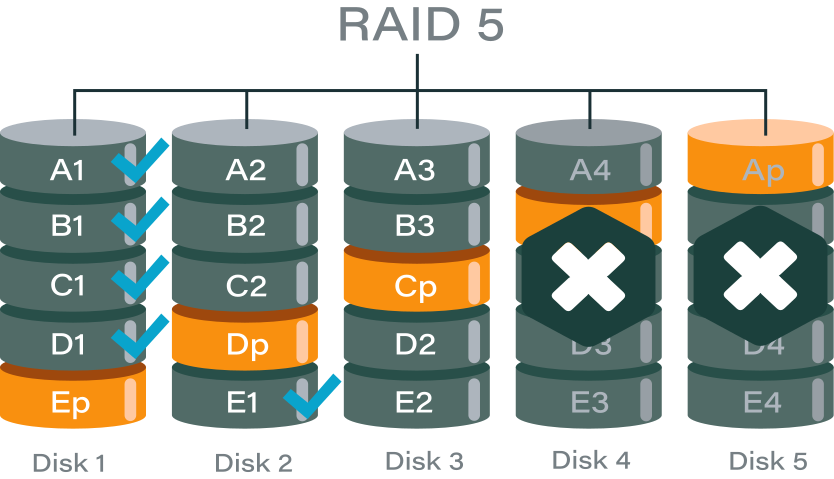
RAID 5 is designed to handle only one disk failure. Once a second drive goes down, the array moves beyond its built‑in fault tolerance. At that point, traditional parity rebuilds are no longer possible.
Recovery then shifts into advanced territory: instead of relying on standard parity, specialists use data reconstruction techniques, disk imaging, and forensic analysis to piece information back together. The chances of success depend heavily on the condition of the failed drives, the timing of the failures, and whether any rebuild attempts were made before the second disk dropped.
Why RAID 5 fails beyond tolerance
RAID 5 fault tolerance explained
RAID 5 works by splitting data into stripes across all disks and adding one parity block per stripe. That parity block is the mathematical checksum that allows the system to rebuild the contents of a missing drive.
Because there is only one parity block per stripe, RAID 5 can only calculate the data for one lost disk. If a single drive fails, the controller uses parity plus the remaining data blocks to rebuild the missing information. This is the built‑in safety net that makes RAID 5 attractive: performance, capacity, and protection against one failure.
But this design has a hard limit. RAID 5 was never engineered to handle more than one disk failure at a time. Once that threshold is crossed, the math no longer works.
What happens when more than one disk fails
When two drives fail, the array loses more data blocks than parity can cover. Imagine a stripe with four disks: three data blocks and one parity block. If one disk is gone, parity fills the gap. But if two disks are gone, parity can only rebuild one of them — the other remains missing.
This creates logical gaps across multiple stripes. Some files may be partially recoverable, but others will have missing segments that cannot be reconstructed. The RAID controller detects this inconsistency and marks the array as failed or unrecoverable.
In practice, this means:
- The operating system can no longer mount the array.
- Applications lose access to stored files.
- Any attempt at a standard rebuild will fail because parity math cannot solve for two unknowns.
At this stage, recovery moves beyond normal RAID tolerance. Specialized tools and techniques — such as disk imaging, parity analysis, and manual reconstruction — are required to even attempt data recovery.
RAID 5 more than one disk failed recovery scenarios
Two disks failed simultaneously
In some cases, two drives can fail at the same time due to external factors rather than gradual wear. Common triggers include:
- Power surge – sudden electrical spikes can damage multiple drives at once, leaving the array instantly broken.
- Controller failure – if the RAID controller itself malfunctions, it may report multiple disks as failed or corrupt their metadata.
- Backplane issues – faults in the backplane or cabling can cause multiple drives to drop offline together, mimicking simultaneous failure.
When this happens, recovery is extremely difficult because parity cannot rebuild two missing disks. Specialized recovery tools or forensic imaging may be the only option.
Second disk failed during the rebuild
Another common scenario is when one disk fails during the rebuild process after the first failure. This usually happens because:
- Bad sectors exposed under rebuild load – the rebuild process stresses every sector of the remaining drives. A disk with hidden defects may collapse under the load.
- Unstable drive not replaced in time – if a drive was already showing signs of instability and wasn’t swapped quickly, it may fail while the array is still vulnerable.
This type of failure is especially frustrating because the rebuild itself triggers the second collapse. Recovery requires careful cloning of the unstable drive before attempting reconstruction.
False dual‑disk failure
Not every “two‑disk failure” is real. Sometimes one of the drives is physically healthy but appears failed due to:
- Metadata or controller error – corrupted RAID metadata or a misbehaving controller can mark a good disk as offline.
- Logically dropped drive – the disk is fine at the hardware level but has been excluded from the array by software logic.
In these cases, recovery may be possible by re‑importing the healthy disk or correcting metadata errors. Identifying a false failure is critical, because it can turn an “unrecoverable” situation into a fixable one.
RAID 5 recovery beyond tolerance: what still works
Partial parity reconstruction
Even when two disks fail, not every stripe is completely broken. Some stripes may still have all their data blocks intact, while others lose only one block that parity can cover. In these cases, partial parity reconstruction can recover files stored in consistent areas of the array.
This doesn’t restore the entire RAID, but it can salvage usable portions of data. Large files may be fragmented, but smaller files or those located in intact stripes often remain accessible. Recovery tools focus on identifying these “safe zones” and extracting what can still be rebuilt.
Sector‑level disk imaging and analysis
Failed disks are not always completely unreadable. Many sectors may still be accessible even if the drive is degraded. By creating sector‑level images of each disk, recovery specialists can capture every readable block before the hardware deteriorates further.
These images are then analyzed to reconstruct missing data. In practice, failed disks are treated as partially readable sources rather than total losses. This approach allows recovery software to piece together files from whatever fragments remain, typically yielding significant portions of usable data.
Manual RAID parameter reconstruction
Occasionally the greatest obstacle isn’t the disks themselves but the RAID configuration. If metadata is corrupted or the controller misreports settings, recovery requires manual parameter reconstruction.
Key parameters include:
- Disk order – the correct sequence of drives in the array.
- Stripe size – the block size used to split data across disks.
- Parity rotation – the pattern in which parity blocks are distributed.
By manually identifying and re‑applying these parameters, recovery tools can rebuild the logical structure of the array. Once the correct layout is restored, partial parity and sector‑level analysis can be applied more effectively.
RAID 5 unrecoverable array recovery: when “unrecoverable” is not final
“Unrecoverable” is a controller status, not a data verdict
When a RAID controller marks an array as unrecoverable, it simply means the built‑in firmware logic cannot rebuild the disks with its standard parity rules. This is a status flag, not a final judgment on the data itself. The controller stops trying, but the raw blocks on the disks may still contain usable information.
Software‑level reconstruction bypasses controller logic
Specialized recovery software can ignore the controller’s verdict and work directly with the disk contents. By analyzing stripes, parity blocks, and disk order outside the RAID firmware, these tools can reconstruct data that the controller declared lost. This software‑level reconstruction bypasses hardware limitations and often succeeds where the controller fails.
Metadata loss does not equal data loss
RAID arrays rely on metadata to track disk order, stripe size, and parity rotation. If this metadata becomes corrupted, the controller may drop the array entirely. But metadata corruption doesn’t mean the actual file data is gone. With careful analysis, recovery specialists can rebuild the missing parameters manually and reassemble the array. Often, metadata loss is reversible, and the underlying data remains intact.
What not to do after a two-disk RAID 5 failure
Do not initialize or re‑create the array
When the controller marks the array as failed, it may prompt you to initialize or re‑create it. Doing so will overwrite existing metadata and parity information, making recovery far more difficult or even impossible. The original disk layout must be preserved for any chance of reconstruction.
Do not attempt another rebuild
A rebuild works only when one disk is missing. With two failed drives, parity math cannot solve the gaps. Attempting another rebuild risks writing corrupted data across the array, destroying what remains intact. At this stage, the focus should shift to imaging and analysis, not controller‑driven rebuilds.
Do not hot‑swap disks blindly
Swapping drives without a clear recovery plan can cause further damage. If the wrong disk is reinserted or replaced, the controller may treat it as a new member and overwrite critical data. Every disk must be carefully identified and imaged before any changes are made. Blind hot‑swapping often turns a recoverable situation into a permanent loss.
Comparison table: RAID 5 two-disk failure outcomes
| Scenario | Recovery probability | Risk level | Recommended action |
| One disk logical, one physical | Medium | High | Software recovery |
| Two physical disk failures | Low–Medium | Critical | Advanced tools |
| One disk failed during rebuild | Medium | High | Immediate recovery |
| Full parity overwrite | Low | Extreme | Professional-only |
Software‑based RAID 5 dual‑disk failure recovery
When software recovery is viable
Software recovery becomes an option when the failed disks are at least partially readable. Even if they cannot function in the array, as long as sectors can still be imaged, recovery tools can work with them.
It is important that the disks have not been subjected to a full zero‑fill or a forced rebuild attempt. These actions overwrite critical data structures and parity information, making software reconstruction impossible. As long as the raw data remains intact, specialized recovery software can analyze and rebuild the array logically.
Example: DiskInternals RAID Recovery
One widely used tool for this scenario is DiskInternals RAID Recovery. It offers:
- Manual RAID 5 reconstruction – users can define disk order, stripe size, and parity rotation to rebuild arrays even when metadata is lost.
- Support beyond nominal tolerance – the software can handle arrays with more than one failed disk, working with whatever readable data remains.
- Compatibility with hardware and software RAID – it can reconstruct arrays created by dedicated controllers or operating system‑level RAID.
- File preview before saving – recovered files can be previewed to confirm integrity before committing to full extraction.
This approach bypasses the limitations of the RAID controller and focuses directly on the disk contents, giving administrators a chance to recover data even when the array is marked “unrecoverable.”
Ready to get your data back?
To start recovering your data, documents, databases, images, videos, and other files from your RAID 0, RAID 1, 0+1, 1+0, 1E, RAID 4, RAID 5, 50, 5EE, 5R, RAID 6, RAID 60, RAIDZ, RAIDZ2, and JBOD, press the FREE DOWNLOAD button to get the latest version of DiskInternals RAID Recovery® and begin the step-by-step recovery process. You can preview all recovered files absolutely for free. To check the current prices, please press the Get Prices button. If you need any assistance, please feel free to contact Technical Support. The team is here to help you get your data back!
When lab‑level RAID recovery is required
Severe physical disk damage
If one or more drives suffer serious physical damage—such as head crashes, platter scratches, or motor failure—software recovery is no longer an option. These cases require cleanroom environments where specialists can repair or replace components to extract raw data. Attempting to power up or handle such disks outside a lab often worsens the damage and reduces recovery chances.
Multiple disks with unreadable service areas
Every hard drive has a service area that stores firmware and calibration data. If multiple disks in the array have unreadable or corrupted service areas, the drives cannot even initialize properly. Recovery then requires lab‑level tools to rebuild or emulate the missing firmware so the disks can be accessed again. Without this step, the array remains inaccessible regardless of parity or metadata.
Enterprise RAID with proprietary parity logic
Some enterprise‑grade RAID systems use custom parity algorithms or proprietary layouts that differ from standard RAID 5. When these arrays fail, generic recovery software cannot interpret the data correctly. Lab specialists with access to vendor‑specific knowledge and tools are needed to decode the proprietary logic and reconstruct the array. This is especially common in high‑end storage appliances where performance optimizations introduce non‑standard RAID behavior.
How to reduce the risk of dual‑disk RAID 5 failure
Replace degraded drives early
RAID 5 arrays often give warning signs when a disk starts to degrade—SMART errors, slow response times, or increasing bad sectors. Replacing a weak drive before it fails completely is the best way to prevent a dual‑disk failure scenario. Waiting too long risks losing the array when another disk drops unexpectedly.
Never rebuild on unstable disks
A rebuild stresses every sector of the surviving drives. If one of those disks is already unstable, the rebuild process can push it over the edge. Always check drive health before starting a rebuild. If a disk shows errors or instability, clone it first or replace it rather than risking a collapse mid‑process.
Use RAID 6 or backups for critical data
RAID 5 protects against one disk failure, but it cannot guarantee safety against two. For critical workloads, RAID 6 offers dual parity, allowing survival of two simultaneous disk failures. Even better, combine RAID with a solid backup strategy. Backups ensure that even if the array fails beyond tolerance, your data is still safe and recoverable.
FAQ
What happens if two drives fail in RAID 5?
Unfortunately, RAID 5 has a limitation: it can only tolerate one failed drive at a time. If a second drive fails while the system is already in a breakdown state (due to the first failure), the RAID 5 array collapses and your data becomes inaccessible.
Which RAID level can tolerate two disk failures?
A RAID 6 array requires at least four disks and offers increased read speeds with a minimal impact to write performance. This RAID level can tolerate two disk failures.
Can a RAID 5 array be recovered if one of the disks fails in AWS?
RAID-5 supports single parity, so any drive in the array can fail and it can still function and rebuild the data.