
RAID 5 interrupted rebuild recovery: rebuild interrupted, stopped, or aborted
A RAID 5 rebuild can fail mid‑process due to power loss, disk errors, or controller faults. When this happens, the array is left vulnerable: parity is incomplete, performance drops, and data integrity is at risk. This guide explains why rebuilds stop, how to identify the cause, and the exact recovery steps to safely resume or repair an interrupted RAID 5 rebuild.
Immediate answer: can RAID 5 be recovered after an interrupted rebuild?
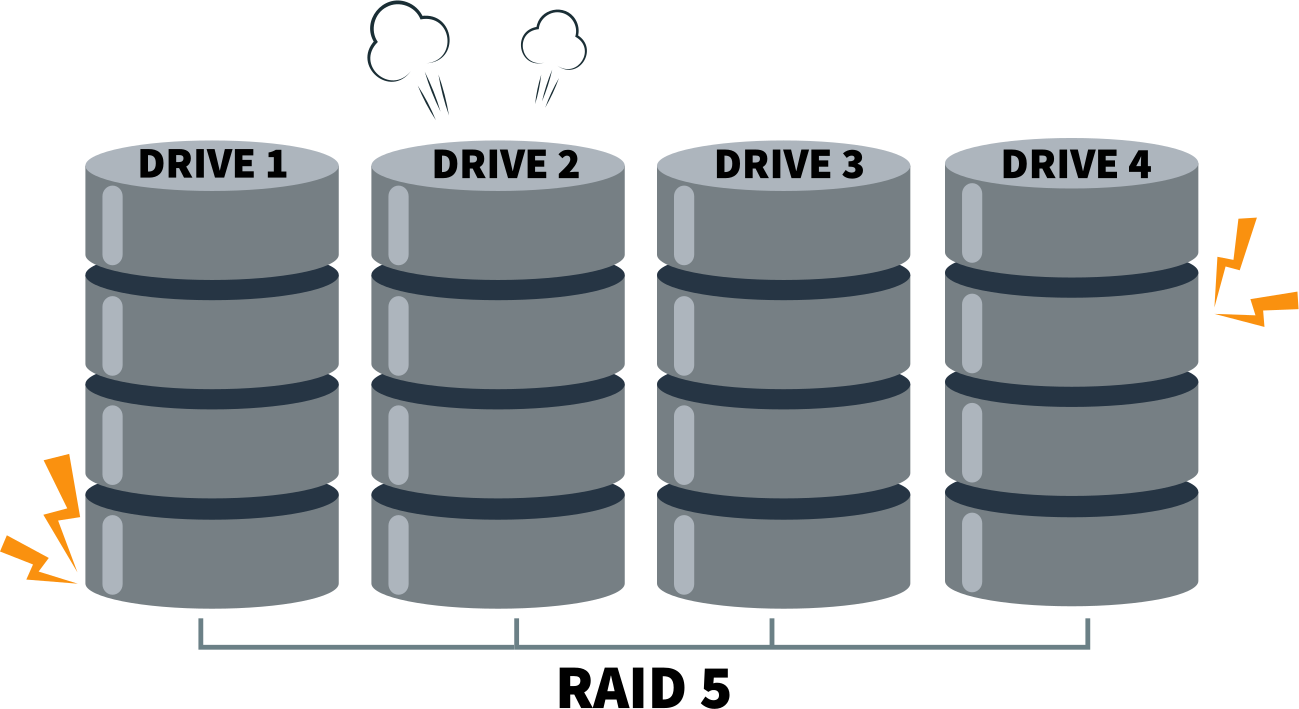
Recovery is possible if the rebuild did not overwrite parity across all stripes.
Why recovery is possible
- Parity structure in RAID 5: Each stripe contains data blocks and one parity block distributed across disks. As long as parity remains intact, missing data can be reconstructed.
- Interrupted rebuilds: If the rebuild stops before parity is fully rewritten, the original parity still exists on most stripes, allowing recovery tools to reconstruct the array.
Factors that determine success
- 1. Rebuild progress:
- Minimal progress: High chance of recovery, since most parity blocks are untouched.
- Partial progress: Recovery is possible but complex, as some stripes contain new parity while others retain old parity.
- Near completion: Risk is highest—parity may be inconsistent across the array.
- 2. Disk role in failure:
- If the replacement disk failed, the original data/parity may still be intact.
- If an active member disk failed mid‑rebuild, recovery becomes harder because both data and parity may be compromised.
Risks of repeated rebuild attempts
- Each new rebuild attempt writes fresh parity across stripes.
- This overwrites the original parity, making it impossible to reconstruct missing data.
- Multiple aborted rebuilds often leave the array in a “mixed parity” state, where some stripes reflect old parity and others new parity—this inconsistency is the main cause of unrecoverable data loss.
Practical takeaway
- Do not restart rebuilds blindly.
- Preserve the current disk state before attempting recovery.
- Use specialized RAID recovery software or professional services to reconstruct the array from the existing parity and data blocks.
What happens when a RAID 5 rebuild is interrupted
How RAID 5 rebuild works at block level
- 1. Parity recalculation
- RAID 5 uses distributed parity: each stripe has one parity block stored across different disks.
- During rebuild, the controller reads surviving data blocks, recalculates parity, and writes it to the replacement disk.
- This ensures redundancy is restored and the array can tolerate future disk failures.
- 2. Sequential stripe overwrite
- Rebuilds proceed stripe by stripe, starting at the beginning of the logical volume.
- Once a stripe is rebuilt, its old parity/data state is overwritten permanently.
- This sequential overwrite means that if the process stops mid‑way, the array contains a mix of rebuilt and unreconstructed stripes.
- 3. Dependency on correct disk order
- RAID 5 relies on the exact sequence of member disks to align parity correctly.
- If the disk order is misidentified (e.g., after controller replacement or manual intervention), parity calculations are written to the wrong positions, corrupting data.
- This dependency makes rebuilds sensitive to configuration errors.
Why interruption corrupts RAID metadata
- 1. Partial parity updates
- When a rebuild halts, some stripes have updated parity while others retain old parity.
- This creates a “mixed parity” state where the controller cannot reliably determine which version is correct.
- 2. Inconsistent stripe state
- A single stripe may contain:
- New parity on the replacement disk.
- Old data/parity on surviving disks.
- This inconsistency breaks the logical mapping of the array, making reconstruction unreliable.
- 3. Logical damage without physical disk failure
- Even if all disks remain physically healthy, the metadata (RAID configuration, rebuild markers, parity maps) becomes corrupted.
- The controller may mark the array as degraded or failed because it cannot reconcile stripe states.
- This is why interrupted rebuilds often appear as “failed arrays” despite no hardware damage.
Example scenario
Imagine a RAID 5 with 3 disks (A, B, C) and parity rotating across them:
- Stripe 1: Data A1, Data B1, Parity C1
- Stripe 2: Data A2, Parity B2, Data C2
- Stripe 3: Parity A3, Data B3, Data C3
During rebuild:
- Stripe 1 parity is recalculated and overwritten → now “new parity.”
- Stripe 2 rebuild starts but is interrupted → parity remains “old.”
- Stripe 3 untouched → parity still “old.”
Result:
- Array contains a mix of new and old parity.
- Controller cannot determine which parity is valid for each stripe.
- Logical corruption occurs even though disks A, B, and C are physically fine.
Common interrupted rebuild scenarios
RAID 5 rebuild stopped recovery
- Power loss: A sudden outage halts the rebuild mid‑process. Some stripes may have updated parity while others remain untouched, leaving the array in a mixed state.
- Manual cancel: If an administrator cancels the rebuild, the controller stops writing parity updates. Depending on progress, this can leave the array partially rebuilt and inconsistent.
- Controller reset: A reset or reboot of the RAID controller interrupts the sequential rebuild operation. Metadata markers may be lost, making it unclear which stripes were already rebuilt.
RAID 5 rebuild aborted recovery
- Second disk error during rebuild: RAID 5 can only tolerate one disk failure. If another disk throws errors mid‑rebuild, the array drops into failure mode, and recovery becomes far more complex.
- Firmware crash: A controller firmware bug can abort the rebuild, leaving incomplete parity updates and corrupted metadata.
- RAID controller failure: Hardware failure in the controller itself halts the rebuild. Even if disks are intact, the array cannot continue until the controller is replaced or repaired.
RAID 5 rebuild interrupted recovery due to wrong drive replacement
- Incorrect disk inserted: Adding the wrong disk (e.g., a blank or mismatched drive) causes the controller to overwrite parity incorrectly, corrupting the array.
- Failed disk misidentified: If the wrong disk is marked as failed and replaced, the rebuild writes parity against the wrong member, destroying valid data.
- Hot‑swap errors: Mistakes during hot‑swap (e.g., removing the wrong drive or improper insertion) can break disk order and cause rebuild corruption.
Recover RAID 5 after interrupted rebuild: what not to do
Do not restart the rebuild
- Restarting a rebuild forces the controller to overwrite parity blocks across stripes.
- Once overwritten, the original parity is lost, eliminating the possibility of reconstructing missing data.
- Multiple rebuild attempts often leave the array in a “mixed parity” state, where some stripes contain new parity and others old parity, making recovery nearly impossible.
Do not initialize or re‑create the array
- Initializing or re‑creating the RAID 5 array erases the existing metadata (disk order, stripe size, parity rotation).
- Without this metadata, recovery tools cannot reconstruct the original stripe layout.
- This action makes logical damage permanent, even if the disks themselves are physically intact.
Do not swap disk order blindly
- RAID 5 depends on the exact sequence of member disks to align parity correctly.
- Blindly swapping disks or guessing their order leads to stripe misalignment, where parity and data blocks no longer match.
- Misaligned stripes increase corruption and can destroy otherwise recoverable data.
Key factors that determine recovery success
Rebuild progress percentage
- Low progress: Most parity blocks remain untouched, giving recovery tools a high chance of reconstructing the array.
- Mid progress: Some stripes contain new parity while others retain old parity, creating mixed states. Recovery is possible but requires advanced analysis to reconcile inconsistencies.
- High progress : Nearly all parity has been rewritten. If interrupted here, recovery is difficult because original parity is largely lost.
Which disk failed first vs during rebuild
- Initial failed disk: If the rebuild was triggered by a single disk failure, recovery depends on the health of the remaining disks.
- Second disk failure during rebuild: RAID 5 cannot tolerate two failed disks. If another disk throws errors mid‑rebuild, the array drops into failure mode, making recovery far more complex.
- Replacement disk failure: If the new disk fails during rebuild, the original parity/data may still be intact, improving recovery chances.
Hardware RAID vs software RAID
- Hardware RAID: Recovery depends heavily on the controller’s metadata and firmware behavior. Proprietary formats can make manual recovery difficult without specialized tools.
- Software RAID (e.g., Windows Storage Spaces, mdadm in Linux): Metadata is often more transparent, and recovery tools can directly access disk structures. This can simplify reconstruction if the rebuild is interrupted.
Controller model and firmware behavior
- Controller metadata handling: Some controllers mark rebuild progress in metadata. If interrupted, they may resume correctly; others may leave the array flagged as failed.
- Firmware stability: Bugs or crashes during rebuild can corrupt parity or metadata. Recovery success depends on whether the controller wrote partial updates before failing.
- Vendor differences: Different RAID vendors (Dell, HP, LSI, Adaptec, etc.) implement rebuild logic differently. Some overwrite parity aggressively, while others preserve old parity until completion. This behavior directly impacts recovery chances.
Comparison table: RAID 5 rebuild outcomes
| Scenario | Recovery chance | Risk level | Recommended action |
| Rebuild stopped early | High | Moderate | Software recovery |
| Rebuild stopped mid-way | Medium | High | Read-only analysis |
| Rebuild near completion | Low | Critical | Professional tools |
| Second disk failed | Variable | Extreme | Immediate recovery |
RAID 5 recovery approach after interrupted rebuild
Step 1: Preserve all disks
- No writes
- Immediately stop all write operations to the array. Any new writes risk overwriting recoverable parity and data blocks.
- Disconnect the disks from the controller if necessary to prevent accidental activity.
- No rebuild retries
- Do not attempt to restart the rebuild. Each retry overwrites more parity, reducing the chances of successful recovery.
- Preserve the current disk state for analysis with recovery tools.
Step 2: Identify original RAID parameters
- Disk order
- Determine the exact sequence of member disks. RAID 5 relies on disk order to align parity correctly.
- Misidentifying order leads to stripe misalignment and corrupted reconstruction.
- Stripe size
- Identify the stripe size (commonly 64 KB, 128 KB, or 256 KB). This defines how data and parity blocks are distributed across disks.
- Recovery tools require the correct stripe size to rebuild logical volumes accurately.
- Parity rotation
- RAID 5 uses distributed parity, rotating parity blocks across disks.
- Knowing the parity rotation pattern (left‑symmetric, right‑asymmetric, etc.) is essential for reconstructing the array.
Step 3: Virtual RAID reconstruction
- Read‑only parity emulation
- Use specialized recovery software to emulate the RAID virtually in read‑only mode.
- This allows parity calculations without altering the actual disks, preserving original data.
- Partial stripe recovery
- Recovery tools can reconstruct incomplete stripes by combining old parity with surviving data blocks.
- Even if some stripes are inconsistent, partial recovery can restore large portions of the array.
Software‑based RAID 5 interrupted rebuild recovery
When software recovery works
- Logical damage
- Software recovery is effective when the disks themselves are physically healthy but the array suffers from logical corruption (e.g., inconsistent parity, broken metadata, or misaligned stripes).
- In these cases, specialized tools can reconstruct the array virtually without altering the original disks.
- No full parity overwrite
- Recovery is possible if the interrupted rebuild did not overwrite parity across all stripes.
- As long as some original parity remains intact, recovery software can emulate the RAID structure and rebuild missing data.
Example: DiskInternals RAID Recovery
- Manual RAID 5 reconstruction
- The tool allows administrators to manually specify RAID parameters such as disk order, stripe size, and parity rotation.
- This is critical when metadata is corrupted or unavailable.
- Supports interrupted rebuild scenarios
- DiskInternals RAID Recovery is designed to handle arrays with mixed parity states, making it suitable for interrupted rebuilds.
- Works with hardware and software RAID
- Compatible with arrays created by hardware controllers as well as software RAID implementations (e.g., Windows Dynamic Disks, Linux mdadm).
- Allows preview before saving data
- Provides a read‑only preview of recovered files before committing to data export.
- This ensures that recovery results are validated before any changes are made to the disks.
Ready to get your data back?
To start recovering your data, documents, databases, images, videos, and other files from your RAID 0, RAID 1, 0+1, 1+0, 1E, RAID 4, RAID 5, 50, 5EE, 5R, RAID 6, RAID 60, RAIDZ, RAIDZ2, and JBOD, press the FREE DOWNLOAD button to get the latest version of DiskInternals RAID Recovery® and begin the step-by-step recovery process. You can preview all recovered files absolutely for free. To check the current prices, please press the Get Prices button. If you need any assistance, please feel free to contact Technical Support. The team is here to help you get your data back!
When professional recovery becomes mandatory
Multiple disk degradation
- RAID 5 can only tolerate a single disk failure.
- If multiple disks show read errors, bad sectors, or complete failure during or after a rebuild, recovery becomes extremely complex.
- Professional labs use advanced imaging techniques to extract data from degraded drives without stressing them further, something not possible with standard software tools.
Controller‑specific parity schemes
- Different RAID controllers (LSI, Adaptec, Dell PERC, HP Smart Array, etc.) implement parity rotation and metadata handling in proprietary ways.
- If the controller fails or parity is partially overwritten, only specialists with knowledge of the specific scheme can reconstruct the array correctly.
- Attempting manual recovery without understanding the controller’s parity logic risks misaligned stripes and permanent corruption.
Enterprise RAID with proprietary metadata
- Large‑scale enterprise arrays often store proprietary metadata structures that define disk order, stripe size, and rebuild progress.
- If this metadata is corrupted or lost during an interrupted rebuild, recovery requires specialized tools and expertise not available in consumer software.
- Professional recovery services can parse and rebuild proprietary metadata to restore access to mission‑critical data.
Prevention: how to avoid RAID 5 rebuild disasters
Never rebuild on unstable disks
- A rebuild stresses all drives in the array by performing continuous read/write operations.
- If surviving disks already show signs of degradation (bad sectors, SMART warnings, slow response), the rebuild can push them into failure.
- Always check disk health with diagnostic tools before initiating a rebuild. Replace or clone unstable drives first to avoid compounding failures.
Verify failed drive before replacement
- Misidentifying the failed disk is one of the most common causes of rebuild corruption.
- Before swapping, confirm the failure using controller logs, SMART data, and consistency checks.
- Replacing the wrong disk leads to overwriting valid data during rebuild, often making recovery impossible.
Use backups before rebuild attempts
- Even if the rebuild looks straightforward, always secure a backup of critical data first.
- Backups provide a safety net in case the rebuild fails or introduces logical corruption.
- For enterprise environments, snapshot or clone the array before attempting rebuild operations to ensure rollback capability.