
RAID 0 for gaming — Is RAID 0 good for gaming?
In the quest for gaming speed, RAID 0 often catches the eye with its promise of faster data access through striping. By spreading data across multiple drives, it can significantly cut down load times. However, it lacks redundancy, posing a risk to data safety. This guide evaluates if RAID 0 genuinely enhances gaming performance and weighs its benefits against its risks.
Executive Summary
RAID 0, known for its ability to improve data throughput by striping data across multiple drives, is often considered for enhancing gaming performance. This configuration can indeed optimize large-file sequential read and write operations, which may seem beneficial for gaming. However, RAID 0 also significantly increases the risk of data loss: if even a single drive in the array fails, the entire dataset can be compromised, resulting in a total loss.
In the context of modern gaming rigs, the advantages of RAID 0 are often outweighed by its drawbacks. Today's fast NVMe and SSD drives are capable of delivering exceptional speed and responsiveness on their own, often surpassing the real-world performance benefits that RAID 0 might offer. These drives also come with the added advantages of reduced data loss risks and minimal maintenance complexity, making them a more reliable and user-friendly choice for gamers who wish to focus on game play rather than technical intricacies.
RAID 0 should be reserved for specific scenarios where its speed benefits are critical and justifiable—such as in controlled environments requiring temporary scratch volumes or in specialized multi-stream content workflows where data is backed up regularly and securely. This ensures that while performance needs are met, data integrity isn't compromised when things go wrong. Thus, for most gamers, investing in a quality NVMe or SSD drive is a better and safer long-term investment.
What RAID 0 Does

How Striping Works
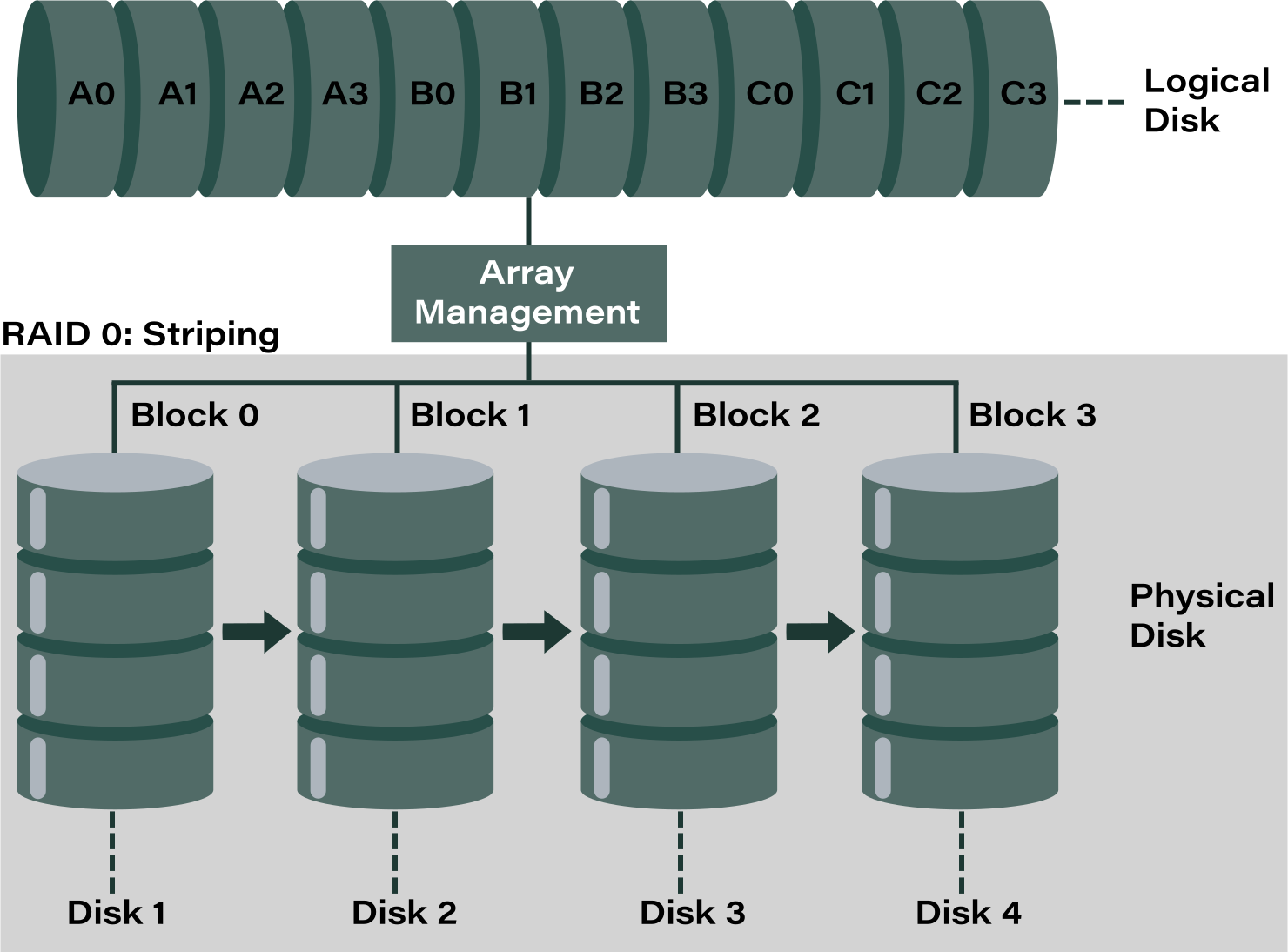
RAID 0 utilizes a technique called striping to enhance performance. By dividing data into equal-sized blocks, it writes these blocks across all drives in the array simultaneously. This means that each drive writes only a portion of the total data, allowing the system to utilize the bandwidth of all drives concurrently, thus significantly increasing sequential read and write speeds. This setup is particularly effective for large file transfers and situations where high data throughput is desired. For example, if you have two drives in a RAID 0 configuration, a file may be split in half, with each half being written to a separate drive, effectively doubling the data's access speed compared to a single drive setup.
Moreover, RAID 0 can enhance parallel IOPS in some instances. This is because the striping can enable multiple spindles to operate at once, which can handle more data requests concurrently. This setup can benefit applications that need to read or write large amounts of data quickly, such as video editing or rendering, where quick access to large files is crucial.
Failure Model
Despite its performance advantages, RAID 0's greatest vulnerability lies in its lack of redundancy. Each piece of data is spread across all drives, meaning that if one drive fails, the system loses its capability to reconstruct the entire dataset. Unlike other RAID levels that incorporate parity or mirroring to safeguard data, RAID 0 does not offer any data protection mechanisms.
The risk of total data loss rises with each additional drive added to the array. In simplistic terms, if the chance of a drive failing is 1%, with four drives in the array, the overall chance of experiencing a failure in the system rises significantly. Therefore, while RAID 0 can deliver impressive speed improvements, it should not be used in situations where data security is paramount. Instead, it is better suited for temporary data processing where speed is essential, but the data can be easily recreated or is backed up elsewhere. This is why RAID 0 configurations are often advised against for critical data storage, as the cost of failure can be prohibitively high without additional protective measures.
Note: what is a RAID hard drive?Does RAID 0 Help Gaming? — Practical Reality
Load Times vs FPS
While RAID 0 is capable of reducing sequential load times, especially in scenarios involving significant asset streaming, it does not enhance frame rates. The distinction is crucial: while faster loading might mean quicker transitions into game levels, it doesn't translate into higher frames per second (FPS) or improved frame stability during gameplay. Most gamers find that the practical gameplay improvements are negligible, as modern NVMe drives already offer fast load times. Therefore, the load-time benefits provided by RAID 0 are often marginal when using contemporary high-speed storage solutions.
Where It Can Help
RAID 0 can be advantageous in very specific scenarios:
- Large Asset Streaming: For systems handling extremely large files, such as multi-terabyte texture packs or high-resolution video assets, RAID 0 might mitigate bottlenecks caused by a single drive or limited PCIe bandwidth. In such cases, the increased throughput can provide smoother streaming of these assets.
- Scratch/Export for Content Creators: For users who also engage in content creation on the same machine, RAID 0 can offer benefits for scratch disk purposes—speeding up processes like rendering or exporting. However, it's essential that reliable backups are maintained, since the risk of data loss is significantly higher.
Where It Does Not Help
RAID 0 falls short in enhancing the general gaming experience:
- FPS and Frame Stability: The major gaming performance factors like FPS, frame stability, and physics processing are predominantly dictated by the CPU, GPU, and OS, rather than disk load times. Consequently, RAID 0 does not provide improvements in these areas.
- Performance Metrics: Although benchmarks might showcase significant improvements in synthetic sequential performance, these gains don't always translate to noticeable improvements in actual gaming workloads. The improvements are constrained to specific use cases, making RAID 0 less beneficial for typical gaming requirements.
RAID 0 Gaming Performance — What to Expect
Sequential Throughput
RAID 0 can noticeably improve large-file sequential transfer rates compared to a single HDD and even against older SATA SSDs. This means faster loading times for large data files. However, when compared to modern PCIe 4.0 or 5.0 NVMe SSDs, the performance gains are often marginal for real-world gaming scenarios. Most of today's NVMe drives already offer exceptional sequential performance, making RAID 0's contributions in this area less pronounced in practical gaming applications.
Random IOPS & Latency
Modern NVMe SSDs already deliver high random IOPS and low latency on their own, which are critical for quick file access and system responsiveness. RAID 0 striping doesn't inherently multiply random IOPS in a manner that significantly impacts game performance. This means that the benefits of striping in terms of reducing latency or increasing random access speeds are limited compared to the capabilities of a single advanced SSD.
Platform Bottlenecks to Check
Several platform-specific bottlenecks can negate the potential benefits of a RAID 0 setup:
- PCIe Lane Limits: Ensure your motherboard and CPU can support the additional lanes required by multiple drives in RAID 0. Insufficient lanes could throttle performance.
- CPU DMI/Chipset Bandwidth: Often, the chipset can become a bottleneck if it can't handle the increased data transfer rates, particularly over DMI links between the CPU and chipset.
- Thermal Throttling: Multiple drives in close proximity may generate excess heat, potentially leading to thermal throttling that can reduce performance.
- Driver/RAID Implementation: The implementation quality of RAID drivers and the RAID controller's efficiency can substantially impact the achievable benefits of RAID 0.
Use Cases & Recommended Storage Patterns for Gamers
Recommended—Single NVMe for OS + Games
For the best balance between simplicity and performance, a fast NVMe drive dedicated to both the operating system and main gaming installations is ideal. This setup capitalizes on the speed of modern NVMe drives, ensuring quick boot times and rapid game loading, while also minimizing complexity and risk compared to RAID configurations.
Optional—Single NVMe + RAID 0 Scratch for Content Creators
For gamers who also engage in content creation, using a RAID 0 array as a scratch disk can be beneficial for handling temporary video files, renders, or caches. This setup allows for faster access and processing of large files during active editing. However, it’s crucial to pair this with reliable storage solutions for critical projects and backups, such as mirrored drives or separate secure storage, to protect against RAID 0’s lack of redundancy.
Don’t Use RAID 0 for Primary, Irreplaceable Data
Avoid putting primary, irreplaceable data on a RAID 0 array. The risk of total data loss due to a single drive failure makes RAID 0 unsuitable for storing anything that cannot be quickly or easily reproduced. It's vital to ensure important data is kept on more secure storage solutions to prevent potential loss.
Note: RAID 0 vs RAID 1Comparison table — RAID 0 vs single SSD (emoji table)
| 🔎 Metric | 🟦 RAID 0 (2× SSD/NVMe) | 🟩 Single NVMe/SSD |
| 🚀 Large sequential throughput | Higher (striped) | Very high (single high-end NVMe) |
| ⚡ Random IOPS / game latency | Variable | Very high & consistent |
| 🎮 Impact on FPS | None | None |
| ⏱ Impact on load times | Minor to moderate (depends on workload) | Minor (often equivalent) |
| 🔒 Data risk | High — any drive failure destroys array | Lower — single-drive failure only (recoverable) |
| 🔧 Complexity | Higher (setup, monitoring, recovery) | Low |
| ✅ Best use | Scratch, temp exports | OS/games/persistent data |
Practical Checklist Before You Build RAID 0 for Gaming
- Benchmark Your Single NVMe: Start by assessing whether your current load times are genuinely limited by storage. If your NVMe drive already offers excellent performance, the benefits of RAID 0 may be minimal.
- Confirm PCIe Lane Availability: Verify that your motherboard and CPU have sufficient PCIe lanes to support a RAID 0 setup without choking the DMI. Insufficient lanes can throttle performance and negate the potential advantages of RAID 0.
- Ensure NVMe Thermal Management: Check that your NVMe drives have an adequate thermal solution to prevent throttling. Overheating can drastically reduce performance, so consider additional cooling if necessary.
- Plan Backups: Develop a robust backup strategy for your data to safeguard against RAID 0's higher failure risks. Automated, off-host, and verified backups are essential to protect your important files.
- Use RAID 0 for Non-Critical Volumes: Restrict RAID 0 use to non-critical volumes like scratch disks, where data loss is not a significant concern. Avoid storing essential or irreplaceable files on RAID 0 arrays.
- Monitor Drive Health: Regularly check the SMART status of your drives and be proactive in replacing any components showing early signs of failure. This minimizes the risk of unexpected data loss.
Recovery: What Happens When RAID 0 Fails & What to Do
Failure Outcome
When RAID 0 fails, the data distributed across the array is lost if any single drive fails. This is because the data integrity relies on the complete set of stripes. As a result, recovering data is both complex and uncertain, often depending on the extent of the failure and the methods employed for recovery.
First Steps on Failure
- 1. Power Off Immediately: To prevent further data corruption, power down the failed RAID 0 as soon as you suspect a failure.
- 2. Image All Member Drives: Create images of all drives in the array. This step is critical as it allows recovery attempts on these images rather than the actual drives, reducing the risk of further damage.
- 3. Avoid Writes: Do not attempt to perform any write operations on the drives, as this can overwrite recoverable data.
- 4. Try Software-First Reconstruction: Utilize software tools capable of RAID 0 recovery. Tools like DiskInternals RAID Recovery™ can automatically detect RAID 0 layouts and preview files before export, providing a non-destructive method to assess what can be recovered.
- 5. Escalate to Professional Lab for Physical Damage: If one or more drives suffer physical damage, seek assistance from a data recovery professional. They have the expertise and equipment to handle damaged hardware and can increase the chances of data retrieval without causing further harm.
Ready to get your data back?
To start RAID data recovery (recovering your data, documents, databases, images, videos, and other files from your RAID 0, RAID 1, 0+1, 1+0, 1E, RAID 4, RAID 5, 50, 5EE, 5R, RAID 6, RAID 60, RAIDZ, RAIDZ2, and JBOD), press the FREE DOWNLOAD button to get the latest version of DiskInternals RAID Recovery® and begin the step-by-step recovery process. You can preview all recovered files absolutely for free. To check the current prices, please press the Get Prices button. If you need any assistance, please feel free to contact Technical Support. The team is here to help you get your data back!
FAQ
Will RAID 0 make my games run smoother?
RAID 0 can reduce load times for large file transfers by increasing sequential throughput, potentially shaving seconds off game loading screens. However, it does not impact frame rates or frame stability during gameplay, as these are primarily influenced by the CPU and GPU. Most modern NVMe drives already offer fast loading times, making RAID 0's improvements marginal for real-world gaming. The risk of total data loss with RAID 0 also makes it less appealing for most gamers. Ultimately, a single fast NVMe SSD is sufficient for smooth and efficient game performance without the added risks of RAID 0.Is RAID 0 worth it for a gaming PC?
For most gamers, RAID 0 isn't worth it due to its high risk of data loss and marginal performance benefits over modern NVMe SSDs. While RAID 0 can slightly improve load times, it doesn’t boost in-game performance like frame rates or stability. Today's fast NVMe SSDs provide excellent speed without the complexity or risk associated with RAID 0. The cost and effort of setting up and maintaining a RAID 0 array often outweigh the benefits, especially when data recovery from failure is so challenging. Overall, a single NVMe SSD is typically a better, safer choice for a gaming PC.Should I RAID 0 NVMe drives or buy one larger/faster NVMe?
Opting for a larger or faster single NVMe drive is generally more advantageous than setting up RAID 0 with multiple NVMe drives. A single, larger NVMe drive simplifies your setup, reduces the risk of data loss, and offers robust performance with minimal maintenance. While RAID 0 might offer incremental improvements in sequential transfers, the gains are often negligible compared to modern high-performance NVMe drives. Additionally, a single NVMe drive avoids the high failure risk inherent in RAID 0 setups, where any drive failure can lead to total data loss. Thus, for most users, investing in a single larger or faster NVMe drive is the more practical and reliable solution.