
Recover .3gp Video Files Effortless!
Like any other file, .3gp video file can be lost and also can be restored. Here you will find out:
- reasons why 3gp file can be lost or deleted
- best tips for 3gp file recovery
- the best software for video recovery including 3 gp files
Are you ready? Let's read!
What is a .3gp video file?

.3gp is a video format that is typically used in mobile phones. In fact, it is a simplified version of MP4, which is necessary for playing short videos. Also, MMS and MBMS use .3gp files. Unfortunately, like all other file formats, .3gp files can be suddenly lost, which can be upsetting. Then the question arises about how to perform .3gp file recovery. But let's get it all in order.
After all, if you are dealing with a lost or deleted .3gp video file, you should not hesitate to recover it, but you also need to understand this problem thoroughly. After reading this article, we hope you will be to quickly and without problems begin .3gp file recovery.
Reasons for .3gp video file loss
Lost or deleted .3gp video files most often occur for these reasons:

- Damage to a .3gp video file by a virus or other malware.
- Bad sectors or a damaged hard disk can also result in a lost or deleted .3gp video file.
- Storage media formatting, on which there was a .3gp video file, can erase it. This action may be accidental or forced, as for example, when it is impossible to open an SD card.
- Accidental or intentional deletion of a .3gp video file.
- When transferring video, the storage media is disconnected from the device or the network is disconnected.
- Due to compression of a .3gp video file, it can also be damaged.
The best tips for .3gp video file recovery:
Lost or deleted .3gp video files can happen on any storage media you have: SD memory cards, internal hard drives, external SSDs, USB drives, etc. But, in any case, you should remember a few simple rules that will help you perform .3gp video file recovery:

- 1. Never install .3gp recovery software in the same place where the .3gp video files were located (for example, if the file was lost on the E logical drive, then you should install the recovery software in partition D).
- 2. Never perform .3gp file repair (or any other) in the place where the files were lost.
- 3. Restore the .3gp video file as soon as possible and do not put it aside for later. Failure to remember these rules may lead to overwriting of the data and .3gp recovery will be impossible. Therefore, be extremely attentive and do not neglect these tips.
Recover .3gp video files with the best software

So now to the point. In order to perform .3gp video file repair, you need to find good professional software. You do not need to search the Internet for this, as the best software is already here. DiskInternals Video Recovery is what you need.
This software was created specifically to recover videos of any format, including .3gp video files. DiskInternals Video Recovery supports all recent versions of Windows. A convenient preview of the files found before recovery will confirm that the video can be restored without any loss of image quality.
Download the free trial version of DiskInternals Video Recovery right now and see how easy it is to use it, as the recovery wizard will help you at all stages of the process. Below is a detailed guide for how to use this software.
Guide for how to recover deleted or lost.3gp video files
Follow these steps and your .3gp file will be retrieved very soon.
Step 1. Download and install DiskInternals Video Recovery for .3gp recovery.
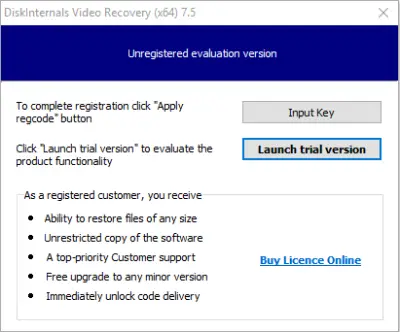
Step 2. The recovery wizard will start automatically.
Step 3. Select the disk, where you want to restore 3 gp file. You can skip this step and search by file type after scanning.
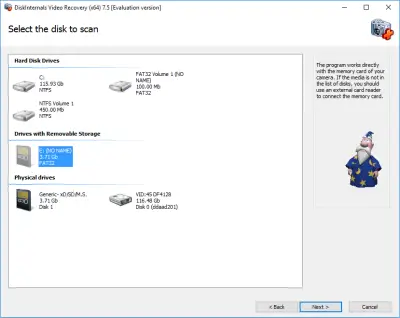
Step 4. Scan. Select a scanning method: fast or full. A quick scan will take less time, but if a good result is important to you, then you should choose a deep scan and wait a bit.
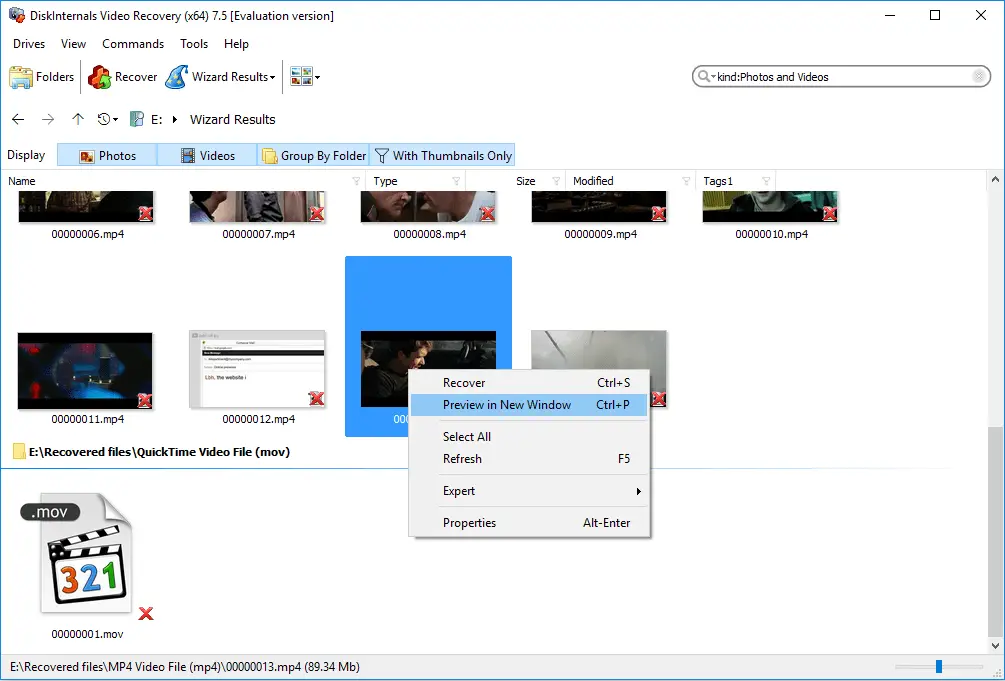
Step 5. Preview and restore. All found .3gp files will be displayed in a new window and marked with a red cross in the upper left-hand corner. Right-click on the desired video file and select "Preview in New Window." Recovery will occur automatically.
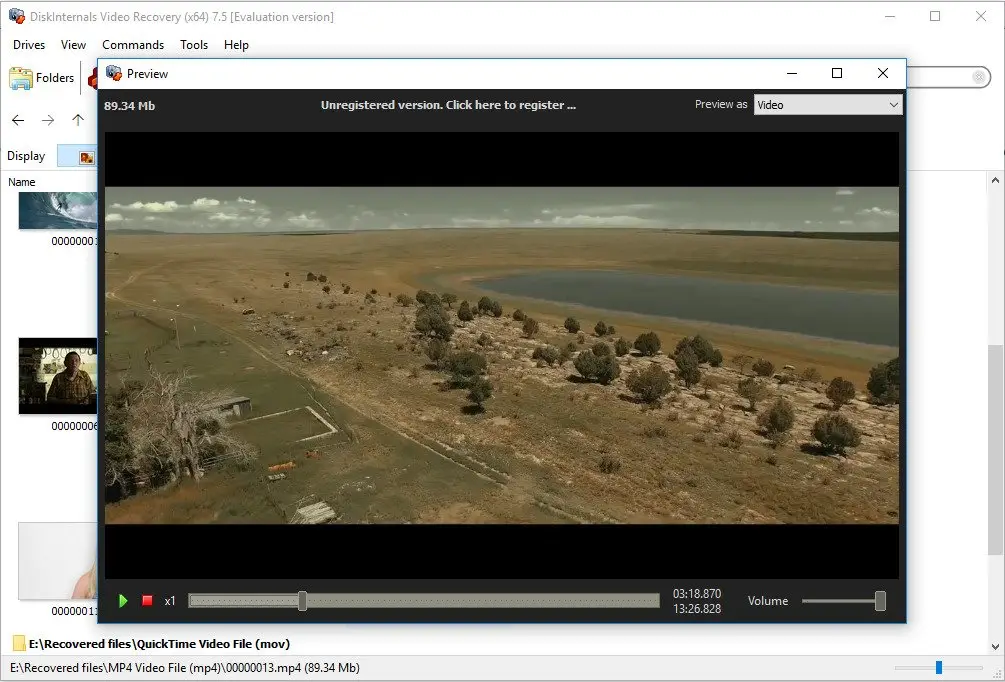
Step 6. Saving. To do this, you just need to purchase a license and enter the license key in the appropriate window. It is best not to save the recovered .3gp file in the same place it was lost, as data overwriting may occur.
Good luck!
Related articles
- 4 Ways to Recover Deleted or Lost PS4 Video Games
- AVI Recovery: Recover AVI Files Right Now!
- How to Recover Deleted or Lost Movies
- How to Recover Deleted Videos from a Laptop
- How to recover deleted videos from Windows 7
- Mp4 Recovery: All that you need to repair Mp4 file
- Recover Deleted Videos from SD card
- [Solved] 4K Video Recovery and All You Need for It
- Video error 0xc00d36c4? Fix it today!
- The best methods on how to recover webcam videos!
- Recover FLV video files effortless and fast!
- How to perform MPG recovery? Find out it here!
- MOV vs MP4: what is more practical?
- WMV file recovery - all you need to know
- Deleted GoPro video? Recover GoPro Files Today!
- Recover MKV files: everything you need to know
- WebM file recovery - make it today!
- What is H.264 video files and how to restore it
- MXF video recovery: all you need to know
- If Your PS4 Won't Turn On
- How to recover files from DJI Drone
- What is an .swf file?
- What is the missing codec error 0xc00d5212?
- If you have video lagging
- How to Fix Music Video Error 0xc00d36b4 on Windows 10
- If you get Video memory management internal error
- If Audio and video going out of sync on Windows 10
- Mp4 repair: restore your favorite videos
- If you get 0xc10100be error
- How to edit your MP4 and prevent dealing harm to it?
- Workable guide on how to convert MKV to MP4?
- 0xc00d36e5 error occurs: your actions
- Windows Media Player encountered a problem while playing the file
- 0xc10100bf error occurs: your actions?
- How to extract audio from video. Top-3 services
- Convert MP3 to MP4
- Convert WebM to MP4
- Best iMovie Alternatives For Windows
- Editing MP3 files with the trimmers for Windows
- Deal with the Most Common Windows Movie Maker Problems
- Here is How to Remove Audio From Video
- How to rotate a video in Windows 10
- Here is How to Compress MOV File
- Here is How to Convert MKV Files
- Here is how to convert AVI to MP4 safely
- How to Recover TikTok Draft Videos or Deleted Videos?
- How to Recover Deleted Videos on your device [2026]
- How to Recover Deleted Videos - Best Ways [2026]
- Recover Deleted MTS Video Files on Windows
- Adult Content Detection
- Recover deleted videos YouTube