
4 ways to recover deleted or lost PS4 video games
A video game can be lost but it also can be recovered.
What do you need to bring back PS4 video game files you will find here.
Are you ready? Let's read!
Why do PS4 videos become lost?

No user is insured from the loss of PS4 files. This can occur due to a voltage drop, such as a sudden power outage.
A very common cause is a loss of communication with the server or a bad Internet connection. Imagine this situation: you accessed your PS4 in the console, on which you have not played for a long time. And suddenly, it is empty; all game data is missing. Well, in the end, some game files may have been accidentally deleted when you cleaned your hard drive. Fortunately, you can recover data from a PS4 hard drive, but you shouldn’t delay it. Hurry and you will have more chances for a positive result!
1. PS4: recover deleted video with cloud storage
You can use this option when you have saved video games online or you are a PS Plus user. Then you can easily restore the files you are interested in. To do this, use the step-by-step instructions, which are described below:
In the PS4 main menu, go to Settings. Next, click “Manage saved application data”. Click on “Saved data in the online cloud”. Next, click "Download in the system storage". You need to select the video games you want to extract. Click "Download".
You then just have to wait for the completion of the process and re-save the game on your PS4 hard drive. Your games are already available and you can safely play them.
2. PlayStation Store for deleted PS4 video file restoring
If your video games were purchased in the PlayStation shop, their recovery is a solved task for you.
Do you wonder if can you recover deleted video games on PS4 completely free of charge? Only use the same account with the username and password.
After you have signed in, you need to go to the PlayStation Store. You will see a list of all the video games you purchased earlier. Select the video game you want to restore. Now it only remains to download the game and save it to the PS4 hard disk. Your video game will be waiting for you on the main screen.
3. PS4 lost game recovery with USB drive
Another effective way to recover data from a PS4 hard drive is a USB drive. This method is not fast, but useful; besides, you will always have on hand a copy of your video game.
First of all, do not forget to turn on the “Sync with PlayStation Network” option on your PS4. Now select and copy the video game files to your USB storage device. When there is accidental deletion of files from the PS4, you can safely connect your flash drive and recover data from your PS4 hard drive.
To do this, go to Settings. Follow the instructions: System > Backup and Restore > Restore PS4 > Select backup files > Click Yes.
After a while you can enjoy the game!
4. Recover data from PS4 hard drive with video recovery software
You can recover deleted video games from your PS4 even if none of the above methods helped you. And the easiest way to do this is with the help of special software to recover deleted PS4 video. The best choice is DiskInternals Video Recovery. And here's why:

- Supports all video formats, including video game formats: MKV, AVI, MP4, MPEG2, AVCHD and others.
- The software is equipped with a reliable and at the same time simple built-in recovery wizard to restore deleted PS4 video games. This is a very convenient feature that will help both beginners and professionals.
- You can easily download and try the software for free to get started before buying a license. This way you will protect yourself and make sure that you recover deleted PS4 video games of high quality.
Following this guide for using DiskInternals software
- 1. Download and run DiskInternals Video Recovery.
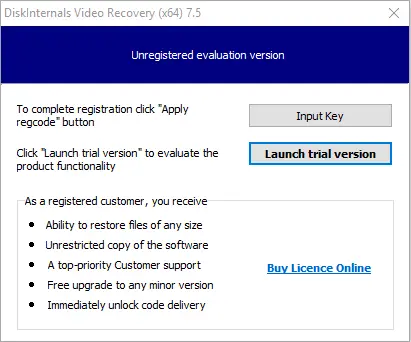
- 2. The installation wizard will automatically prompt you to select the basic parameters for which you will search for deleted video games.
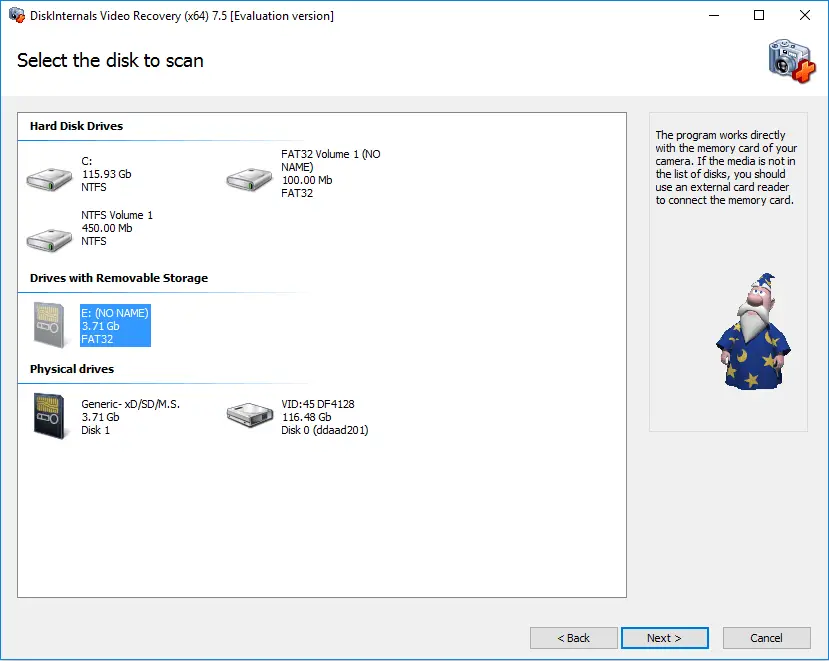
- 3. Scan. You can choose from two scanning options: fast and full (recommended). Wait for the process to complete; it may take some time.
- 4. Preview and recover deleted PS4 video game file. Right-click on the found video game and select the “Preview” function.
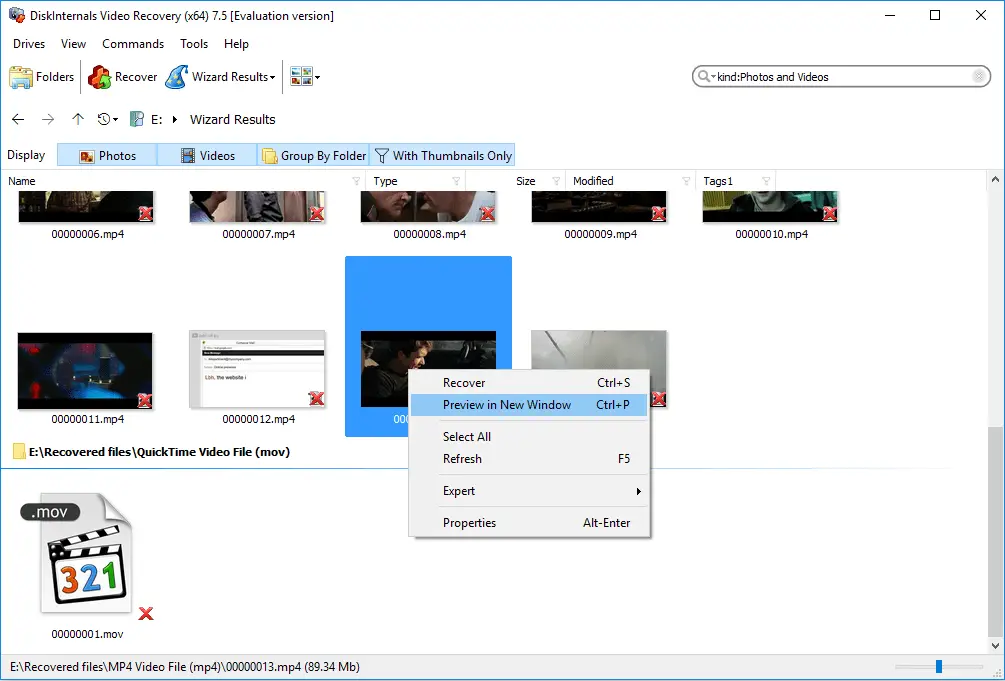
- 5. Save the recovered video games. To do this, you just need to buy a license for this product and enter the license key.
That's all! You can play video games again thanks to DiskInternals Video Recovery!