How to perform data recovery from the hard drive with unallocated space
Here you will find out:
- what is HDD unallocated space
- methods, how to get files from the disk with unallocated space
- how DiskInternals can help you
Are you ready? Let's read!
HDD unallocated space: what is it?
This problem most worries users of new hard drives the first time they connect to a computer. And in fact, this is not a mistake, but a feature of the new drives. But, here, if the error "HDD unallocated space" appeared during disk use, this may be a problem that not everyone can handle.

For this reason, this article was written, so everyone can deal with HDD unallocated space data recovery.
The reasons for an unallocated hard drive
The reasons are commonplace and do not differ much from other system errors.
This may include a faulty hard drive, a weakened file system, a system failure, etc. In addition, some partitions or desired system files may be deleted at random. And viruses and malicious programs can simply encrypt these sections and files, resulting in a similar situation.
Step 1. Restore your data from the unallocated hard drive
HDD unallocated space data recovery (or an external, second internal drive) is a difficult task, and restoring its data using DiskInternals Partition Recovery is not only simple but even interesting.

This application works with all known file systems, even if they are damaged. But, if you have another reason for the problem, no worries; the application will cope with the change. This statement is based on many years of experience and the feedback of regular, grateful customers. With equal accuracy, photos, documents, music, video, etc. are restored.
You can recover up to 1 PB of data without additional costs. The recovery wizard selects the course of action, analyzing the stated search criteria. The program is available for free with all options except data export (this will require a license).
Now start downloading the program, after which the wizard starts its work. Just in case, keep these instructions with you:
- 1. Click on your hard drive, which shows the HDD unallocated space error.
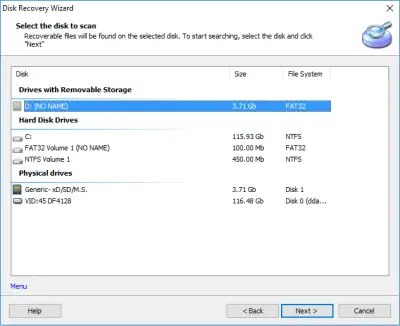
- 2. Select the type of file you want to search for. If this is not so important, click on the Skip button; in this case, the search range will be as wide as possible.
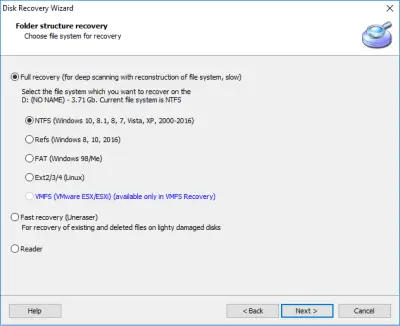
- 3. Click on the Scan button. You can select one of several modes.
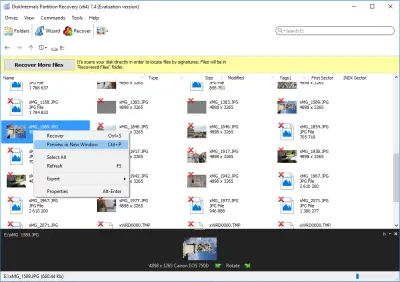
- 4. View found files marked with a red cross. This feature is free and quite smart and useful.
- 5. Saving. A license is required; then the wizard will help to end the session. You will need to export files to another medium to avoid overwriting data.
Step 2. Unallocated hard drive fix with Disk Management
This method is quite effective, and now is the time to use it.
Right-click on Start and select Disk Management.
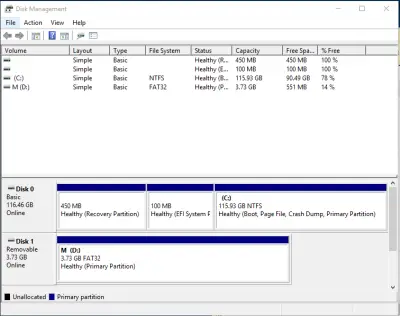
Now in the Disk Management window, click on the Problem Disk (with the right mouse button) and select New Volume. Set all the basic options for the disk and click Enter. If you need more sections, you can create them in the same way.
Thus, you will distribute the disk into partitions and the error will disappear by itself.
Related articles
- What To Do If You Cannot Extend Volume in 2026
- Convert RAW to NTFS in 2 Steps!
- Сorrupted Hard Drive - What To Do Now?
- External hard drive repair software [2026]
- Guide: How to Fix a Corrupted Hard Drive Fast
- Hard disk detected as RAW? Perform RAW Drive Recovery!
- Hard Disk Recovery | DiskInternals Partition Recovery
- Hard Drive Repair and Bringing Files Back
- How to Fix a Corrupted External Hard Drive at Home in 2025
- How to Fix a Crashed Hard Drive on Your Own
- How to fix hard drives at home
- How to recover data from a damaged external hard disk
- How to Repair a Damaged Partition with Partition Recovery™
- How to Recover Data from a Formatted Hard Drive in 7 Steps (2025)
- Recover Files from Corrupted External Hard Drive Today!
- Recovering Data from Crashed Hard Drive: Safe
- Repairing of Corrupted Hard Drive
- Revive Your Laptop Hard Drive With Recovery Tips
- How to Recover Data from a RAW Hard Drive - Raw Partition Drive Recovery
- The best, most reliable software to recover files from a corrupted hard drive
- Repair a Hard Drive with Bad Sectors | Fix HDD Bad Sectors & Recover Data
- Disk is Write-Protected? Don't Give Up Yet!
- External hard drive not showing up? Fix it in 2025!
- New hard drive not showing up in Windows 10
- Seagate external HDD not showing up in Windows 10? Solved!
- External hard drive: Access is denied
- External hard drive having ‘the parameter is incorrect’
- Seagate external hard disk light blinking but not detecting
- WD HDD Repair Tool Guide: Western Digital Hard Drive Repair, Recovery & Fix 2026
- How to Fix: Windows Detected a Hard Disk Problem⠀
- OEM Partition and how to delete it safely
- Having hard drive error code 2000-0142? Fix it!
- Signs Your Hard Drive Is Failing in 2025
- How to repair SATA Hard Drive?⠀
- What causes lead to a hard drive fails?
- How to Recover Data from a Dead External Hard Drive and Repair It (2026)
- Solved 2025! Fix a dead external hard drive and restore files
- [Solved] How to get files off a broken laptop safe
- [Solved] Wiped vs accidentally erased hard drive
- [Solved!] External hard drive not detected
- Initialize a disk before the disk manager can access it
- [Error] The volume does not contain a recognized FS
- How you can initialize disk without losing data
- Internal/external hard drive shows 0 bytes
- [Windows] Recover an unallocated partition today
- Make Unallocated Space Into Free Space
- How to Unpartition an External or Internal Hard Drive
- If the Hard Drive Disappeared on Windows 10
- [SOLVED] How to Recover Files from a Hard Drive that Won't Boot
- Why the Hard Drive Clicking Happens and How to Fix It
- Couldn't Create a New Partition or Locate an Existing One
- Need to Install Windows 10 on the External HDD?
- If Hard Drive Short DST Check Failed
- How to fix ASUS motherboard not detecting SATA hard drive issue
- ReFS: can you use it for RAID
- If Windows 10, 11 doesn't recognize hard drive
- Recover lost.dir files android Device (2026)
- Not enough unallocated space on target disk
- How to delete an EFI System Partition
- Converting a dynamic disk to a basic disk
- How to use OneDrive
- Partition a hard drive on Windows 10
- Guide on how to activate partition
- How to check hard drive health?
- How to deal with smart hard disk error 301 on HP laptops?
- How to use Windows partition manager correctly
- Is it worth it to compress this drive to save disk space?
- Step-by-step guide on how to wipe a hard drive
- Moving hard drive to new computer
- Seagate hard drive beeping: your actions
- If the Unknown Hard Error message appears
- If you want to remove OneDrive
- If you get hard disk short DST failure
- Creating new simple volume: only workable tips
- How to use a hard drive reader
- This is how to combine partitions Windows 10
- Primary vs. Logical partition comparison
- How to Backup in Windows 10, 11?
- What to do in case of External Hard Drive I/O Error?
- Maxtor Hard Drive Recovery
- LaCie External Hard Drive Recovery
- Hard Drive Password Recovery: Everything You Need to Know
- Hard Disk 3f0 Boot Device Not Found on HP: Fix it Now!
- How to Recover a Wiped Hard Drive
- Partition Recovery Guide in pictures