Thumbnails are not showing in Windows 10: your actions
Here you will find out:
- what are thumbnails
- what to do if thumbnails are not showing in Windows 10
- when DiskInternals can help you
Are you ready? Let's read!
What are Windows thumbnails?
Windows 10 by default creates thumbnails of document content instead of using generic document icons. Thumbnails are small images that are stored in a special database file called the thumbnail cache. This prevents Windows from wasting resources on thumbnail images every time you open the folder.
Sometimes you may see distorted or incorrect sketches. This suggests that the thumbnails stored in the cache for those specific files are corrupted or missing. This situation may be due to Windows system errors or hardware.
In order not to lose your data, the most correct and immediate action for you is to delete the thumbnail cache. Next, you can prevent the creation of thumbnails by default, or, conversely, recreate faulty sketches from scratch the next time you restart your computer.
If suddenly, as a result of the problem “Windows 10 image thumbnails not showing”, files are missing or damaged, you can also find a solution to the problem in this article.
First, open the Start menu and type "Disk Cleanup" in the search bar, and select the Disk Cleanup application
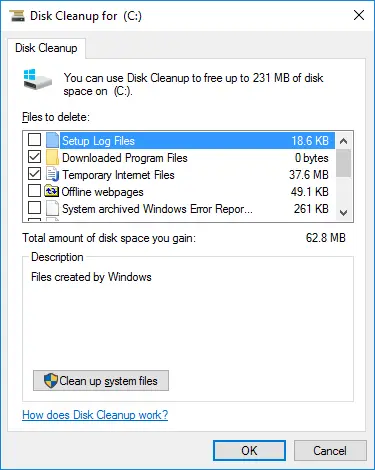
Find here the Files to Delete list, which will contain the various types of saved data that Windows can safely delete to clean up space.
You can check the boxes next to all items, or if you only want to delete thumbnails, then uncheck the boxes for other items (for example, Downloaded Files and Temporary Internet Files, etc.).
Now click "OK" to remove all of your selected items.
Then a warning message will appear: "Are you sure you want to permanently delete these files?" - click "Yes".
The process of deleting thumbnail cache files will take you about a minute. Afterward, restart your computer.
Now is the time to check your sketches. To do this, open Explorer or look at the sketches on the desktop. If the thumbnails are still damaged, the problem is more likely in the file itself. If so, open the file in the associated program and make sure it matches the faulty sketch created by Windows.
Turn them off
If your Windows 10 thumbnails never work as expected, or you don't need them at all, you can turn them off completely effortlessly.
So, open the Start menu and type "File Explorer Options" in the search bar. You can also right-click on start, select conductor. In the new explorer window, click on the View tab and select Options.
Now that you are in the Explorer Options window, click the View tab and click on Advanced Options. Here, check the box next to "Always show icons, not thumbnails" and click "OK".
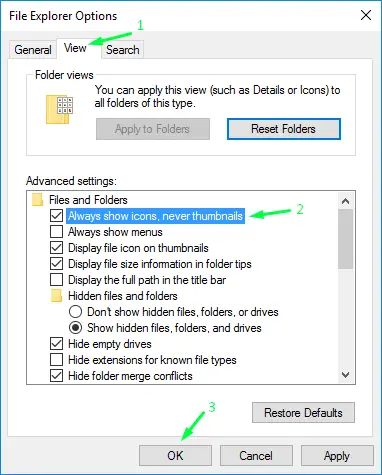
This action will allow Windows to display only standard document icons instead of thumbnails and thus eliminates the “Windows 10 thumbnails not showing” problem.
Protect your data!
Now let's move on to the question of what to do if your files were still damaged as a result of incorrect sketches. As promised, we offer you the easiest and most effective method! This is DiskInternals Partition Recovery, which will professionally recover data of any format, even damaged data, up to 1 PB in size. You can also create a disk image with all the data on your computer and save it to an external drive; this way, you will never lose your files! The application scans deeply on each of the disk partitions individually, without missing a single file, so you can return images, music, documents, images, mail, etc.
DiskInternals Partition Recovery is a proven application that hasn't let anyone down yet! Moreover, you can always rely on an experienced Recovery Wizard and not even think about anything. Immediately after scanning, view all the results for free and safely download them to a computer or other medium.
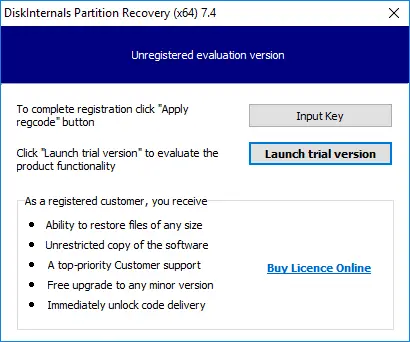
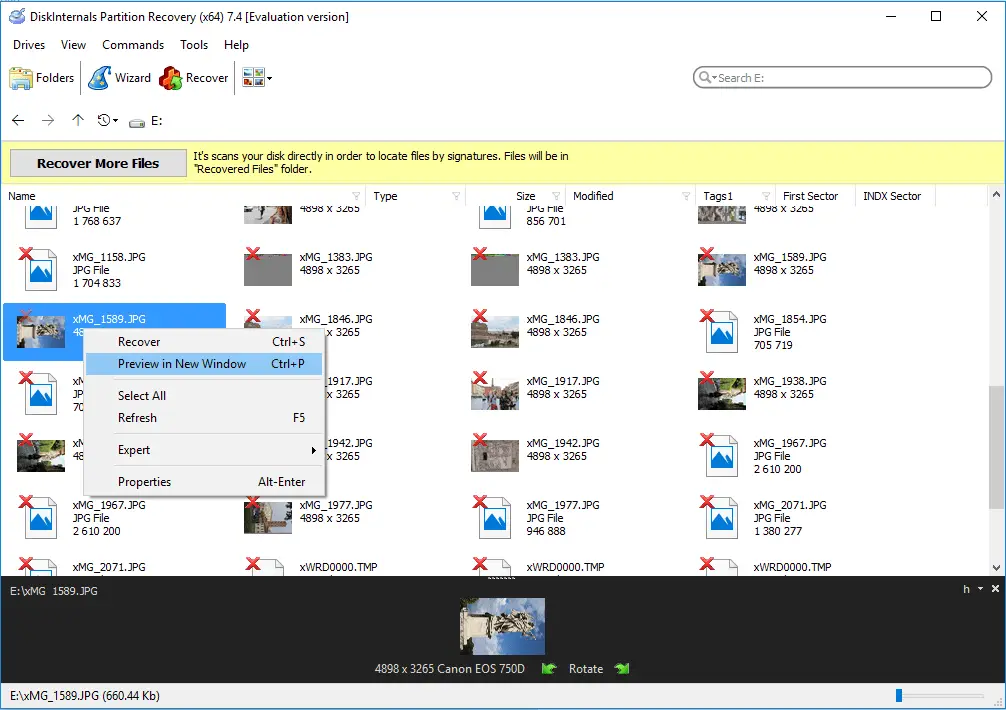
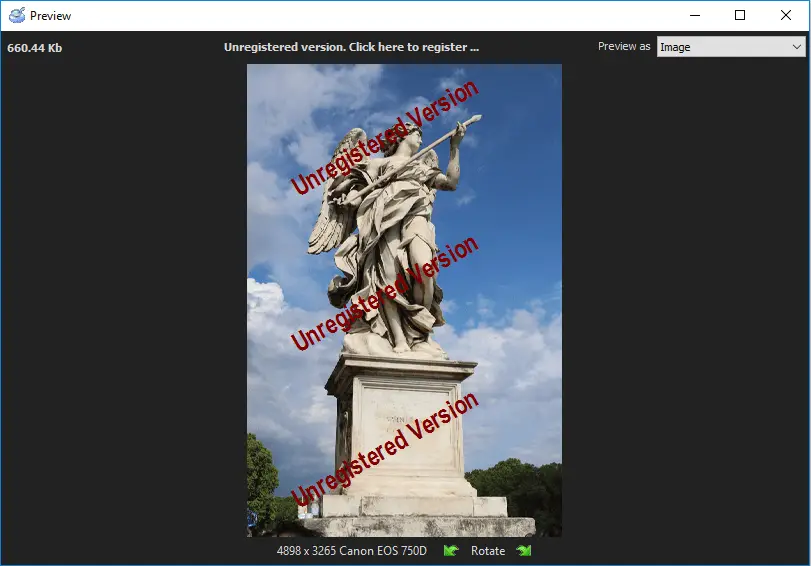
The data export function is available only in the licensed version of the program. However, if you decide to use a disk image, it will be ideal, as it can be done completely free of charge in the trial version of the program.
Therefore, do not wait, do not delay, but feel free to use DiskInternals Partition Recovery!

Related articles
- Error 15 on Windows and how to fix it in 2025
- Scanning and Repairing Drive is Stuck | Windows10
- Operating System Not Found or Missing? Fix it!
- [SOLVED 2026] Attempted to Write to Read-Only Memory Issue
- Bootmgr is Missing
- Windows Server 2016 Essentials vs Standard
- Windows Server 2016 Standard vs Datacenter
- Should you delete hiberfil.sys file?
- If your PC ran into a problem and needs to restart
- The operating system is not presently configured to run this application
- Video TDR failure
- How to Partition A Hard Drive in Windows 10/11
- How to Recover a Deleted Folder in Windows 10
- A Step-by-Step Guide to Starting Windows 11 in Safe Mode
- You Need Permission to Perform This Action
- Whea_uncorrectable_error windows 10 - Fix it⠀
- Windows 10 stuck at getting ready
- The code execution cannot proceed
- How to uninstall Microsoft Edge and keep your data safe
- PC randomly freezes? The 2026 solutions for Windows!
- Here is How to Deal With CLOCK_WATCHDOG_TIMEOUT Issue
- Here is Everything You Need to Know About CLI
- Your location is currently in use: how to fix this issue?
- Your Folder Can't Be Shared: Fix it Now!
- What is WMI Provider Host, and how should you interact with it?
- What to do if wireless capability is turned off
- Here is everything you need to know about Windows Terminal
- Step-by-step guide on how to work with Windows ink
- Windows can't find one of the files in this theme
- Here’s everything you need to know about $ windows. bt folder
- Windows 10, 11 Start button is not working
- Here is how to rollback Windows 11 to Windows 10
- Windows 10 quick access is not working
- Windows 10 does not have a digital output device
- If Windows 10, 11 Installation is Stuck
- Windows 10, 11 Action Center is missing: your actions?
- What to Do if the Wi-Fi Network is Not Showing Up
- How to find out why Windows 10 crashed: crash log
- What should you do if white screen of death appears?
- How to get help in Windows 10
- Unable to reset the PC: a partition is missing
- Unexpected Store Exception issue occurs: your actions
- What if You are Unable to Access Jar File?
- Here is How to Deal with Typical File System Errors
- Razer Synapse is Not Opening? Fix it now!
- How to reset PS4 properly
- What to Do in Case of an Orange Screen Issue in Windows 10?
- Msvcp100.dll problem: fix it now!
- The program can't start because msvcr71.dll is missing
- Idp.generic virus
- How to use registry editor?
- Here is How to Refresh Your Browser
- How to disable igfxtray with no harm to your data?
- If you need to delete backup files in Windows
- How to delete files from OneDrive, but not computer?
- Fix Windows Connection Error 651 Now!
- Fix Windows 10, 11 dwm.exe Error Now
- Here is how to interact with dllhost.exe
- Here is how to clean Registry in Windows 10, 11
- DirectX encountered an unrecoverable error? Fix it now!
- OneDrive is not syncing? Fix it now!
- Here is How to Fix Error 1603
- Fix dpc_watchdog_violation Windows 10, 11 Error Now!
- How to use Windows 10, 11 compatibility tester properly
- Here is how to stop OneDrive from syncing
- How to interact with SysWOW64
- Here is how to reformat Windows 10 safely
- How to provide a memory test in Windows 10
- Here is how to restart Windows Explorer
- How to Use a Duplicate File Finder in Windows 10
- File Association Helper in Windows 10, 11
- How to create and use guest account in Windows 10: guide
- Folder keeps reverting to read only
- Here is How to Deal with System Error 5
- Fix the Red Screen error now!
- 'Driver overran stack buffer' error occurs. Your actions?
- An algorithm, if file record segment is unreadable
- What should you do in case of 'err_cache_miss'?
- What should you do in case of ‘err_empty_response’?
- Fix dxgmms2.sys error now!
- What should you do if the Epic Games launcher is not working in 2026?
- The disk does not have enough space to replace bad clusters
- What should you do in case of the ‘Device not migrated’ issue?
- How to get rid of dev error 6068
- Here is How to Deal with the logilda.dll Error in Windows 10
- What should you do if the cursor disappears? 2026 solution
- How to Fix Confirm Form Resubmission on Refresh?
- Computer won't wake up from sleep Windows 10
- Code Execution Cannot Proceed Because of Msvcp140.dll
- What to do when a CLASSPNP.SYS error occurs
- What should you do if you can't reset your Windows 10, 11 OS?
- Change Drive Letter in Windows 10, 11
- Best Wii Emulators For Windows in 2026
- Use Dreamcast Emulators with no threat
- Antimalware Service Executable isn’t working correctly
- What to Do if Alt-Tab is Not Working in Windows 10, 11
- Black Screen of Death and How to Fight It
- What to Do if a Folder with a Question Mark Appears on Mac?
- This PC Can't Run Windows 11. Fix it Now!
- If you want to fix the Windows Search not working problem
- What should you do if you forgot your Windows 10, 11 password
- Step-by-step guide on how to auto login Windows 10, 11
- Discord screen share and audio are not working
- Make sure your data is safe while using IOS emulators for PC
- What to do if Windows 10, 11 Remote Desktop is not working?
- Here is how to change administrator on Windows 10, 11 safely
- Let's deal with 'Exception Access Violation' error
- Windows was unable to complete the formatting? Cope with the problem!
- Error: irql_not_less_or_equal on Windows 10? Not a problem!
- You do not have permission to save files to this location
- Windows resource protection could not start the repair service
- Windows service registration is missing or corrupt
- Windows resource protection couldn't perform requested operation
- Don't have permission to save in this location in Windows 10
- Stop Windows 10, 11 from Restarting: The Best Methods!
- [Error] WD Passport Not Recognized
- If your user profile is corrupted
- We couldn't complete the updates undoing changes
- The default gateway is not available: what can you do?
- Thread stuck in device driver issue occurs: your actions?
- Windows could not automatically detect this network's proxy settings
- Windows Media Player server execution failed in Windows 10, 11
- What is NES emulator and how to use it right?
- Here is how to disable Software Reporter Tool
- How to Fix Windows 10 Unidentified Network Issue
- This App Can't Run on Your PC? Fix it now!
- How to Fix There are Currently No Power Options Available Error
- Windows Defender Blocked by Group Policy: Fix it Now!
- Second Monitor is Not Detected in Windows
- If you want to remove junk files on Windows
- Nvlddmkm.sys error: what should you do?
- Here is how to reset Windows 10, 11 with no harm to your data
- The remote device won't accept the connection? Fix it now!
- Here is How to Deal With System Requires SMB2 or Higher Issue
- Photoshop Scratch Disk is Full? Fix it Now!
- Localbridge.exe error in Windows 10
- If you cannot login to Windows 10, 11
- Don't have permission to save changes to this file
- Java is not recognized
- Intel Optane Memory Pinning Error Occurs: Your Options
- What To Do If You Get a Microsoft Account Problem Notification
- File explorer is running slow? Fix it now!
- Taskbar icons are missing in Windows 10: Fix it now!
- The computer has rebooted from a bug-check: what does it mean?
- Guide on how to get rid of bloatware in Windows 10
- Fix file system error 65535 on Windows fast&safe!
- Get rid off error loading operating system
- The File System Type Is RAW
- If the folder has disappeared in Windows 10, 11
- [Windows 10, 11] Critical process died? Fix it!
- You Don't Currently Have Permission to Access this Folder
- If you want to delete Delivery Optimization Files
- When you need to format the Windows 10, 11
- HAL initialization failed
- Dxgkrnl.sys error occurs: your actions?
- Distributedcom 10016 error occurs: your actions
- Everything you need to know about CRC SHA
- Fix 'Driver power state failure in Windows 10' now!
- ‘Dns_probe_finished_bad_config’ issue occurs: your actions?
- D3dx9_43.dll error
- Solved: computer is sending captcha automated queries
- Fix Windows 10, 11 video scheduler internal error
- How to Fix WerFault.exe Application Error in Windows 10
- How to Fix Windows 10, 11 Explorer.exe Errors
- What to do if Discord won't stop updating?
- JavaScript error occurred in the main process
- Here is what to do if Driver Verifier has detected a violation
- How to Fix Bad System Config Info Error
- Fix the Issue: Can't Read from the Source File or Disk
- Bootrec.exe commands
- Bootrec /fixboot access is denied error occurs: your actions
- Application has been blocked from accessing graphics hardware
- What should you do in case of the atikmdag.sys error?
- Bluetooth audio stuttering in Windows 10
- Vulkan Runtime Libraries
- Perform a Clean Boot on Windows 10, 11
- What to Do if APC Index Mismatch Stop Code Appears
- The Active Directory Domain Services are Currently Unavailable
- What to Do if You Can't Type in Windows Search
- What if Chrome didn't shut down correctly in Windows 10, 11?
- The action cannot be completed because the file is open in system
- [SOLVED] Install an Operating System on Your Hard Disk Issue
- Failed to transfer logged messages to the event log with status 50
- Create or remove Administrator Account in Windows
- Guide on How to Repair Windows 10, 11 Without Harming Your Data
- This file doesn't have associated program
- Here is How to Deal With Windows 10, 11 Yellow Screen Issue
- DISM Restore Health Tool
- Here is How to Uninstall Segurazo in 2025
- What if Windows Security asks to enter network credentials?
- What if you can't copy and paste?
- What to Do if You Get a wudfrd Failed to Load Error 219?
- How to uninstall McAfee? What to do if it won't?
- How to enable hosted network support in Windows 10?
- Fix Searchprotocolhost.exe issues now
- How to interact with Removable Storage Devices Folder?
- How to work with Windows 10, 11 on ARM
- Here is how to factory reset Surface Pro