
20 Practical and Useful Examples of Bash Find Command
Here you will find out:
- what is find command in Linux
- examples of the find command
- when DiskInternals can help you
Are you ready? Let's read!
About find command in Linux
The find command in Linux is a command-line utility for traversing the file hierarchy. It can be used to find and track files and directories.
It supports searching by file, folder, name, creation date, modification date, owner and permissions. By using the ‘-exec’ command, you can execute other Linux commands on the found files or folders.
Operators you may need
With the exception of operators, each expression returns a value. If the test matches the current file, the test returns true. You can conjugate everything with operators.
Each operator applies only to the next expression. Therefore, term1 or term2 and term3 are the same as (term1 or term2) and term3.
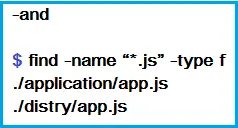
Choose a project that ends in .js and is a file. You can guess the operator; it is the default operator.
Examples: search by name or directory
1. How to find in current working directory every file whose name is love.txt:

2. How to find files in the home directory:
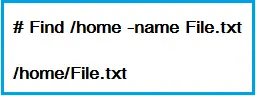
3. How to find files by name and ignore case:

4. How to find directory by name:

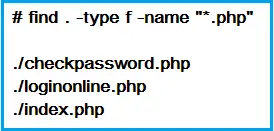
5. How to find PHP files by name:

6. How to find all PHP files in the directory:
Examples: search by permission number
7. How to find files with permissions № 777:

8. How to find files without permissions № 777:

9. How to find SGID files with permissions № 644:

10. How to find sticky bit files with permissions № 551:

Examples: different file search
11. How to find the SUID file:

12. How to find the SGID file:

13. How to find read-only files:

14. How to find executable files:

15. How to find files with permissions № 777 and Chmod № 755

16. How to find files with permissions № 777 and Chmod № 644
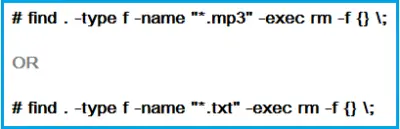
17. How to find and delete individual files:

18. How to find and delete multiple files:
Examples: how to find empty files or directories
19. How to find all empty files:

20. How to find all empty directories:

Do you want an explorer for Linux files on Windows?
DiskInternals Linux Reader is one of the best pieces of software available on the market.
Not only are you getting a user-friendly UI, expansive features and top-of-the-line tools to help you with data transfer, data mounting and data reading from Linux to Windows, but you’re also getting software that supports pretty much all kinds of Linux filesystems and more.
With both free and premium options, you can never go wrong with this industry-grade software backing up your OS, virtualized or otherwise.
Related articles
- About a bash date command
- How to Access Linux Ext2 or Ext3 on Windows
- How to Access Ext4 from Windows
- How to Mount Ext4 on Windows for Free
- Mount Linux Drive on Windows for Free
- Bash Script: All You Need to Know
- An Algorithm: How to Create Bash While Loop
- Linux Shell: What You Need to Know at First
- 5 Basic Shell Script Examples for Your First Script
- Bash: How to Check if the File Does Not Exist
- Bash Time Command on Linux
- How to use bash get script directory in Linux
- How to Check Bash String Equality
- How to Use Linux Wait Command
- Bash: How to Loop Through Files in Directory
- Bash Cat Command in Examples
- Bash Script SSH: How to Use It
- Bash: A Script For User Input
- Linux ZSH: the basic you need to know
- Basic of Grep in Linux Shell Script
- Shell Script Cut: Basic You Need to Know
- Bash: How to Check if String Not Empty in Linux
- Bash: how to split strings in Linux
- Linux: Sudo in Bash Scripts
- Hello World Script in Bash
- A Linux bin/bash Shell
- Linux: New Line in Shell Script
- Linux: Bash String Ends With
- Linux: Bash Printf Examples
- Linux: Bash First Line
- Linux: $0 in a Shell Script
- Linux: A Bash Startup Script
- Linux: Write a Shell Script
- Shell Script: Replace String in File
- A crontab service shell script
- Bash and sh: is there any difference
- A Bash Dirname Command
- Linux: A Bash Source Command
- A Bash to Loop through Lines in File
- Linux: A Bash Linter
- A Bash Nested Loop
- A Bash Test Command
- Use a Shell Script to Send an Email
- A Bash Status of Last Command
- Linux: A Bash Basename Command
- Using Bash to Write to a File
- About Bash Language
- Bash for Loop in One Line
- AWK in a Bash Script
- Learn about useful bash scripts
- Learn about systemd startup script
- About chaining bash commands
- Learn about a bash error code
- Using a bash tee command
- About a bash export command
- Learn about a bash wait command
- Arch Linux install script
- About advanced bash scripting
- To run a shell script in Dockerfile
- About a bash UNTIL loop
- Learn about C shell script
- Learn about Korn shell scripting
- Using /usr/bin/env command
- Whether bash waits for command to finish
- Using bash if 0
- Using && in an IF statement in bash
- If you want to run shell script in background
- The disk you inserted was not readable by this computer error
- Learn about SFTP in bash scripting
- Learn to run Perl script in Linux
- Examples of using the Expect
- Copy command in shell scripts
- Shell script usage
- Install Oracle Database
- Here is everything you need to know about Bash for Windows
- Guide in Pictures
- How to Use Shell Script Sleep Command
- A Bash Multiline Command