
Grep in Shell Script: the Basic you Need to Know
Here you will find out:
- about grep command in Linux shell script
- how to use it
- when DiskInternals can help you
Are you ready? Let's read!
About grep in Linux shell script
Often, programmers need to find a file that contains a specific line or a specific word in that line. On Linux, this is accessible with one exact, simple but powerful grep command - grep stands for "global regular expression print". It can also find strings by pattern or regular expressions, and also filter the output of commands, and much more.
All these are done with instant speed, so it is very convenient to use.
Examples of shell grep commands
All commands are not complex and lend themselves to simple logic. Here are the most important and basic commands for starting a string search.
grep -i 'bar' filename1 - search for the word 'bar' in Linux (case insensitive)
grep 'word' filename2 - search in Linux on any line containing the word “word” in the file name
grep -c 'nixcraft' frontpage.md - search and count the total number of times the line 'nixcraft' appears in a file called frontpage.md
grep -R 'foo' - look for the word “foo” in all files in the directory and in all its subdirectories in Linux
Examples of grep's syntax in Linux
Examples of command syntax are as follows:
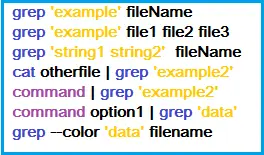
These are various commands for finding strings, regular expressions in multiple files, and even in a directory, using recursive mode.
Practical use of grep command
Now, it’s time from theory to approach practice.
- 1. We start by looking for user boo in the Linux password file. The command looks like this:

The result will look something similar:

You can be case insensitive (whether capital and lowercase letters) for the program will be the same (e.g. ABC, Abc, abc). Then the command will slightly change:

- 2. If you need to find only a specific word and not words with a common root, you will need this command:

- 3. You can also search for not one, but two and more words:

These are just a few examples of using grep in the shell script, but in general, it is a very extensive topic with many additional features.
How to open Linux files on Windows?
DiskInternals Linux Reader must be with all Linux owners.
This software will be needed if you are using a virtual machine or dual-boot, and you need to get files from Linux to Windows - and this, from experience, will be needed sooner or later. The program supports Ext2/3/4, ReiserFS, Reiser4, HFS, HFS, etc.
Here, read-only access to files on Linux disks is possible, while the source files will remain the same. You can also use the preview before transporting files, at no cost.
Based on the foregoing, DiskInternals Linux Reader is an unrivaled assistant for owners of dual boot or VM.
Related articles
- How to Access Linux Ext2 or Ext3 on Windows
- How to Access Ext4 from Windows
- How to Mount Ext4 on Windows for Free
- Mount Linux Drive on Windows for Free
- Bash Script: All You Need to Know
- An Algorithm: How to Create Bash While Loop
- Linux Shell: What You Need to Know at First
- How to Use Shell Script Sleep Command
- Bash: How to Check if the File Does Not Exist
- How to use bash get script directory in Linux
- 20 Examples of Bash Find Command
- Shell Script Cut: Basic You Need to Know
- Bash: How to Check if String Not Empty in Linux
- Linux: Sudo in Bash Scripts
- Linux: Bash Printf Examples
- Linux: Bash First Line
- Linux: A Bash Startup Script
- Linux: Write a Shell Script
- Shell Script: Replace String in File
- Bash and sh: is there any difference
- A Bash Dirname Command
- Linux: A Bash Source Command
- A Bash to Loop through Lines in File
- A Bash Nested Loop
- Use a Shell Script to Send an Email
- Using Bash to Write to a File
- About Bash Language
- Bash for Loop in One Line
- Learn about useful bash scripts
- About chaining bash commands
- About a bash export command
- Learn about a bash wait command
- Arch Linux install script
- About advanced bash scripting
- Learn about C shell script
- Learn about Korn shell scripting
- Using && in an IF statement in bash
- If you want to run shell script in background
- The disk you inserted was not readable by this computer error
- Learn about SFTP in bash scripting
- Copy command in shell scripts
- Install Oracle Database
- About a bash date command
- Guide in Pictures
- 5 Basic Shell Script Examples for Your First Script
- Bash Time Command on Linux
- How to Check Bash String Equality
- How to Use Linux Wait Command
- Bash: How to Loop Through Files in Directory
- Bash Cat Command in Examples
- Bash Script SSH: How to Use It
- Bash: A Script For User Input
- Linux ZSH: the basic you need to know
- Bash: how to split strings in Linux
- Hello World Script in Bash
- A Linux bin/bash Shell
- Linux: New Line in Shell Script
- Linux: Bash String Ends With
- Linux: $0 in a Shell Script
- A crontab service shell script
- A Bash Multiline Command
- Linux: A Bash Linter
- A Bash Test Command
- A Bash Status of Last Command
- Linux: A Bash Basename Command
- AWK in a Bash Script
- Learn about systemd startup script
- Learn about a bash error code
- Using a bash tee command
- To run a shell script in Dockerfile
- About a bash UNTIL loop
- Using /usr/bin/env command
- Whether bash waits for command to finish
- Using bash if 0
- Learn to run Perl script in Linux
- Examples of using the Expect
- Shell script usage
- Here is everything you need to know about Bash for Windows