VMDK Recovery guide
SEsparse VMDK Recovery
Last updated: October 11, 2026
SEsparse VMDK recovery can help extract guest files when the relevant virtual-disk components are still accessible. The objective is to extract files from SEsparse snapshot evidence or restore data from its related VMDK components to a separate healthy destination.
On ESXi, SEsparse is a space-efficient snapshot redo-log format within a snapshot chain. Its redo-log data is stored in a single -sesparse.vmdk file for that snapshot disk; a descriptor may be a separate companion, and the snapshot can depend on its parent. This is not a numbered split-disk set. A hosted split VMDK is a different layout stored in numbered extents. Each requires a different evidence check before scanning. This is guest-file recovery, not in-place repair or a way to restore or boot a complete virtual machine.
Short answer: Preserve every accessible related file with its original name and location. Continue only when the files are available locally or exposed by an ESXi host through SFTP, use a read-only virtual reconstruction, and validate representative results before export.
Check the component matrix before selecting a source. Stop when a dependency is missing, a usable virtual view cannot be formed, or the required result is a working VM. Recovery is not guaranteed.
Protect the Source and Confirm Recovery Prerequisites
Before opening any VMDK component, make a go-or-no-go decision from observable evidence. Preserve all available components together and record their original names, paths, observed sizes, and timestamps where available.
| Preflight check | Continue when | Stop when |
|---|---|---|
| Source protection | Every available source component can remain read-only throughout the attempt | A mount, application, or process may rename, move, overwrite, or otherwise change the source |
| Available evidence | The intended SEsparse snapshot component or complete available hosted split set can be identified without guessing | A required descriptor, parent, extent, or other dependency is expected but unavailable |
| Stable access | Local access or an SFTP connection to the ESXi host is stable enough for a scan | The source disconnects, changes, or is exposed only intermittently |
| Free space | A separate healthy destination has enough capacity for selected recovered files | Export would have to use the source storage or another unsafe destination |
| Recovery objective | The objective is to recover guest files | The objective is in-place repair, writing replacement components to the source, snapshot consolidation, or a bootable VM |
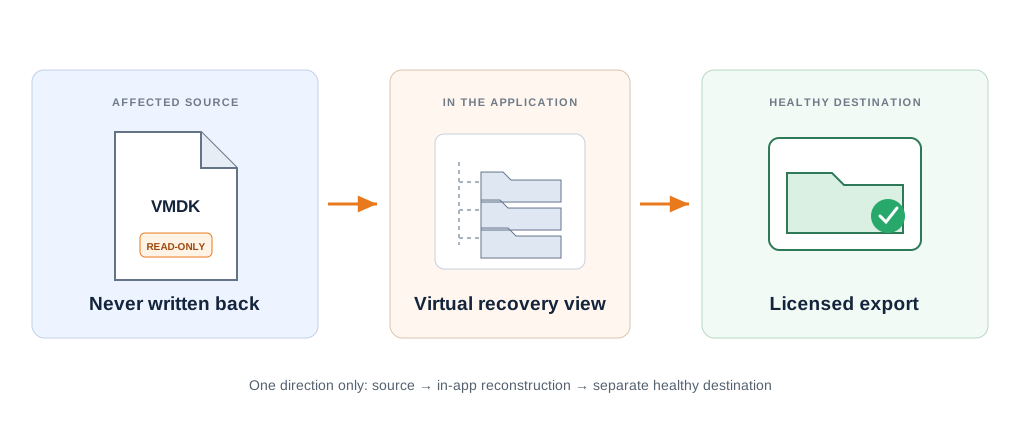
DiskInternals Recovery Engine attempts a virtual recovery view and relationship tree using accessible descriptor, snapshot, split, flat, and parent files. It does not alter the originals or rewrite a descriptor, header, CID, or extent table. It cannot recover data blocks or sectors absent from the available files, recreate arbitrary missing metadata or components, or guarantee a complete chain or result.
Local files or files still exposed by an ESXi host can be inventoried.
It opens exposed files but does not parse VMFS; VMFS Recovery handles sector-level datastore recovery.
Licensed export must use separate storage with sufficient free space.
Do not scan a partial set, export to source storage, treat preview as a full-recovery guarantee, or continue after a dependency stop condition.
SEsparse VMDK Recovery: Identify the Available Components
A VMDK can include metadata and data components. A name or extension alone does not prove that dependencies or underlying data are complete. Classify what is actually accessible before deciding whether to scan.
Accessible SEsparse evidence
Evidence: An SEsparse snapshot redo-log file and its required, identifiable parent and descriptor components are accessible.
Decision: Proceed conditionally with the SEsparse workflow below; accessibility does not prove completeness.
Next: Preserve the entire available set and continue only if it can be identified without inventing a relationship. Its snapshot role alone is not a reason to change routes.
Available split VMDK set
Evidence: All expected accessible split extents remain together.
Decision: Proceed conditionally; the segments are one evidence set.
Next: Confirm the sequence and follow the split-set checks below.
Missing or unusable descriptor
Evidence: A required descriptor for the SEsparse snapshot or another disk component is unavailable or unusable.
Decision: Route first; do not create or edit metadata here.
Next: Use Recover VMDK Without Descriptor.
Available flat extent
Evidence: A flat extent is available without a usable descriptor path.
Decision: Route first for a dedicated evidence assessment.
Next: Use Flat VMDK Recovery.
Broader snapshot-chain troubleshooting or other delta cases
Evidence: The case requires assessing a broader snapshot chain or other delta components beyond the identifiable SEsparse set covered here.
Decision: Route to the snapshot-chain assessment. An accessible SEsparse set with its required parent and descriptor remains eligible for this page's workflow.
Next: Use VMDK Snapshot Recovery for that broader assessment.
Deleted or host-missing container
Evidence: The VMDK container was deleted or is no longer exposed by the ESXi host.
Decision: Stop this accessible-file workflow; it cannot open a file the host no longer exposes.
Next: Use Recover a Deleted or Missing VMDK File.
Component no longer exposed from VMFS
Evidence: A required component is no longer exposed by the ESXi host.
Decision: VMDK Recovery opens files the host exposes through SFTP but does not parse VMFS or search deleted datastore space.
Next: Use Recover a Deleted VMDK From a VMFS Datastore; VMFS Recovery handles sector-level datastore recovery.
Complete virtual-machine outcome
Evidence: The required result is a restored or bootable VMware virtual machine.
Decision: Choose a different recovery objective; recovering a VMDK or guest files does not restore the complete VM configuration or prove that the VM can boot.
Next: Use Restore a VMware VM From VMDK.
The first two cards are the only bounded scan cases covered below. The remaining cards are stop or route decisions. If a sparse VMDK header is reported as corrupt, do not edit it to test a scan. If an SEsparse .vmdk file was deleted or is no longer exposed, stop this workflow for accessible files.
Split VMDK Recovery: Keep Every Extent Together
A split VMDK stores one virtual disk across multiple extent files. Those extents are one evidence set, not independent disks. Recover split VMDK files only after confirming that every expected accessible extent remains together in its original sequence and location.
- record filenames, paths, and observed sizes without changing them;
- do not select one extent in isolation;
- do not rename parts to close a numbering gap;
- do not move components into a new layout or edit metadata around an absent member.
If an expected extent is missing or inaccessible, stop this split-set workflow and preserve what remains. Virtual reconstruction can attempt to establish relationships from the accessible components, but it cannot recover data blocks absent from them or guarantee a complete result. Return to the component matrix and choose the decision that matches the observed evidence.
Recover Files with DiskInternals Recovery Engine
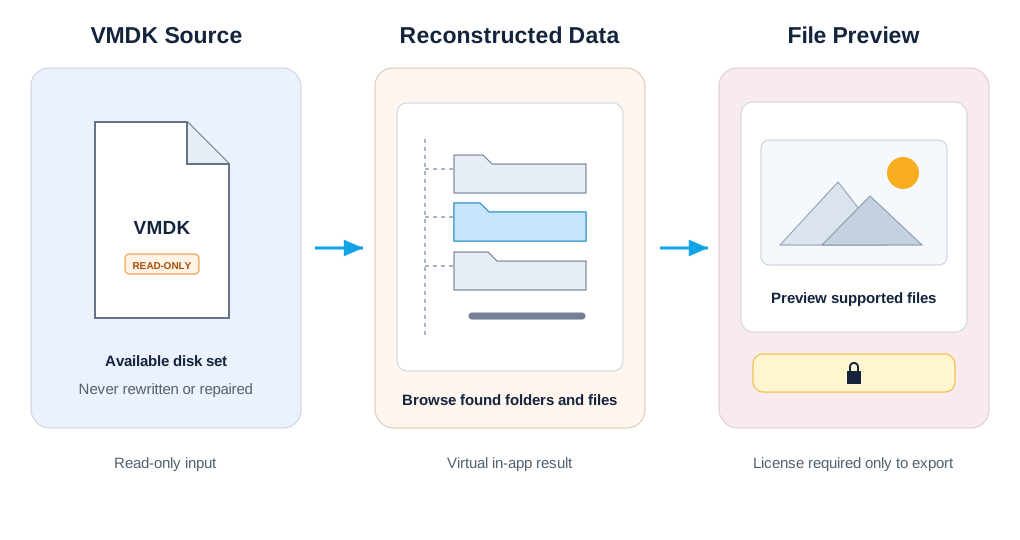
This sequence is for guest-file extraction from accessible SEsparse snapshot evidence or a complete available hosted split set. The free evaluation can scan and preview supported files. A license is required to export selected files to a separate healthy destination.
Each stage has an observable check and a stop condition. If evidence becomes incomplete or the application cannot form a usable virtual view, preserve the source and return to the component matrix.
Inventory the Available Evidence Before Opening It
Treat the inventory as an evidence log, not as a list of files you expect to be related. Record what is actually visible before opening any component in recovery software.
| Role | What belongs here | What must not happen |
|---|---|---|
| Source evidence | The untouched accessible VMDK files or a protected working copy of the complete available set | Do not install software, save sessions, rename components, or export recovered files here |
| Recovery environment | A healthy Windows system running DiskInternals Recovery Engine | Do not confuse its program or temporary folders with the source or export destination |
| Destination | Separate healthy storage with enough space for the selected recovered files | Do not use the affected datastore, source folder, or another location on the same unsafe storage |
- Define the objective. Record the guest-file recovery goal and identify the intended virtual disk or virtual machine by a name meaningful in the current environment.
- Record visible files. Copy the exact name, extension, original directory, observed size, and timestamp of every accessible related file. Preserve capitalization and numbering exactly.
- Record access. Note whether the source is local or exposed by an ESXi host over SFTP. For remote access, record the host and source directory.
- List dependencies. Note each descriptor, parent, extent, snapshot, delta, or other dependency indicated by the available evidence, including anything expected but unavailable.
- Classify the source. Use observable evidence to identify an accessible SEsparse set, a complete available split set, or an out-of-scope state from the matrix.
- Prepare the destination. Record the physical destination, free space, and folder that will receive licensed exports.

Swipe or scroll horizontally to read the diagram. Use arrow keys when focused.
| Decision | Required evidence |
|---|---|
| Go: accessible SEsparse snapshot redo-log file | The intended SEsparse snapshot component, its required identifiable parent and descriptor, and every accessible related file are preserved together; no required known dependency is missing. Its snapshot role alone is not a reason to change routes. |
| Go: complete available split set | Every expected accessible extent is present in the original sequence and location; the set can be identified without renaming or guessing |
| No-go: incomplete or uncertain evidence | A descriptor, parent, extent, or other expected dependency is unavailable, identity is uncertain, or one file is being treated as proof of a complete disk |
| No-go: different outcome | The objective is in-place repair, an undeleted datastore component, snapshot consolidation, or a restored and bootable VM |
Observable check: The intended source set can be identified from available evidence without relying on an extension alone or guessing a missing relationship.
Next: Record go only when the evidence fits one of the first two matrix cases. Otherwise record no-go and use the matching route there.
Stop: Do not open the source when a required component is unavailable, source identity is uncertain, files are changing, access is unstable, or the objective is a complete VM. Preserve the evidence log with the source set.
Start a Read-Only Virtual Reconstruction
Install and run DiskInternals Recovery Engine from the healthy Windows recovery environment, never from the affected storage. Work with the protected local evidence or connect only to files that an ESXi host still exposes over SFTP.
| Object | Meaning | Safe check |
|---|---|---|
| Source set | The preserved accessible SEsparse snapshot evidence or complete available hosted split set | Names, paths, sizes, and access method match the inventory |
| Virtual recovery view | The in-app reconstruction formed from available evidence | It appears inside the application and does not replace or update source files |
| Export destination | The separate healthy storage prepared for licensed output | It is not inside the source folder or affected datastore |
Select the intended source through the normal VMDK-opening flow and compare it with the inventory before scanning. Confirm the path, visible filenames, observed sizes, and access method. When several virtual disks or similarly named directories exist, stop and resolve identity from environment records instead of choosing by filename alone.
DiskInternals Recovery Engine uses available evidence to form a virtual recovery view inside the application. This is not an in-place repair and does not modify the original files.

Swipe or scroll horizontally to read the diagram. Use arrow keys when focused.
For remote source files, VMDK Recovery opens files exposed by the ESXi host through SFTP, but it does not parse VMFS or search deleted datastore space. If a required component is no longer exposed, use VMFS Recovery for sector-level datastore recovery.
- the selected input matches the source set recorded in the inventory;
- the application is not pointed at the destination or an unrelated VMDK;
- every accessible related component remains in its preserved location;
- the source remains stable and unchanged during access;
- the application presents a plausible virtual disk or guest file-system view rather than only an isolated unclassified file.
Observable check: The application identifies a plausible virtual disk or guest file-system view that corresponds to the intended source.
Next: Continue only while the source remains unchanged and the in-app view remains consistent with the inventory.
Stop: Stop if a dependency is unavailable, access becomes unstable, the source cannot be identified, or no usable virtual view can be formed. Do not edit a descriptor, header, CID, extent name, or path to force the view to open.
Scan for the Guest Files You Need
Define a small representative target set before scanning. Include important files from different folders and types whose expected content or approximate size is already known. This gives the scan a practical success criterion other than a large result count.
| Target record | Useful evidence |
|---|---|
| Expected folder or path | The known project, user, database, or application-data location inside the guest file system |
| Representative filename or pattern | A known document, archive, database, media file, or filename family |
| Expected type and approximate size | Enough information to distinguish the intended file from unrelated results |
| Expected date or version | A known period or revision where guest metadata remains available |
| Validation method | Previewed content, archive listing, media playback, or later application-level opening after export |
Start a scan only from the usable virtual view. The free evaluation can scan supported guest files, but discovery in a result list does not prove that a file is intact or exportable.
- keep the source set and remote access path unchanged;
- do not move, rename, replace, or add components to alter the result;
- do not start a second competing scan against the same evidence;
- record disconnects, read errors, path changes, or a changing result context;
- compare emerging folders and files with the representative targets instead of judging only by item count.
| Scan status | Meaning | Next action |
|---|---|---|
| Plausible match | Several expected folders or representative files appear in context consistent with the intended guest disk | Continue to representative preview |
| Partial or uncertain | Some expected items appear, but paths, sizes, dates, or surrounding content do not agree consistently | Record the mismatch and preview a wider representative sample before any export decision |
| Mismatch or no usable result | Expected content is absent, results belong to another disk, or the virtual view is internally inconsistent | Stop and return to the evidence inventory and component matrix |
Observable check: Record whether representative needed folders and files appear with plausible names, locations, apparent sizes, and dates where available.
Next: Select a representative sample across different folders and file types for preview. Favor files whose expected content is already known.
Stop: Stop if results are absent, unrelated, internally inconsistent, or if access changes during the scan. Do not edit or swap source components during the same session.
Preview, Validate, and Export to a Healthy Destination
Use the free evaluation to preview representative supported files before deciding whether to license an export. Preview several results rather than relying on one easy-to-open file.
- Previewed content. The supported file opens and shows the expected text, image, document, archive, database fragment, or media content.
- File size and type. The apparent size and detected type are plausible for the expected file.
- Directory context. The file appears with folders and neighboring files that belong to the intended guest system.
- Dates and versions. Available timestamps or revision details are consistent with the expected period.
- Content-to-name match. Previewed content belongs to the filename, project, user, or application context shown.
- Multiple samples. Files from different folders and formats produce a consistent picture rather than one isolated success.
| Preview status | Meaning | Decision |
|---|---|---|
| Promising | Several representative supported files open and contain the expected content | Prepare a selected export to the healthy destination |
| Uncertain | Metadata looks plausible, but preview is unavailable, incomplete, or inconsistent for important files | Expand the sample and keep the result unverified |
| Problematic | Preview is truncated, corrupt, mismatched, or unreadable across important samples | Stop; do not treat licensing or export as a repair step |
Preview supports a recovery decision. It does not guarantee that every file is complete, intact, or exportable.
- it is separate from the affected source and datastore;
- it is healthy and reliably connected;
- it has enough free space for all selected files;
- its destination folder is clearly identified;
- it will not overwrite source evidence or an earlier verified recovery set.
After licensing, export only selected files to that destination. Keep the exported set separate from the untouched source and unverified earlier attempts. Record the export folder and preserve available scan or session information needed to understand how the result was produced.
Export completion is not the final check. Open representative recovered copies from the destination with the applications that normally use them. Include small and large files, archives, databases, media, and application-specific formats where they matter. Check complete playback, archive extraction, document content, database or project consistency, and known checksums or trusted originals where available.
| Result | Definition |
|---|---|
| Verified | The exported file opens independently and passes the relevant content-level checks |
| Partially verified | Some content is usable, but completeness, dependencies, or application integrity remain uncertain |
| Unreadable | The exported copy does not open correctly, is clearly incomplete, or does not match the intended content |
Keep the source unchanged until important files have been verified and copied to at least one additional safe location. If representative exports fail, retain the evidence and recovery notes rather than repeating the attempt after modifying source components.
Observable check: Representative previews match the target set, the destination is separate from the source, and representative exported copies open independently after licensed export.
Stop: Do not export if the destination is the affected source, lacks capacity, or is not healthy. Stop after export if representative copies are missing, unreadable, or inconsistent with preview. Unresolved dependency, access, VMFS, or complete-VM conditions return to the matrix.
Frequently Asked Questions About SEsparse and Split VMDK File Recovery
-
No. On ESXi, SEsparse is a snapshot redo-log format stored in a single
-sesparse.vmdkdata file for that snapshot disk; a descriptor may be a separate companion, and the snapshot may depend on its parent. A split VMDK is a separate hosted-disk layout made of numbered extents. Do not treat them as interchangeable evidence sets; use the component matrix to classify what is accessible before scanning. -
The workflow keeps source access read-only. DiskInternals Recovery Engine forms a virtual reconstruction inside the application from available evidence; it does not repair, rewrite, or update the original VMDK components.
-
You need identifiable, accessible SEsparse snapshot evidence or a complete available hosted split set, stable read-only access, and a separate healthy destination with enough space. A missing required component is a stop condition.
-
No. A representative preview helps assess whether selected supported files contain plausible content. It does not prove that every result is complete, intact, or exportable. Validate several representative files before export.
-
Stop this bounded file workflow and preserve what remains. VMDK Recovery can attempt a virtual view and relationship tree from accessible descriptor, snapshot, split, flat, and parent files; it cannot recover absent data blocks or sectors or guarantee a complete chain or result. It does not parse VMFS or search deleted datastore space. VMFS Recovery handles sector-level datastore recovery when the host no longer exposes a required file. Use the component matrix to choose the route that matches the observed access condition.
-
The workflow recovers files from accessible evidence, including available VM configuration files as individual files. They do not restore the complete VM configuration or guarantee that the VM will function on a different server. Recovering a VMDK or guest files does not prove that the VM can boot. Use the complete-VM decision in the component matrix when that is the required outcome.