Hard Disk Partition Data Recovery Software Free Download
There are numerous reasons why you might find your partitions missing, including accidental deletion. The good news is that restoring lost or deleted partitions is entirely possible—all you need is trustworthy data recovery software.
This article aims to shed light on why partitions vanish from hard drives and offer the most effective strategies for retrieving them, along with all the stored files. Even better, some data recovery software options allow you to perform partition recovery at no cost.
When Do You Need Partition Recovery Software?

Partitions help computer owners and users properly aggregate data in the sense that you can create a partition in your hard drive to store specific data/file format(s). For example, if you want to create and run virtual machines on your system, you must have to create a VMFS-formatted partition to store the VMs data files. There are many other reasons why PC users partition their primary storage drive.
But then, if a virus or malware attacks your partitioned hard drive, chances are that the partitions will get corrupted and become inaccessible. Partitions are not failsafe; they can get corrupted or disappear due to several possible reasons – you could even mistakenly delete them. Power surges, OS crashes, disk failures, and other issues are possible scenarios that could lead to partition loss.
Evidently, you want partition recovery software when you find that parts of the partitions on your hard drive or solid-state drive are missing and you are unsure of what caused this to happen. It's crucial to realize that data loss or partition loss is somewhat inevitable; all you need to do is be vigilant at all times and keep a recovery program close at hand. Although there are numerous partition recovery tools available, not all of them are extremely effective.
Partition Recovery Software Free Download Full Version
With many options out there, it could be difficult to really know the best partition recovery software to download and use. However, there’s nothing to worry about. DiskInternals Partition Recovery comes standard with all the features you’ll ever need from a partition recovery software, and it is available to download for free.
DiskInternals Partition Recovery allows you to scan your hard drive and rediscover all the lost partitions for free – you only need to pay after the files and partitions you want have been fully recovered. This partition recovery app is rated high by experts due to its intuitiveness and high recovery efficiency.
Whether your disk partitions got damaged, corrupted, mistakenly deleted, or missing, DiskInternals Partition Recovery will retrieve them for you. Interestingly, this software recovers from HDDs, SSDs, external drives, and IDE drives. It supports all known file systems used by Windows, Linux, and macOS.
Also, DiskInternals Partition Recovery comes with a built-in recovery wizard that guides the user throughout the recovery process, and there are three recovery modes available. All features of DiskInternals Partition Recovery are accessible on the free version. Here’s a quick guide to recovering your lost partitions using the software.
Guide
1. Download and install DiskInternals Partition Recovery
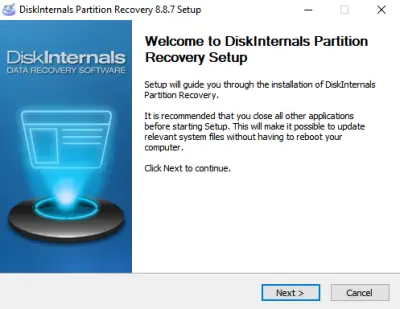
2. Launch the app and select the drive where the partitions were created
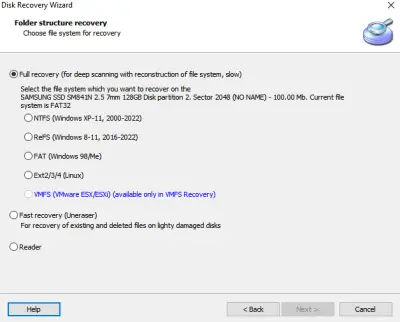
3. Follow the Recovery Wizard’s instructions and choose a recovery mode (it is best to choose Full Recovery mode if you want to recover everything that has been lost from the selected drive).
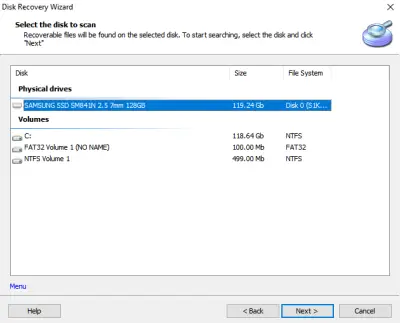
4. Wait for the scan to run completely, and you’ll be presented with the lost files and partitions (indicated with a red asterisk).
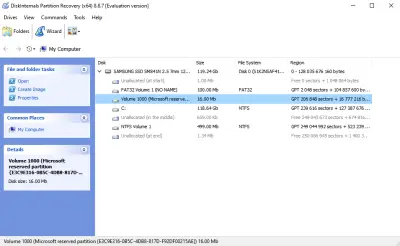
5. You can preview the files for FREE.
Conclusion
DiskInternals Partition Recovery lets you recover and preview files for free. It also comes with a built-in wizard that makes the entire recovery process seamless. The DiskInternals Partition Recovery runs on all Windows OS computers – from Windows 7 to 11.
Related articles
- Recover Data from Dead Hard Drive: Methods, Tools, and Recovery Strategies
- Windows 10 preparing automatic repair
- Best Free Partition Recovery Software for Windows (2026)
- Free damaged partition recovery software
- Recover Lost or Deleted Partition
- Accidentally Formatted/Deleted Recovery Partition
- Error 0x80070570
- System Restore failed with an error message
- Merge partitions in Windows 10
- What is a repairing disk errors message
- Change a boot drive in Windows 10
- How to recover uninstalled programs
- How to shutdown Windows without updating
- If System Restore is not working
- Restoring your previous version of Windows error
- Reset Windows 7 to factory settings
- How to Delete Temporary Files on Windows 8
- How to Disable Secure Boot
- How to boot Last Known Good Configuration on Windows 10, 11
- How to fix if it looks like Windows didn't load correctly error
- What are System Recovery Options in Windows
- Resource Protection could not perform operation
- SFC Commands Review
- Windows 7/8/10 Safe Mode when F8 is not working
- Windows Defender won't turn on
- How to Use Bootsect
- Diskpart Commands Overview
- [Solved!] Offline startup repair cannot repair your PC
- Advanced Boot Options
- How secure is OneDrive
- How to edit boot.ini: step-by-step guide
- How to use the DIR command correctly?
- What are Win dump files
- Need to flush DNS cache? Learn how to do it safely
- If you get the error “Could not find the recovery environment”
- Clean up WinSXS folder on Windows 7, 8
- Windows 10 defrag
- How to restore Windows 10, 11 system: only workable solutions
- How to use dual boot on Windows 7 and 10 safely?
- Make your computer faster! Windows 10, 11 refresh
- What should you do if Windows 10, 11 backup is not working
- How to run Windows memory diagnostic?
- Change directory in cmd Windows 10, 11
- Disable Driver Signature Enforcement in Windows 8, 10
- If you get the “Diskpart has encountered an error” issue
- If you get “we can't create a recovery drive” issue
- Differential and incremental backups
- About Windows 10, 11 recovery mode
- Here are all windows.com/stopcodes and here is how to fix them
- Windows Memory Diagnostic Tool Stuck? Fix it Now!
- Here is What to Do if Windows Rollback is Not Working
- Here is how to create and use a restore point in Windows 10, 11
- Create a Windows 10 recovery disk from another computer
- Best command prompt tricks to use in data recovery
- Recover formatted partition free | How to Recover Files after Partition Formatting [2026]
- Bootable Partition Recovery Software
- How to Restore Hard Drive Partitions on Windows?
- How to Recover a Hard Drive That Won't Boot
- How to Recover Data from Dead Laptop SSD in 2025
- How to Recover Ransomware Encrypted or Deleted Files After Attack
- Western Digital Partition Repair & Partition Recovery Tool
- Top Data Recovery Software for Windows (2026)
- Best Hard Drive Data Recovery Services in 2026
- FREE Hard Disk Repair Software for HDD Repair
- 9 Best Hard Drive Repair Software for Windows in 2026 (Free & Paid)
- How to Recover Deleted Files Without Backup in Windows 10/11
- How to Recover Files Deleted by McAfee
- How to Recover Data from Crashed Hard Drive - FAST in 2026
- Best Damaged Hard Drive Recovery Software in 2026
- How to Recover Data from a Dead or Failed Hard Drive
- Partition Table Recover: How to Fix Lost Partition Table & Recover Lost Partition Data
- How to Recover Deleted Folder in Windows 11
- What Is a Lost Partition? Causes, Risks & How to Recover Lost Partitions
- How to Restore Partition on Windows 10
- Western Digital External Hard Drive Repair Tool & WD External HDD Repair Guide
- How to Fix a Damaged Hard Disk or External Hard Drive Without Losing Data
- Repair Lost Partition on HDD & Drives - Step-by-Step Partition Recovery Guide
- Best Free Partition Recovery Software for Windows 7 in 2025
- Free Partition Recovery Tool